Loading
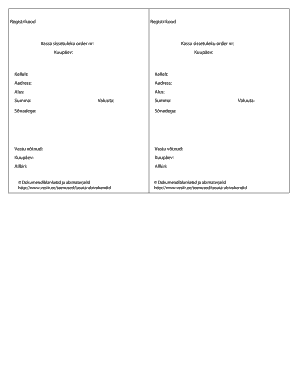
Get Kassa Sissetuleku Order
How it works
-

Open form follow the instructions
-

Easily sign the form with your finger
-

Send filled & signed form or save
How to fill out the Kassa Sissetuleku Order online
Filling out the Kassa Sissetuleku Order online can be a straightforward process if you follow each step carefully. This guide will provide you with a detailed overview of the form's components and clear instructions on how to complete it effectively.
Follow the steps to accurately complete the Kassa Sissetuleku Order online.
- Press the ‘Get Form’ button to download the Kassa Sissetuleku Order and access it in your preferred editor.
- Fill in the 'Kassa sissetuleku order nr' section with the designated order number assigned to this transaction.
- Enter the 'Kuupäev' field with the date you are completing the order. Ensure that you use the correct format for clarity.
- In the 'Kellelt' section, provide the name of the individual or organization from whom the payment is received.
- Input the 'Aadress' with the complete address of the payer, ensuring accuracy for correspondence.
- Specify the 'Alus' by detailing the reason or basis for this order, which may include reference numbers or descriptions.
- Indicate the 'Summa' in numbers, ensuring that the amount is clear and correctly entered.
- Select the appropriate 'Valuuta' that reflects the currency for the transaction.
- Write out the 'Summa' in words as an additional safeguard against errors in numerical entry.
- Document the 'Vastu võtnud' section with the name of the person or entity receiving the order.
- Fill in the date once again in the 'Kuupäev' field for the acceptance of the order.
- Finally, sign the form in the 'Allkiri' section to validate the document, ensuring your signature is clear.
- Review all fields for accuracy before saving your changes, downloading, printing, or sharing the completed form.
Complete your Kassa Sissetuleku Order online today for an efficient and effective process.