Loading
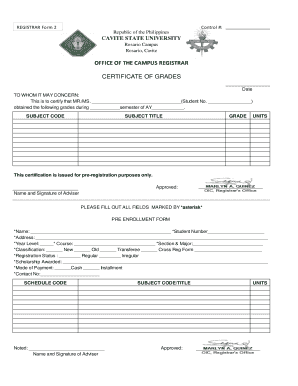
Get Cvsu Registrar
How it works
-

Open form follow the instructions
-

Easily sign the form with your finger
-

Send filled & signed form or save
How to fill out the Cvsu Registrar online
Filling out the Cvsu Registrar form online is a straightforward process that requires attention to detail. This guide will provide you with clear, step-by-step instructions to ensure that you complete the form accurately and efficiently.
Follow the steps to complete the Cvsu Registrar form online.
- Press the ‘Get Form’ button to access the form and open it in your preferred editing tool.
- Begin by entering your personal information in the fields marked with an asterisk. This includes your full name, student number, and address. Make sure all details are accurate.
- Indicate your year level, course, section, and major in the respective fields. These details are essential for proper classification.
- Choose your classification status by selecting one of the options: new, old, transferee, or cross registration. Fill in any necessary forms for your selected classification.
- Specify your registration status by indicating if you are a regular or irregular student.
- Provide details regarding any scholarship awarded. This information can influence your registration process.
- Select your preferred mode of payment, either cash or installment, depending on what works best for your financial situation.
- Enter your contact number for any follow-up communication regarding your application.
- Ensure all sections of the form are complete, especially those highlighted with asterisks, as these are mandatory.
- Once you have filled out the form, review all entered information for accuracy. Make any necessary corrections.
- After confirming that all information is correct, save your changes. You may also download, print, or share the completed form as needed.
Start completing your documents online today to ensure a smooth registration process.
Contact Us Office of the Student Affairs and Services - cvsumainosas@cvsu.edu.ph. > for inquiries about course offering and admission inquiries. Office of the University Registrar - registrarmain@cvsu.edu.ph. ... University Library - cvsulibrary@cvsu.edu.ph. ... University Webmaster - webmaster@cvsu.edu.ph.