Loading
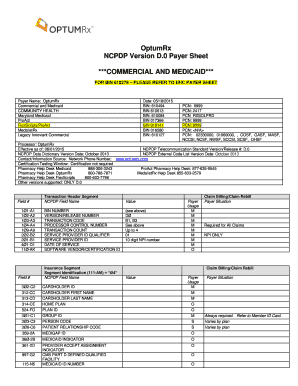
Get Optumrx Ncpdp Version D.0 Payer Sheet ***commercial And ...
How it works
-

Open form follow the instructions
-

Easily sign the form with your finger
-

Send filled & signed form or save
How to fill out the OptumRx NCPDP Version D.0 Payer Sheet online
This guide provides clear, step-by-step instructions for completing the OptumRx NCPDP Version D.0 Payer Sheet online. Designed to assist all users, including those with little experience in digital document management, this resource ensures a smooth and accurate submission process.
Follow the steps to accurately complete the OptumRx NCPDP Payer Sheet.
- Press ‘Get Form’ button to retrieve the form and open it in the designated interface.
- Begin with the Transaction Header Segment fields. Enter the appropriate BIN number based on the payer's instructions. For example, for OptumRx, you might use values like '610494' or '610613'. Ensure you record the correct Version/Release Number (D.0) and Transaction Code relevant to your submission.
- Move to the Insurance Segment. Input the Cardholder ID, and provide the first and last names of the cardholder. Make sure to include the Home Plan and Group ID accurately as specified.
- In the Patient Segment, fill in necessary details including Patient ID, Date of Birth, and address information. Ensure the Patient Relationship Code is marked correctly to reflect the patient’s relationship to the cardholder.
- For the Claim Segment, enter the Prescription/Service Reference Number, Product/Service IDs, and the necessary Billing Codes. Be mindful to provide all required information, including the Quantity Dispensed and Days Supply.
- If applicable, complete the Prescriber Segment with the Prescriber ID and name. This information is crucial for the pharmacy’s verification process.
- Review all entered information carefully for accuracy and completeness to avoid any delays or rejections in processing.
- Once you have filled out all sections, you can save changes, download a copy for your records, print the form, or share it as needed.
Start completing your OptumRx NCPDP Version D.0 Payer Sheet online today to streamline your processing and ensure timely submissions.
OptumRx is your CalPERS pharmacy benefit manager for Anthem, Health Net, Sharp, UnitedHealthcare, and Western Health Advantage. Our goal is to provide safe, easy and cost-effective ways for you to get the medication you need. How can I find a network pharmacy? 1-855-505-8110.
Industry-leading security and compliance
US Legal Forms protects your data by complying with industry-specific security standards.
-
In businnes since 199725+ years providing professional legal documents.
-
Accredited businessGuarantees that a business meets BBB accreditation standards in the US and Canada.
-
Secured by BraintreeValidated Level 1 PCI DSS compliant payment gateway that accepts most major credit and debit card brands from across the globe.