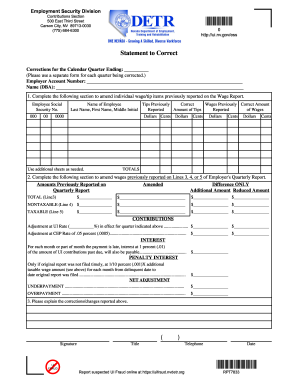
Arter Ending: _____________ (Please use a separate form for each quarter being corrected.) Employer Account Number: _______________ Name (DBA): ________________ NOTE: Corrections can also be made online by selecting Employer Self Service (ESS) at https://uitax.nvdetr.org. 1. Complete the following section to amend individual wage/tip items previously reported on the Wage Report. Employee Social Security No. 000 00 Name of Employee Tips Previously Correct Wages Previously Correct Amount Last Na.

How it works
  • Open form

    Open form follow the instructions

  • Easily sign form

    Easily sign the form with your finger

  • Share form

    Send filled & signed form or save

How to fill out the NV RPT7833 online

This guide provides clear and step-by-step instructions for filling out the NV RPT7833 form online. Whether you are correcting wage reports or amending contributions, this resource is designed to support users of all experience levels.

Follow the steps to successfully complete the NV RPT7833 online.

  1. Click the ‘Get Form’ button to access the NV RPT7833 form and open it in the online editor.
  2. In the section labeled ‘Statement to Correct,’ fill in the calendar quarter that you are correcting. Remember to use a separate form for each quarter.
  3. Enter your employer account number and your business name, or DBA (doing business as), in the designated fields.
  4. Locate the section to amend individual wage/tip items. Here, input each employee's Social Security number, name, tips previously reported, and wages previously reported in the required fields.
  5. If you are amending amounts previously reported on the Employer's Quarterly Report, complete the designated section for Lines 3, 4, and 5 of the report, indicating both amended amounts and any reductions or increases.
  6. Calculate any adjustments at the UI rate and the CEP rate, entering those amounts in the corresponding fields.
  7. For late payments, calculate the interest amounts and penalties as required, filling those into the form.
  8. Finally, explain any corrections or changes you reported in the designated space. Ensure to sign and date the form, and add your title and telephone number.
  9. Once completed, save your changes, download a copy for your records, print it if needed, or share it as appropriate.

Complete your NV RPT7833 form online today to ensure timely corrections and accurate reporting.

Get form

Experience a faster way to fill out and sign forms on the web. Access the most extensive library of templates available.

Related content

Electronic Filing Information

Wage adjustments must be made to the quarter in which the wages were originally reported...

Learn more
Questions & Answers

Get answers to your most pressing questions about US Legal Forms API.

Contact support

How do I get a Nevada employer account number?

To obtain a Nevada employer account number, you must register your business with the Nevada Department of Employment, Training, and Rehabilitation. The registration process can usually be completed online, ensuring you provide all required information. NV RPT7833 may serve as a valuable tool, providing clear steps on how to navigate this process. With the right support, securing your employer account number becomes straightforward.

Confirming your identity involves submitting necessary documentation and information to the unemployment office. This could include authenticating your Social Security number and providing your identification. You can also leverage NV RPT7833 for comprehensive guidance through each step of the confirmation process. By using this resource, you enhance your chances of a successful identity verification.

To verify your identity for Nevada unemployment, you will need to provide personal details and supporting documentation. This may include your Social Security number, driver's license, and other identification forms. Utilizing tools like NV RPT7833 can simplify this process, as they offer clear instructions and resources. Make sure you have everything ready to avoid delays in your application.

The approval process for Nevada unemployment claims typically takes around two to three weeks. However, factors such as the volume of claims and individual circumstances can affect this timeline. If you need assistance, consider using NV RPT7833 to help streamline your application. This resource can guide you through the process and ensure you meet all necessary requirements.

To acquire a Nevada state tax ID number, you must register your business with the Nevada Department of Taxation. This process usually involves completing an application that requires basic information about your business. Having a state tax ID number is essential for complying with tax obligations tied to NV RPT7833.

Your Nevada employer account number is a unique identifier assigned to your business by the state. It is used for various purposes, including reporting and paying unemployment taxes. Always keep this number handy, as it connects your business activities to regulations outlined in NV RPT7833.

You can obtain your Nevada employer account number by registering your business with the Nevada Department of Employment, Training and Rehabilitation. Once you complete your registration, the state will issue your unique employer account number. This number is essential for tracking unemployment tax obligations, including those tied to NV RPT7833.

Filing Form 8288 involves submitting it to the IRS for withheld tax on certain transactions, particularly real estate sales. While this form is not directly related to NV RPT7833, using resources available on platforms like uslegalforms can guide you through the filing process. Proper filing helps prevent penalties and ensures compliance with federal regulations.

SUTA, or State Unemployment Tax Act, is primarily an employer tax. Employers contribute to this tax, which funds the unemployment benefits provided to eligible employees. Understanding the role of SUTA in your business operations is essential, especially when complying with requirements like those outlined in NV RPT7833.

To register your business for unemployment in Nevada, you need to fill out the necessary registration forms through the Nevada Department of Employment, Training and Rehabilitation (DETR). You can easily find these forms on the DETR website. This registration ensures that your business is compliant with state laws and allows you to manage unemployment insurance under NV RPT7833 effectively.

Get This Form Now!

Use professional pre-built templates to fill in and sign documents online faster. Get access to thousands of forms.

If you believe that this page should be taken down, please follow our DMCA take down process here.

Get NV RPT7833