Loading
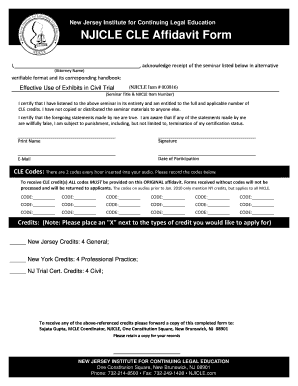
Get Affidavit Form Without Credit Fields.qxp
How it works
-

Open form follow the instructions
-

Easily sign the form with your finger
-

Send filled & signed form or save
How to fill out the Affidavit Form Without Credit Fields.qxp online
The Affidavit Form Without Credit Fields.qxp is designed to help users certify their attendance at a seminar and claim Continuing Legal Education (CLE) credits. This guide provides clear and supportive instructions for completing this form online, ensuring you can successfully submit it with confidence.
Follow the steps to fill out your Affidavit form online
- Press the ‘Get Form’ button to acquire the form and open it in your editing interface.
- Begin by filling in your full name in the designated space labeled ‘Attorney Name’.
- In the section for seminar title and NJICLE item number, input the details of the seminar you attended, ensuring they correspond with the seminar you are claiming credits for.
- Certify your attendance by checking the box confirming you have listened to the entire seminar and indicate that you are entitled to the credits.
- Specify that you have not copied or shared seminar materials with anyone.
- Sign your name where indicated and print it beneath your signature.
- Provide your email address in the specified field.
- Enter the date you participated in the seminar in the designated field.
- Record the CLE codes related to the seminar in the provided lines; ensure all required codes are listed as they are essential for processing your credits.
- Mark an 'X' next to the types of credits you wish to apply for in the credits section, ensuring the credits correspond to your seminar attendance.
- Save your completed form, then you may choose to download, print, or share it as needed for submission.
Complete your Affidavit Form Without Credit Fields online today to ensure a smooth processing experience.