Loading
Get Individualized Plan For Employment Ipe - Vr Provided
How it works
-

Open form follow the instructions
-

Easily sign the form with your finger
-

Send filled & signed form or save
How to fill out the Individualized Plan for Employment IPE - VR Provided online
Completing the Individualized Plan for Employment (IPE) is an important step in accessing vocational rehabilitation services. This guide provides clear, step-by-step instructions to help users fill out the IPE form effectively in an online format.
Follow the steps to complete your Individualized Plan for Employment online.
- Press the ‘Get Form’ button to access the Individualized Plan for Employment IPE. This will allow you to open the form in an online editor.
- Begin by entering your name in the designated field at the top of the form. Ensure that your name is spelled correctly and matches your official identification.
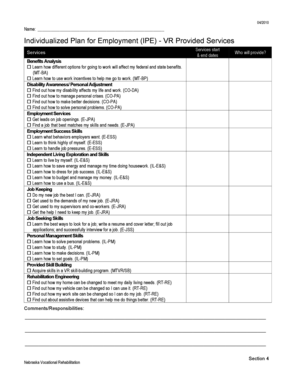
- In the section labeled 'Services', list the specific services you will require. Under each service, enter the start and end dates, as well as the name of the provider who will deliver the service.
- For 'Benefits Analysis', check the boxes for each option that applies to you. Make sure to include options that discuss how working could affect your federal and state benefits.
- Fill in the 'Disability Awareness/Personal Adjustment' section by selecting applicable options. This may include understanding the impact of your disability on your work and life.
- Continue with the 'Employment Services' section. Identify services such as job leads and matching job opportunities to your skills.
- In the 'Employment Success Skills' section, choose the skills that are necessary for job success and write down responsibilities.
- Complete the 'Independent Living Exploration and Skills' section by selecting skills that will help you live independently.
- In the 'Job Keeping' section, indicate how you will maintain employment and adapt to job demands.
- Fill out the 'Job Seeking Skills' by selecting all relevant skills that will assist you in finding employment.
- Continue to 'Personal Management Skills' and check options that will assist you in personal development.
- In the 'Provided Skill Building' section, identify any specific skill-building programs you will participate in.
- Complete the 'Rehabilitation Engineering' section by noting adjustments that may need to be made to your home, vehicle, or work site.
- Use the 'Comments/Responsibilities' section to add any additional notes or responsibilities related to your IPE.
- Once all fields are completed, review your form for accuracy. You can then save your changes, download a copy, print the form, or share it as needed.
Take the first step towards your employment goals by completing the Individualized Plan for Employment online today.
Related links form
October 14, 2021. The Individualized Plan for Employment is a critical document in the vocational rehabilitation process you will go through with the Department of Rehabilitation (DOR).