Loading
Get Form 535 Template
How it works
-

Open form follow the instructions
-

Easily sign the form with your finger
-

Send filled & signed form or save
How to fill out the Form 535 Template online
Filling out the Form 535 Template online is a straightforward process that ensures your formal proof of debt is submitted correctly. This guide provides step-by-step instructions to help you navigate each section of the form with ease.
Follow the steps to complete your Form 535 Template online
- Press the ‘Get Form’ button to obtain the form and open it in an editor.
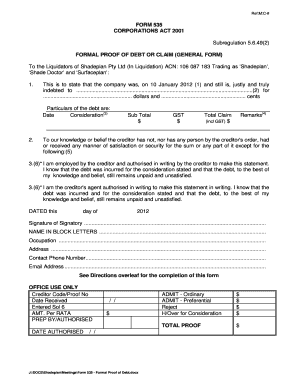
- Begin by entering the date in which the company became indebted (1). Ensure that you input the exact date accurately.
- In the space provided, enter the name and address of the creditor (2). This should include any partners if applicable, and the occupation of the creditor should be noted if an employee or agent is completing the form.
- State the amount owed in dollars and cents. Provide a detailed description of how the debt arose under ‘Consideration’ (3), specifying the nature of goods or services provided.
- Fill in the particulars of the debt, including any relevant prorated amounts under the subtotal, GST, and total claim (4). Add any remarks necessary to substantiate payment.
- Indicate if there are any securities related to the debt (5). Provide details regarding the value of any securities held and list them in the specified format.
- In the section for the signatory, indicate whether you are an employee of the creditor or their authorized agent (6). Complete this section only if it applies to you.
- Enter the date on which the form is signed, along with the signature, name in block letters, occupation, address, contact phone number, and email address.
- Review the form for completeness and accuracy. Save your changes. You can choose to download, print, or share the finalized form as needed.
Complete your Form 535 Template online today for a seamless submission experience.
Insert the full name and address of the creditor, the amount you are owed inclusive of GST and then separately identify the GST component. − in the 'Remarks' column, provide details as the substantiating documentation you have attached. e.g. 'copies of invoice', 'copy of hire agreement'.
Industry-leading security and compliance
US Legal Forms protects your data by complying with industry-specific security standards.
-
In businnes since 199725+ years providing professional legal documents.
-
Accredited businessGuarantees that a business meets BBB accreditation standards in the US and Canada.
-
Secured by BraintreeValidated Level 1 PCI DSS compliant payment gateway that accepts most major credit and debit card brands from across the globe.