Loading
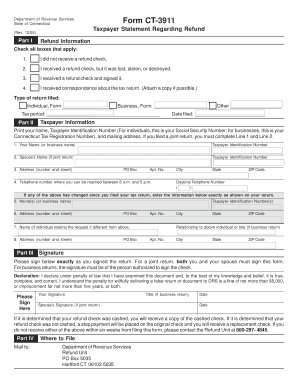
Get Ct-3911, Taxpayer Statement Regarding Refund. Taxpayer Statement Regarding Refund
How it works
-

Open form follow the instructions
-

Easily sign the form with your finger
-

Send filled & signed form or save
How to fill out the CT-3911, Taxpayer Statement Regarding Refund online
Filling out the CT-3911 form is essential for resolving issues related to tax refunds in Connecticut. This guide will provide clear, step-by-step instructions to assist you in completing the form accurately and effectively.
Follow the steps to complete the CT-3911 form for your taxpayer statement regarding refund.
- Click ‘Get Form’ button to obtain the form and open it in your preferred editor.
- In Part I, select the relevant boxes that describe your refund situation. The options include not receiving a refund check, losing a refund check, signing a received refund check, or receiving correspondence regarding your tax return. Make sure to check all that apply.
- Indicate the type of return you filed by selecting either 'Individual' or 'Business.' Provide the appropriate form number next to the selected option.
- Fill out the tax period for which you are requesting the refund. This should correspond with the tax return you filed.
- In Part II, provide your name, Taxpayer Identification Number (either Social Security Number for individuals or Connecticut Tax Registration Number for businesses), and your complete mailing address, including PO Box and apartment number if applicable.
- If you filed a joint return, ensure to complete the spouse's information, including their name and Taxpayer Identification Number.
- Provide your daytime telephone number where you can be reached during business hours.
- If any of your information has changed since you filed your tax return, enter that information in the designated section to ensure it matches your filed return.
- Complete the section for the person making the request if different from the primary taxpayer information. Include their address and relationship to the taxpayer.
- In the signature section, each individual who filed the return must sign exactly as they signed on the original return. If it’s a business return, the authorized person must sign.
- Read the declaration statement carefully and acknowledge your understanding. Then, fill in the date of signing.
- Finally, save your changes and choose to download, print, or share the completed form, ensuring you have a copy for your records.
Start filling out the CT-3911 form online to resolve your tax refund issues today.
Fax: 855-332-3068 or Mail: **Be sure to mark EIP Trace Request on the envelope.
Industry-leading security and compliance
US Legal Forms protects your data by complying with industry-specific security standards.
-
In businnes since 199725+ years providing professional legal documents.
-
Accredited businessGuarantees that a business meets BBB accreditation standards in the US and Canada.
-
Secured by BraintreeValidated Level 1 PCI DSS compliant payment gateway that accepts most major credit and debit card brands from across the globe.