Loading
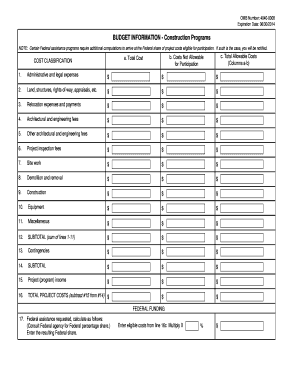
Get Omb Number: 4040-0008
How it works
-

Open form follow the instructions
-

Easily sign the form with your finger
-

Send filled & signed form or save
How to fill out the OMB Number: 4040-0008 online
Filling out the OMB Number: 4040-0008 form is essential for providing budget information for construction programs. This guide will walk you through each section of the form to ensure you complete it accurately and efficiently.
Follow the steps to fill out the form correctly.
- Press the ‘Get Form’ button to obtain the form and open it for editing.
- Begin by filling in the total allowable costs in the designated columns. List the total costs in column 'a', and note any costs that are not allowable for participation in column 'b'. Ensure each category accurately reflects the expenses outlined.
- Calculate the subtotal for all allowable costs from lines 1 to 11, and enter the total in the subtotal field. Additionally, enter any contingencies on line 13 and summate that to find the new subtotal on line 14.
- After completing all sections, review the form for accuracy. Once confirmed, you can save changes, download, print, or share the form as necessary.
Start completing your OMB Number: 4040-0008 form online today!
An Employer Identification Number (EIN) is also known as a Federal Tax Identification Number, and is used to identify a business entity. Generally, businesses need an EIN.