Loading
Get Alberta Prorate Form 2
How it works
-

Open form follow the instructions
-

Easily sign the form with your finger
-

Send filled & signed form or save
How to fill out the Alberta Prorate Form 2 online
Filling out the Alberta Prorate Form 2 online is a crucial step for individuals and businesses looking to register vehicles for prorate services. This guide will walk you through each section of the form to ensure you complete it accurately and efficiently.
Follow the steps to complete the Alberta Prorate Form 2 online
- Click ‘Get Form’ button to obtain the form and open it in the editor.
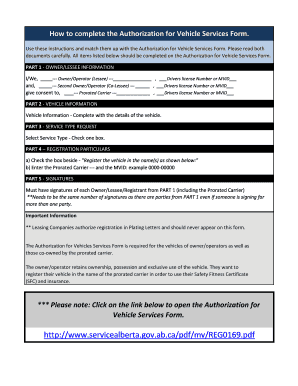
- In Part 1, provide owner and lessee information. You will need to enter the names of the owner/operator and the second owner/operator along with their respective driver's license numbers or MVIDs.
- In Part 2, fill in the vehicle information by entering the required details about the vehicle, including make, model, year, and any other specified information.
- In Part 3, select the service type request by checking the appropriate box that corresponds to the type of service you are requesting.
- In Part 4, complete the registration particulars. Check the box indicating you want to register the vehicle in the name(s) shown. Enter the name of the prorated carrier and their MVID, following the example format.
- In Part 5, ensure that all required signatures are provided. Each owner, lessee, or registrant listed in Part 1 must sign, including the prorated carrier, making sure the number of signatures matches the number of parties.
- After completing the form, review all the information for accuracy. Save any changes made, and select the options to download, print, or share the completed form as needed.
Complete your Alberta Prorate Form 2 online for an efficient filing experience.
To register a vehicle, you must go to a registry agent with the following: proof of ownership document, such as a lease, bill of sale, probated will or letters of administration. proof of valid insurance for the vehicle that includes the name(s) of the person(s) requesting the registration. acceptable identification.