Loading
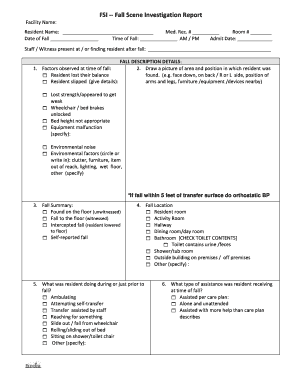
Get Fsi ?? Fall Scene Investigation Report
How it works
-

Open form follow the instructions
-

Easily sign the form with your finger
-

Send filled & signed form or save
How to fill out the FSI Fall Scene Investigation Report online
Filling out the FSI Fall Scene Investigation Report is crucial for documenting incidents involving falls within care facilities. This guide will provide a clear and concise step-by-step approach to ensure accurate completion of the report online.
Follow the steps to effectively fill out the FSI report.
- Click ‘Get Form’ button to obtain the form and open it in the editor.
- Begin by entering the facility name, resident's name, medical record number, room number, date and time of the fall, and admission date. Ensure all fields are accurately completed for documentation purposes.
- Identify and check the factors observed at the time of the fall. Options may include balance loss, slipping, or environmental hazards. Provide specific details where necessary.
- In the fall description section, draw a simple picture of the scene where the resident was found, including their position and any nearby furniture or equipment.
- Summarize the fall circumstances by indicating if the fall was witnessed, intercepted, or self-reported. This helps clarify the incident's context.
- Specify the location of the fall by selecting the appropriate setting, such as resident's room or bathroom. Be detailed, especially if the fall occurred outside or in a complex area.
- Indicate the activity the resident was engaged in right before the fall, such as ambulating or reaching for an item. This will shed light on the fall's trigger.
- Record the type of assistance the resident was receiving at the time of the fall. Options can vary from assisted help to being unattended.
- Document any comments made by the resident prior to the fall regarding their intended actions, as this can provide valuable insights.
- Describe the resident's mental and psychological status before the fall and compare it to their usual status, providing a holistic view of their well-being.
- Note the resident's footwear during the incident, as this may have contributed to the fall. Consider additional factors such as any assistive devices in use.
- Include vital sign information if available, especially if they signified a possible cause for the fall, such as abnormal blood pressure readings.
- Conclude with a summary of the root cause of the fall and initial interventions recommended to prevent future incidents. Ensure a care plan is updated based on findings.
- Finalize the report by adding the printed name of the nursing staff completing the form, along with date, time, and signature. Don’t forget to include team meeting notes and any additional care strategies discussed.
- Review all entries for clarity and completeness. Once satisfied, save changes, and proceed to download, print, or share the FSI report as needed.
Complete the FSI Fall Scene Investigation Report online today to enhance documentation and improve resident safety.