Loading
Form preview
  • US Legal Forms
  • Form Library
  • More Forms
  • More Uncategorized Forms
  • Sales Tax Return Worksheet/instructions - State.sd.us - State Sd

Get Sales Tax Return Worksheet/instructions - State.sd.us - State Sd

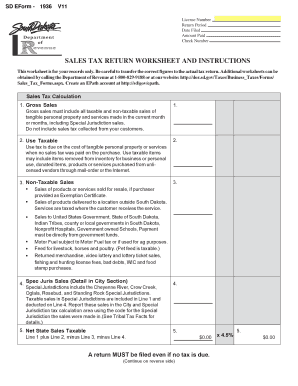
SALES TAX RETURN WORKSHEET AND INSTRUCTIONS This worksheet is for your records only. Be careful to transfer the correct figures to the actual tax return.

How it works

  1. Open form

    Open form follow the instructions

  2. Easily sign form

    Easily sign the form with your finger

  3. Share form

    Send filled & signed form or save

How to use or fill out the Sales Tax Return Worksheet/instructions - State.sd.us - State Sd online

Filling out the Sales Tax Return Worksheet correctly is essential for ensuring compliance with state tax regulations. This guide provides clear and detailed instructions to help users navigate the form efficiently, tailored to meet the needs of all individuals, including those with limited legal experience.

Follow the steps to complete the Sales Tax Return Worksheet effectively.

  1. Press the ‘Get Form’ button to access the Sales Tax Return Worksheet and open it in your editing tool.
  2. Enter your License Number, the Return Period, the Date Filed, the Amount Paid, and the Check Number in the designated fields.
  3. In the Gross Sales section, input the total amount of all sales before any tax deductions, including both taxable and non-taxable sales.
  4. In the Use Taxable field, list any items that are subject to use tax due to no sales tax being paid during the purchase.
  5. For Non-Taxable Sales, ensure you detail any products or services you sold for resale using an Exemption Certificate, or sales delivered outside South Dakota.
  6. In the Special Jurisdiction Sales section, provide details on sales conducted in special jurisdictions, using the appropriate code for each location.
  7. Calculate the Net State Sales Taxable by adding the figures from Gross Sales and Use Taxable, then subtracting Non-Taxable Sales and Special Jurisdiction Sales.
  8. Complete the City & Special Jurisdiction Tax Calculation Detail by listing the names, codes, rates, and tax due for all applicable locations.
  9. Add all tax amounts from the City & Special Jurisdiction Tax Calculation to determine the Total City/Special Jurisdiction Tax.
  10. Calculate the Total Tax Due by summing the Net State Sales Taxable and the Total City/Special Jurisdiction Tax.
  11. If applicable, include any Penalty/Interest and Adjustments in the provided fields.
  12. Finally, calculate the Total Due and enter the Amount Remitted, ensuring the check is made payable to the South Dakota Treasurer.
  13. Complete your process by reviewing the worksheet for accuracy and then use the print feature to create a hard copy for mailing.

Start filling out the Sales Tax Return Worksheet online to ensure your tax filing is accurate and compliant.

Get form

Experience a faster way to fill out and sign forms on the web. Access the most extensive library of templates available.
Get form

Related content

Sales & Use Tax | South Dakota Department of...
Find sales and us tax laws, tax facts, educational seminars, streamlined sales tax project...
Learn more
Decisions for Farmers Market Setup and Operation
Aug 28, 2019 — Vendor Taxes · State Sales and Use Tax rate: 4% Applies to all taxable...
Learn more
2006 Publication 600 - Internal Revenue Service
specified items. State and Local General Sales Tax Deduction Worksheet. (See the...
Learn more

Related links form

Specs Fonctionnelles ImmoSunset Correction Lori Hogg Foundation Chart Cenpatico Provider Specialty Profile.docx 337-059-SAMPLE LOSS Permit Renewal Form August 2013.doc - Doh Wa

Questions & Answers

Get answers to your most pressing questions about US Legal Forms API.

Contact support

South Dakota has a 4.5% statewide sales tax rate, but also has 291 local tax jurisdictions (including cities, towns, counties, and special districts) that collect an average local sales tax of 1.822% on top of the state tax.

Some customers are exempt from paying sales tax under South Dakota law. Examples include government agencies, some nonprofit organizations, and merchants purchasing goods for resale. Sellers are required to collect a valid exemption or resale certificate from buyers to validate each exempt transaction.

You have two options for filing and paying your South Dakota sales tax: File online File online at the South Dakota Department of Revenue. You can remit your payment through their online system. AutoFile – Let TaxJar file your sales tax for you.

South Dakota is very tax-friendly toward retirees. Social Security income is not taxed. Withdrawals from retirement accounts are not taxed. Wages are taxed at normal rates, and your marginal state tax rate is 0.0%.

What is South Dakota's Sales Tax Rate? The South Dakota sales tax and use tax rates are 4.5%.

States with the lowest sales tax New York: 4% sales tax rate. Wyoming: 4% sales tax rate. Colorado: 2.9% sales tax rate. Alaska: no sales tax. Delaware: no sales tax. Montana: no sales taxes. New Hampshire: no sales tax. Oregon: no sales tax.

Filing Requirements Regardless of the filing frequency the return is due by the 20th of the following month. For example, a return for the January reporting period is due by February 20th. For paper filers, the payment is due at the same time as the return.

Get This Form Now!

Use professional pre-built templates to fill in and sign documents online faster. Get access to thousands of forms.
Get form
If you believe that this page should be taken down, please follow our DMCA take down processhere.
Get Sales Tax Return Worksheet/instructions - State.sd.us - State Sd
Get form
  • Adoption
  • Bankruptcy
  • Contractors
  • Divorce
  • Home Sales
  • Employment
  • Identity Theft
  • Incorporation
  • Landlord Tenant
  • Living Trust
  • Name Change
  • Personal Planning
  • Small Business
  • Wills & Estates
  • Packages A-Z
  • Affidavits
  • Bankruptcy
  • Bill of Sale
  • Corporate - LLC
  • Divorce
  • Employment
  • Identity Theft
  • Internet Technology
  • Landlord Tenant
  • Living Wills
  • Name Change
  • Power of Attorney
  • Real Estate
  • Small Estates
  • Wills
  • All Forms
  • Forms A-Z
  • Form Library
  • Legal Hub
  • About Us
  • Help Portal
  • Legal Resources
  • Blog
  • Affiliates
  • Contact Us
  • Delete My Account
  • Site Map
  • Industries
  • Forms in Spanish
  • Localized Forms
  • State-specific Forms
  • Forms Kit
  • Real Estate Handbook
  • All Guides
  • Notarize
  • Incorporation services
  • For Consumers
  • For Small Business
  • For Attorneys
  • USLegal
  • FormsPass
  • pdfFiller
  • signNow
  • altaFlow
  • DocHub
  • Instapage
Form Packages
  • Adoption
  • Bankruptcy
  • Contractors
  • Divorce
  • Home Sales
  • Employment
  • Identity Theft
  • Incorporation
  • Landlord Tenant
  • Living Trust
  • Name Change
  • Personal Planning
  • Small Business
  • Wills & Estates
  • Packages A-Z
Form Categories
  • Affidavits
  • Bankruptcy
  • Bill of Sale
  • Corporate - LLC
  • Divorce
  • Employment
  • Identity Theft
  • Internet Technology
  • Landlord Tenant
  • Living Wills
  • Name Change
  • Power of Attorney
  • Real Estate
  • Small Estates
  • Wills
  • All Forms
  • Forms A-Z
  • Form Library
Customer Service
  • Legal Hub
  • About Us
  • Help Portal
  • Legal Resources
  • Blog
  • Affiliates
  • Contact Us
  • Delete My Account
  • Site Map
  • Industries
  • Forms in Spanish
  • Localized Forms
  • State-specific Forms
  • Forms Kit
Legal Guides
  • Real Estate Handbook
  • All Guides
Prepared for you
  • Notarize
  • Incorporation services
Our Customers
  • For Consumers
  • For Small Business
  • For Attorneys
Our Sites
  • USLegal
  • FormsPass
  • pdfFiller
  • signNow
  • altaFlow
  • DocHub
  • Instapage
Social Media
Call us now toll free:
+1 833 426 79 33
As seen in:
© Copyright 1999-2026 airSlate Legal Forms, Inc. 17 Station Street, Suite 303, Brookline, MA 02445
  • Your Privacy Choices
  • Terms of Service
  • Privacy Notice
  • Content Takedown Policy
  • Bug Bounty Program