Loading
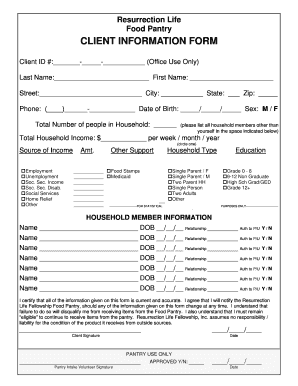
Get Food Pantry Client Information Form - Resurrection Life
How it works
-

Open form follow the instructions
-

Easily sign the form with your finger
-

Send filled & signed form or save
How to fill out the Food Pantry CLIENT INFORMATION FORM - Resurrection Life online
Filling out the Food Pantry client information form is an essential step in accessing the resources available at Resurrection Life. This guide will provide you with clear instructions on how to complete the form accurately and effectively.
Follow the steps to access and complete the form.
- Press the 'Get Form' button to obtain the online form and open it in your document editor.
- Enter your client ID number in the designated field at the top of the form. This section is for office use only.
- Fill in your last and first name, street address, city, state, and zip code in the corresponding sections.
- Provide your phone number, ensuring to use the correct format, and enter your date of birth accurately.
- Indicate your sex by selecting either 'M' for male or 'F' for female.
- Indicate the total number of people in your household, excluding yourself.
- List all household members other than yourself in the space provided.
- Enter your total household income in the designated field and specify whether it is per week, month, or year by circling the appropriate option.
- Select the source of your income from the provided options and list any amounts where applicable.
- If applicable, provide information on any other support you receive, such as food stamps or Medicaid.
- Specify your household type by selecting one of the provided options.
- Indicate your education level by selecting the appropriate category from the list.
- Fill out the household member information for each additional member, including their name, date of birth, relationship to you, and whether they are authorized to pick up items.
- Read the certification statement acknowledging the accuracy of the information provided and your obligation to notify the pantry of any changes.
- Sign and date the form at the bottom where indicated.
- Once completed, save your changes, and proceed to download, print, or share the form as necessary.
Complete your document online to access essential food pantry services.