Loading
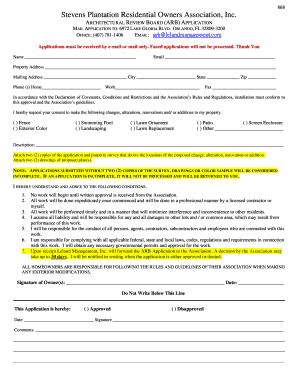
Get Stevens Plantation Residential Owners Association
How it works
-

Open form follow the instructions
-

Easily sign the form with your finger
-

Send filled & signed form or save
How to fill out the Stevens Plantation Residential Owners Association online
This guide provides step-by-step instructions on how to correctly fill out the Stevens Plantation Residential Owners Association Architectural Review Board application online. It is designed to assist you in navigating the process smoothly.
Follow the steps to complete your application efficiently.
- Click ‘Get Form’ button to access the application, allowing you to open it in an online editing format.
- Fill in your name and email address in the provided fields. Ensure that your email is valid as it will be used for communication regarding your application.
- Provide your property address along with your mailing address. Make sure to include the city, state, and zip code accurately.
- Enter your home and work phone numbers in the designated areas. Include a fax number if applicable, though it is not required.
- Indicate the changes, alterations, renovations, and/or additions you are requesting by checking the relevant boxes next to options like fence, exterior color, swimming pool, landscaping, etc.
- In the description box, provide further details about the proposed changes. Be as specific as possible to help the review board understand your request.
- Prepare two copies of the application and a property survey illustrating the proposed changes. Attach these documents along with two drawings of the proposed plans.
- Confirm your understanding of the conditions listed in the application by signing and dating the form. Ensure all responsibilities are acknowledged.
- After completing the form, review all entries for accuracy before submitting. You can save your changes, download, print, or share the completed application.
Complete your application online today and ensure your requests are processed in a timely manner.