Loading
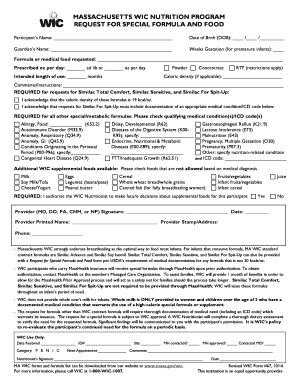
Get Massachusetts Wic Nutrition Program Request For Special Formula And Food
How it works
-

Open form follow the instructions
-

Easily sign the form with your finger
-

Send filled & signed form or save
How to fill out the Massachusetts Wic Nutrition Program Request For Special Formula And Food online
Completing the Massachusetts Wic Nutrition Program Request For Special Formula And Food online is a straightforward process. This guide provides step-by-step instructions to help users accurately fill out the form with confidence and ease.
Follow the steps to successfully complete your request.
- Use the ‘Get Form’ button to obtain the form and open it in the designated editor.
- Begin by entering the participant’s name in the designated field. Ensure that the name matches official documents.
- Provide the date of birth (DOB) in the format MM/DD/YYYY, ensuring that all digits are accurately entered.
- Complete the guardian’s name section, providing the full name of the individual responsible for the participant.
- For premature infants, indicate the weeks of gestation in the appropriate field.
- Detail the formula or medical food being requested in the dedicated field. Be specific about the type required.
- Indicate the prescribed ounces per day, choosing either 'ad lib' or specifying a number of ounces.
- State the intended length of use for the requested formula, also in months.
- Select the appropriate type of formula: Powder, Concentrate, or Ready-to-Feed (RTF), and note any applicable caloric density.
- In the comments/instructions field, provide any special instructions or additional comments regarding the request.
- Acknowledge the caloric density requirement for specific formulas, and provide the necessary medical condition or ICD code if relevant.
- Check any relevant medical conditions or ICD codes that apply to the participant.
- Indicate any foods that are not allowed based on the medical diagnosis by checking the appropriate options.
- Authorize the WIC Nutritionist to make future decisions about supplemental foods for the participant by selecting 'Yes' or 'No.'
- Collect the provider's signature, printed name, and contact information. Ensure the date is accurately filled out.
- Review all entered information for accuracy and completeness before saving changes.
- Upon final review, users can save changes, download, print, or share the completed form as needed.
Begin your application and complete the Massachusetts Wic Nutrition Program Request For Special Formula And Food online today.
You can get your current WIC food balance by checking your last store receipt, using the balance inquiry terminal at an authorized WIC store, logging in to this portal, or by calling the Customer Service number on the back of your WIC EBT card.