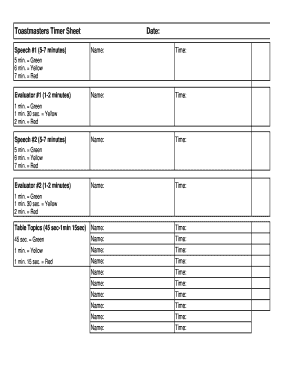
Toastmasters Timer Sheet Speech #1 (57 minutes)Date: Name:Time:Name:Time:Name:Time:Name:Time:Name: Name: Name: Name: Name: Name: Name: Name: Name: Name:Time: Time: Time: Time: Time: Time: Time: Time:.

How it works
  • Open form

    Open form follow the instructions

  • Easily sign form

    Easily sign the form with your finger

  • Share form

    Send filled & signed form or save

How to fill out the Toastmasters Timer Sheet Pdf online

This guide will assist you in completing the Toastmasters Timer Sheet Pdf online, ensuring you accurately track speech times for effective meeting management. Follow the detailed steps provided below for a seamless experience.

Follow the steps to successfully fill out the Toastmasters Timer Sheet Pdf.

  1. Click ‘Get Form’ button to access the Toastmasters Timer Sheet Pdf and open it in your preferred online editor.
  2. Locate the section for Speech #1. Enter the date of the meeting, followed by the name of the first speaker in the designated fields.
  3. For each speaker listed under Speech #1, enter their name and corresponding time after their speech. Ensure that the times reflect the completion of their speeches within the 5-7 minute range, colored as follows: 5 minutes = Green, 6 minutes = Yellow, and 7 minutes = Red.
  4. Repeat the process for Evaluator #1 and fill in the name, making sure to note the timing: 1 minute = Green, 1 minute 30 seconds = Yellow, and 2 minutes = Red.
  5. Proceed to fill out Speech #2 in the same manner as Speech #1, entering the date, speaker name, and times, adhering to the same color codes.
  6. Complete the section for Evaluator #2 by entering their name and timing, using the same color codes for evaluation time.
  7. Finally, document the details for the Table Topics section by entering the speakers’ names and tracking their times, identifying completion at 45 seconds = Green, 1 minute = Yellow, and 1 minute 15 seconds = Red.
  8. Once all fields are completed, you may save the changes, download, print, or share the completed timer sheet as required.

Complete the Toastmasters Timer Sheet Pdf online to enhance your meeting effectiveness today.

Get form

Experience a faster way to fill out and sign forms on the web. Access the most extensive library of templates available.

Related content

The Oracle - Goddard Toastmasters! - Nasa

Adapted from the Toastmasters Club Management Handbook. The Grammarian ... and Leadership...

Learn more
Chatter by the Charles - Meeting Role Descriptions...

Welcome to the Chatter by the Charles Toastmasters Club. ... Introduce each of the...

Learn more
TOASTMASTER Breadmaker Manual L0904325

User Manual: TOASTMASTER TOASTMASTER Breadmaker Manual TOASTMASTER ... This timer can only...

Learn more
Questions & Answers

Get answers to your most pressing questions about US Legal Forms API.

Contact support

How do you explain timer role in Toastmasters?

The timer is responsible for monitoring time for each meeting segment and each speaker. As Timer, you: Acquire the timing/signaling equipment from the sergeant at arms and know how to operate it. Explain the timing rules and demonstrate the signal device if called upon to do so.

The timer of the meeting monitors each participant, indicates when they are nearing the end of their allotted time, and, at the end of the meeting, reports the length of each prepared speech, Table Topics® response, and evaluation. The role is straightforward, which is a great way for new members to get involved.

All speeches delivered by contestants must conform to the timing guidelines for the contest. International and Humorous speeches shall be from five to seven minutes. A contestant will be disqualified if the speech is less than four minutes 30 seconds or more than seven minutes 30 seconds.

“Greetings Mr./Madam Toastmaster, fellow Toastmasters, and guests. As Timer, I will time the Table Topics® speakers, formal speeches, and the evaluations. I will also alert each speaker of the time they have left, using the green, yellow, and red cards, which denote specific times remaining.

The Timekeeper's function is to provide timing signals to most of the participants and to report specifically on the timing performance of topics speakers, prepared speakers and evaluators. The reports also remind the audience, when they are about to vote, of the names of each person and their subject.

The speaker will have 30 seconds grace period before and after for prepared speeches for qualifying. Each speech has a time limit as per the manual.

It is the timer's responsibility to confirm the length of the speeches being presented before the start of each meeting. Confirm members who are scheduled to participate with the Toastmaster and the General Evaluator. Confirm the time allotted to each prepared speech with all speakers.

It is the timer's responsibility to confirm the length of the speeches being presented before the start of each meeting. Confirm members who are scheduled to participate with the Toastmaster and the General Evaluator. Confirm the time allotted to each prepared speech with all speakers.

Get This Form Now!

Use professional pre-built templates to fill in and sign documents online faster. Get access to thousands of forms.

If you believe that this page should be taken down, please follow our DMCA take down process here.

Get Toastmasters Timer Sheet Pdf