Loading
Get Placheck
How it works
-

Open form follow the instructions
-

Easily sign the form with your finger
-

Send filled & signed form or save
How to fill out the Placheck online
Filling out the Placheck is a crucial process for conducting classroom observations effectively. This guide provides a clear, step-by-step approach to assist users in completing the form accurately, ensuring the collection of valuable observational data.
Follow the steps to complete the Placheck form accurately.
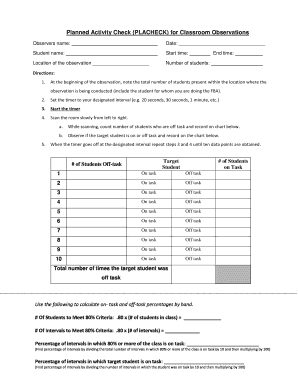
- Press the ‘Get Form’ button to access the Placheck form and open it in your document editor.
- Enter the observer's name in the designated field at the top of the form.
- Record the date of the observation by filling in the appropriate section with the current date.
- Input the name of the student being observed in the specified area of the form.
- Fill in the start time of the observation in the relevant field.
- Indicate the location of the observation by entering the location name in the provided space.
- Note the total number of students present in the observation area at the beginning.
- Enter the end time of the observation when it concludes.
- Follow the guidelines to observe and document student behavior as directed in the instructions, using the provided checklists.
- Once all sections are completed, you may save changes, download, print, or share the form as needed.
Start completing your Placheck form online to enhance your classroom observation process.
Simply put, PLACHECK is when you use momentary time sampling with a group. Momentary time sampling is when you set a timer and when the timer goes off, record whether or not a person is engaged in a behavior. With PLACHECK, you set a timer and when the timer goes off, record how many people are engaged in a behavior.