Loading
Get Queens College Transcript
How it works
-

Open form follow the instructions
-

Easily sign the form with your finger
-

Send filled & signed form or save
How to fill out the Queens College Transcript online
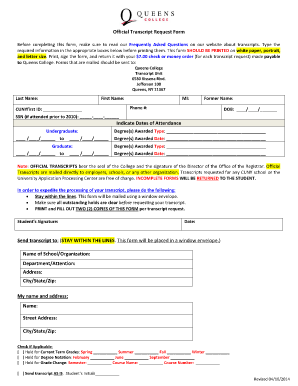
This guide provides clear instructions on how to fill out the Official Transcript Request Form for Queens College. Following these steps will ensure that your transcript request is completed accurately and submitted for processing.
Follow the steps to successfully complete the transcript request form.
- Click 'Get Form' button to obtain the transcript request form and open it for editing.
- Provide your last name, first name, and middle initial in the designated fields to identify yourself.
- If applicable, enter your former name to ensure that all records are accurately searched.
- Input your phone number so that the college can reach you if there are any issues with your request.
- Enter your CUNYfirst ID to facilitate the retrieval of your academic records.
- Fill in your date of birth in the specified format to assist with identification.
- If you attended Queens College prior to 2010, include your Social Security Number in the required field.
- Indicate your dates of attendance for both undergraduate and graduate studies as applicable.
- List the type and date of each degree awarded to you, ensuring all information is complete and accurate.
- Sign and date the completed form to confirm your request and ensure its validity.
- Prepare to send your transcript request to the designated address, ensuring you stay within the lines as instructed.
- Submit a check or money order for $7.00 for each transcript request, made payable to Queens College.
- Review your form once more before finalizing and send it to the appropriate address provided in the instructions.
Complete your transcript request online to ensure a smooth and efficient process.
All students picking up or requesting transcripts must first go to one of the kiosks located in the New Student Services Center and select Pick Up Transcripts.