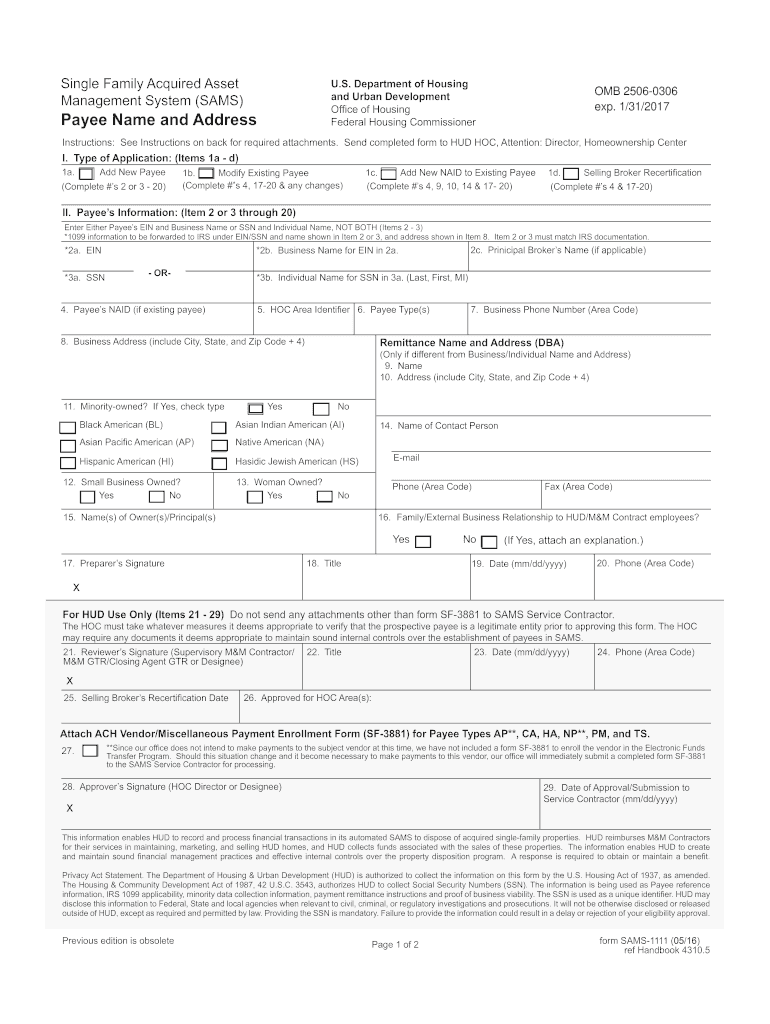
Ignature (HOC Director or Designee) 29. Date of Approval/Submission to Service Contractor (mm/dd/yyyy) x This information enables HUD to record and process financial transactions in its automated SAMS to dispose of acquired single-family properties. HUD reimburses M&M Contractors for their services in maintaining, marketing, and selling HUD homes, and HUD collects funds associated with the sales of these properties. The information enables HUD to create and maintain sound financial manageme.
Loading

Open form follow the instructions

Easily sign the form with your finger

Send filled & signed form or save
How to fill out the SAMS-1111 online
The SAMS-1111 form is essential for managing payee information within the Single Family Acquired Asset Management System. This guide will provide you with clear, step-by-step instructions on how to accurately complete the form online, ensuring a smooth submission process.
Follow the steps to accurately complete the SAMS-1111 form online:
- Click ‘Get Form’ button to obtain the form and open it in the editor.
- Identify the type of application you are submitting: check the appropriate box for 'Add New Payee,' 'Modify Existing Payee,' 'Add New NAID to Existing Payee,' or 'Selling Broker Recertification' in Item I.
- Complete the Payee's Information section (Items 2-3 through 20). Enter either the Employer Identification Number (EIN) and Business Name or Social Security Number (SSN) and Individual Name, ensuring that only one is used.
- For Item 2a, enter the EIN if applicable, or enter the SSN in Item 3a if you are filling out the form for an individual.
- Provide the principal broker’s name in Item 2c if relevant to your application.
- Complete Item 5 by entering the HOC Area Identifier, and Item 6 by specifying the Payee Type using the appropriate code.
- Fill in the Business Address in Item 8, including the city, state, and zip code.
- If applicable, enter the Remittance Name and Address in Items 9-10.
- Indicate if the business is minority-owned in Item 11. If yes, select the appropriate minority type.
- In Item 12, mark if the business qualifies as a small business.
- In Item 13, indicate if the business qualifies as woman-owned.
- Complete the contact person's information in Item 14.
- List the names of all owners/principals in Item 15.
- Declare any related parties in Item 16 and provide an explanation if necessary.
- Sign and date the form in Items 17-20 as the preparer.
- If you are a reviewer for the HUD office, complete Items 21-24.
- Provide the Selling Broker's Recertification Date in Item 25, and note the approved areas in Item 26.
- If necessary, check Item 27 if the vendor will not receive any payments.
- Sign and date the form in Items 28-29 as the approver.
- Once completed, users can save their changes, download, print, or share the form as required.
Complete the SAMS-1111 form online to ensure accurate processing of your application.
Experience a faster way to fill out and sign forms on the web. Access the most extensive library of templates available.
Related content
This information enables HUD to record and process financial transactions in its automated...
“X-Ray Specular Reflection Studies of Silicon Coated by Organic Monolayers...
The following information is just a sample of the many valuable time saving features...
Get answers to your most pressing questions about US Legal Forms API.
How to find a HUD real estate agent?
You can find a HUD real estate agent by looking for professionals who specialize in government-owned properties. Many agents prominently display their expertise on their websites or profiles. Consider using platforms like uslegalforms, which provide directories of qualified agents familiar with SAMS-1111 and HUD transactions, ensuring you find the best representation for your needs.
How to become a listing agent for HUD?
To become a listing agent for HUD, you must first obtain a real estate license in your state. After that, you can apply to be a HUD-approved listing broker by fulfilling their specific criteria and guidelines. Familiarizing yourself with the SAMS-1111 program will give you a competitive edge, as you will have insights into how to best represent HUD properties.
How do I find a HUD realtor?
Finding a HUD realtor is straightforward. You can start by searching online for real estate agents who specialize in HUD homes. It’s often helpful to look for agents who are familiar with the SAMS-1111 program, as they will understand the nuances involved in buying a HUD home. You can also check local real estate websites for listings and recommendations.
Is buying a HUD home a good idea?
Buying a HUD home can be a great investment for you. These properties often come at lower prices than traditional market homes, making homeownership more accessible. Additionally, HUD homes may not always require a large down payment. This affordability combined with the opportunity for value appreciation makes them appealing, especially in the context of programs like SAMS-1111.
How do I find a HUD inspector?
You can find a HUD inspector by checking the directory provided by the Department of Housing and Urban Development. Look for inspectors who have experience with HUD properties, as they will understand the specific requirements. Consider using US Legal Forms to connect with qualified inspectors who adhere to the standards necessary for SAMS-1111.
How to become a HUD listing agent?
To become a HUD listing agent, you must first obtain a real estate license in your state. Next, you should complete the HUD training program and abide by their requirements. Once you are certified, register on the SAMS-1111 platform to start listing HUD properties and help buyers find the perfect home.
Use professional pre-built templates to fill in and sign documents online faster. Get access to thousands of forms.
If you believe that this page should be taken down, please follow our DMCA take down process here.