Loading
Get Soc 2273.pdf - Cdss Ca
How it works
-

Open form follow the instructions
-

Easily sign the form with your finger
-

Send filled & signed form or save
How to fill out the SOC 2273.pdf - Cdss Ca online
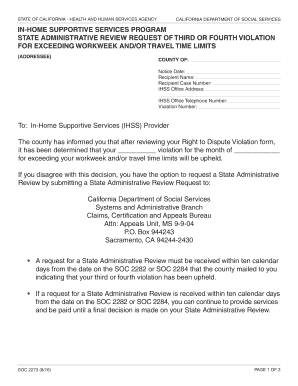
The SOC 2273.pdf form is essential for requesting a State Administrative Review regarding your violation of exceeding workweek and travel time limits under the In-Home Supportive Services program. This guide provides clear, step-by-step instructions to help you complete the form accurately and efficiently online.
Follow the steps to fill out the SOC 2273.pdf form online.
- Click the ‘Get Form’ button to obtain the form and open it in the editor.
- Complete the header section with the following information: County of, Notice Date, Recipient Name, Recipient Case Number, IHSS Office Address, IHSS Office Telephone Number, and Violation Number. Ensure all details are accurate.
- Identify the reason for your appeal by marking the appropriate box that corresponds to the reason for the violation you are contesting.
- In the space provided, clearly explain your reasons for believing that the county's decision to uphold the violation is incorrect. Be specific and provide details supporting your case.
- If additional space is needed, mark the checkbox indicated and attach any extra pages containing your explanation.
- You must sign and date the form, as well as obtain the recipient's signature if required.
- Review the completed form to ensure all sections are filled accurately. Make a copy of the form and all supporting documents for your records.
- Submit the completed form and supporting documents to the California Department of Social Services using the mailing address provided in the instructions.
- After submitting, monitor for a confirmation and response from the Appeals Unit within their specified timeframe.
Complete your SOC 2273.pdf form online today to initiate your State Administrative Review!
You (or your authorized representative) must complete PART A of this form to let the county know who you have chosen to provide your authorized services. If you have multiple providers, you must fill out a separate form for each person who will be providing authorized services for you.