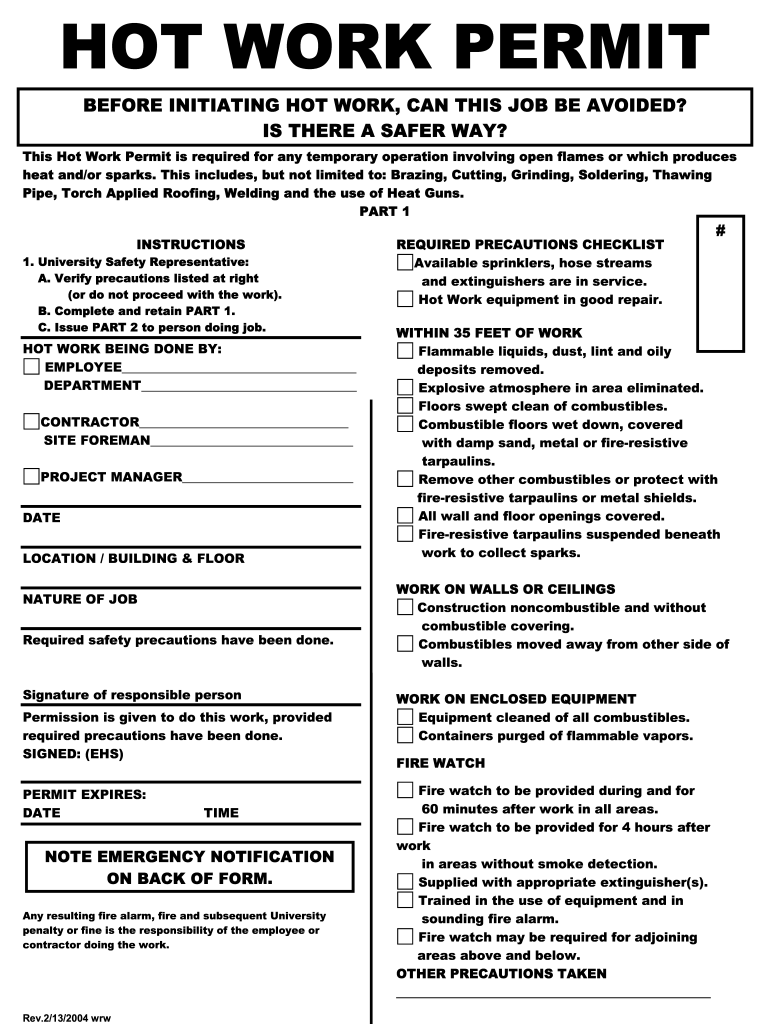
TRACTOR_______________________________ SITE FOREMAN________________________________ PROJECT MANAGER___________________________ DATE LOCATION / BUILDING & FLOOR NATURE OF JOB Required safety precautions have been done. Signature of responsible person Permission is given to do this work, provided required precautions have been done. SIGNED: (EHS) PERMIT EXPIRES: DATE TIME STARTED: TIME TIME FINISHED: FIRE WATCH SIGNOFF Work area and all adjacent areas to which sparks and heat might spread were .

Open form follow the instructions

Easily sign the form with your finger

Send filled & signed form or save
How to fill out the Hot Work Permit online
The Hot Work Permit is a crucial document required for any operations that involve open flames or generate heat and sparks. This guide provides clear and comprehensive instructions on how to fill out the Hot Work Permit online, ensuring all necessary precautions are adequately addressed.
Follow the steps to complete the Hot Work Permit online confidently.
- Click ‘Get Form’ button to obtain the Hot Work Permit and open it in your preferred editor.
- Begin by completing the section labeled 'Hot Work Being Done By' with the name of the employee, department, contractor, site foreman, and project manager.
- Fill in the date, location, building, floor, and nature of the job to provide important contextual information for the permit.
- Verify and check the required safety precautions listed to ensure they have been completed.
- The University Safety Representative needs to sign and date the form to confirm that all safety precautions are in place.
- Indicate the permit's expiration date and time to specify the duration the permit is valid.
- After completing Part 1, issue Part 2 to the person performing the hot work.
- In Part 2, the person conducting the work should indicate the time started and keep the permit posted in the hot work location for reference.
- Upon completing the hot work, record the time finished and ensure a final inspection is done by the fire watch, who will sign off the permit.
- Finally, submit the completed permit to the project manager or the risk management department before leaving the work site.
Complete your Hot Work Permit online to ensure a safe working environment.
Experience a faster way to fill out and sign forms on the web. Access the most extensive library of templates available.
Related content
May 6, 2025 — Facilities that perform hot work operations conducted on or near a covered...
Hot Work Permits are needed for all cutting, welding, soldering and brazing activities, in...
n. Hot work equipment is in good working condition. Requirements within 35 ft. (10 m) of...
Get answers to your most pressing questions about US Legal Forms API.
What is hot work vs cold work?
Hot work refers to any operation that generates sparks, heat, or open flames, such as welding and grinding. In contrast, cold work includes tasks that do not create heat, like mechanical repairs or inspections. By distinguishing between hot work and cold work, organizations can better manage safety risks and protect their workers.
What is the difference between a hot work permit and a cold work permit?
A hot work permit is specifically for high-risk operations that can ignite fires, while a cold work permit addresses tasks that are deemed lower risk. Essentially, the hot work permit involves stricter safety measures to mitigate fire hazards. Understanding these differences allows businesses to implement appropriate safety protocols for various work environments.
What is the difference between hot work permit and cold work permit?
The primary difference between a hot work permit and a cold work permit lies in the nature of the tasks involved. A hot work permit covers activities that generate heat or sparks, such as welding and cutting, which can ignite flammable materials. Conversely, a cold work permit applies to tasks that do not produce a heat source, ensuring that safety measures are tailored to the specific job.
Does OSHA require a hot work permit?
OSHA does not have a specific requirement for hot work permits, but it does mandate that employers provide a safe working environment. The use of a hot work permit is considered a best practice to demonstrate compliance with safety standards. Therefore, many companies choose to implement hot work permits to ensure they meet OSHA guidelines and protect their employees.
Are there different types of work permits?
Yes, there are several types of work permits, including hot work permits, cold work permits, and confined space permits. Each serves a distinct purpose, ensuring that specific safety measures are implemented based on the nature of the work. Understanding these different permits helps companies manage risks effectively.
What is the hot work permit?
The hot work permit is a crucial safety tool used in various industries to control and monitor hot work activities. This document outlines required safety measures, necessary protective equipment, and emergency procedures. In conclusion, the hot work permit helps maintain compliance with safety regulations and protects workers and property.
What is a hot work permit?
A hot work permit is a written document that authorizes specific types of work that can generate heat, spark, or flame. It includes safety guidelines to minimize the risk of fires or explosions during operations like welding, cutting, or grinding. Therefore, obtaining a hot work permit is essential for ensuring safety in environments where flammable materials are present.
How do you qualify for a work permit?
To qualify for a work permit, individuals must demonstrate knowledge of the specific tasks and potential hazards involved in their work. Companies often provide training to ensure workers understand safety procedures and the importance of permits, especially for hot work situations. Familiarizing yourself with your organization’s requirements will help you successfully obtain a hot work permit.
What are the OSHA requirements for hot work?
OSHA requirements for hot work include conducting a thorough assessment of the work area and implementing safety measures such as fire watches and training workers. Employers must ensure that workers have access to necessary safety equipment and that they follow proper procedures to minimize risk. Adhering to these requirements not only protects employees but also contributes to a safer work environment overall.
Who pulls a hot work permit?
Typically, a designated safety officer or supervisor pulls a hot work permit in a workplace. This person verifies that all safety measures are in place before allowing hot work activities to begin. Their role is crucial to ensure that risks are minimized and that the team understands the precautions that must be followed.
Use professional pre-built templates to fill in and sign documents online faster. Get access to thousands of forms.
If you believe that this page should be taken down, please follow our DMCA take down process here.