Loading
Get Fedex Office Payroll Direct Deposit Form
How it works
-

Open form follow the instructions
-

Easily sign the form with your finger
-

Send filled & signed form or save
How to fill out the FedEx Office Payroll Direct Deposit Form online
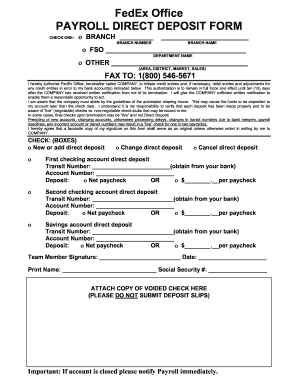
Filling out the FedEx Office Payroll Direct Deposit Form is an essential process for ensuring your paycheck is deposited directly into your bank account. This guide will provide you with a step-by-step approach to complete the form accurately and efficiently online.
Follow the steps to successfully complete your direct deposit form.
- Press the ‘Get Form’ button to access the Payroll Direct Deposit Form and open it in your chosen editor.
- Select the appropriate option for ‘Check One’ by marking the box corresponding to your branch details, either the branch number, branch name, FSO, or other specified areas.
- Fill in your bank account information. For each account, enter the transit number and account number as required, making sure to obtain the transit number from your bank.
- Indicate how you want your deposit processed. You can choose to have the net paycheck deposited or specify a fixed amount per paycheck for each account.
- Complete the signature section by signing the form and dating it. Also, print your name and provide your Social Security number as required.
- Attach a copy of a voided check to the form, ensuring that you do not submit deposit slips. This is important for verifying your account details.
- Review all the information provided for accuracy before finalizing the form.
- Once completed, save your changes, download, print, or share the form as needed, and ensure it is submitted to the correct department.
Start completing your documents online today for a seamless payroll experience.
Getting direct deposit from FedEx involves completing the FedEx Office Payroll Direct Deposit Form. Fill in your bank details accurately, and submit the form via the appropriate channels, such as the employee portal. Once approved, this will allow your wages to be deposited directly into your account, simplifying your payroll process and enhancing convenience.