Loading
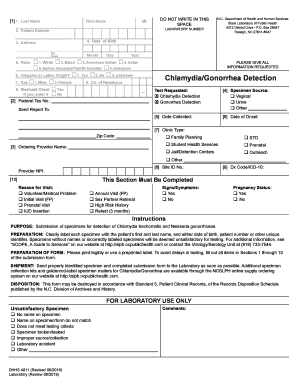
Get Chlamydia/gonorrhea Detection (dhhs 4011)
How it works
-

Open form follow the instructions
-

Easily sign the form with your finger
-

Send filled & signed form or save
How to fill out the Chlamydia/Gonorrhea Detection (DHHS 4011) online
Filling out the Chlamydia/Gonorrhea Detection (DHHS 4011) form online is a crucial step in ensuring accurate testing for these infections. This guide will walk you through each section of the form, providing clear instructions to help you complete it effectively and accurately.
Follow the steps to complete the form correctly.
- Press the ‘Get Form’ button to obtain the form and open it in your online editor.
- Begin by filling in the first section with your last name, first name, and middle initial. Ensure that these fields are completed with accurate information.
- In the next fields, enter your laboratory number and patient number if applicable.
- Provide your date of birth using the specified format of month, day, and year.
- Fill in your address and postal zip code. Make sure to provide complete and correct details.
- Indicate your race by selecting the appropriate checkbox. You may choose among options including White, Black, American Indian, Asian, Native Hawaiian/Pacific Islander, or Unknown.
- Respond to the question about Hispanic or Latino origin by selecting Yes, No, or Unknown.
- Select your sex from the provided options: Male or Female.
- Indicate your county of residence.
- If you are a Medicaid client, mark 'Yes' and enter your Medicaid number; otherwise, select 'No'.
- In the Test Requested section, check the boxes for Chlamydia Detection and Gonorrhea Detection.
- Specify the specimen source, selecting from options like Vaginal, Urine, or Other.
- Enter the date the specimen was collected.
- Detail the date of onset of any symptoms if applicable.
- Fill in the section labeled 'Send Report To' with the appropriate contact details.
- Indicate the clinic type by checking the relevant option.
- Complete the provider name and site identification number fields.
- Enter the diagnosis code or ICD-10 in the respective field.
- Choose a reason for the visit among the provided options.
- Lastly, specify any signs or symptoms present and confirm your pregnancy status.
- Once all fields are completed, review your answers for accuracy. Save your changes, and you may download, print, or share the completed form as needed.
Take the next step in your health care by completing the Chlamydia/Gonorrhea Detection form online today.
138263: Chlamydia (Chlamydophila) pneumoniae, PCR | Labcorp.
Industry-leading security and compliance
US Legal Forms protects your data by complying with industry-specific security standards.
-
In businnes since 199725+ years providing professional legal documents.
-
Accredited businessGuarantees that a business meets BBB accreditation standards in the US and Canada.
-
Secured by BraintreeValidated Level 1 PCI DSS compliant payment gateway that accepts most major credit and debit card brands from across the globe.