Loading
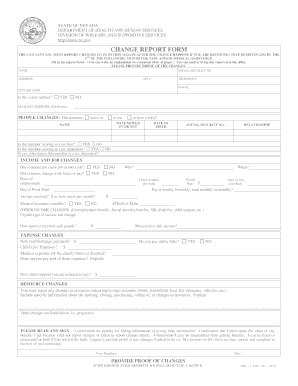
Get Can 2584 Eg Be Faxed Form
How it works
-

Open form follow the instructions
-

Easily sign the form with your finger
-

Send filled & signed form or save
How to fill out the Can 2584 Eg Be Faxed Form online
Filling out the Can 2584 Eg Be Faxed Form online can streamline your reporting process. This guide provides step-by-step instructions to ensure you complete the form accurately and efficiently.
Follow the steps to complete the form online.
- Press the ‘Get Form’ button to access the form and open it in your online editor.
- Begin by entering your personal information in the designated fields. This includes your name, social security number, address, apartment number, telephone number, and email. Ensure all details are current and accurate.
- Indicate whether your address has changed by selecting 'Yes' or 'No'. If there is a mailing address that differs from your residential address, provide it in the specified section.
- For people changes, indicate if someone moved in or out, or if there is a new baby. Fill in the date this change occurred along with the name and date of birth of the individual involved.
- Report any income and job changes, specifying if anyone started or ended employment or if there were changes in work hours or pay. Be sure to include the company name, weekly hours, pay frequency, and details about any tips received.
- Document any changes to your other income, providing explanations of types and amounts received monthly. Include who receives this income as well.
- List any expense changes, such as new rent or mortgage payments, child care costs, and whether utility bills are being paid.
- Clarify changes regarding resources, noting any significant updates related to accounts or assets, and provide detailed explanations.
- Before submitting, review the statement confirming the accuracy of the information provided. You must sign and date this section to affirm your understanding of the penalties for false information.
- Once you have completed the form and confirmed all information, save your changes. You may choose to download, print, or share the form as needed before submission.
Complete your documents online today and ensure timely reporting of changes.
How do I replace a lost or stolen EBT card? If you can't find your EBT card, call the Nevada EBT hotline as soon as you can: 1-866-281-2443. If someone manages to use your card, you won't be able to get those benefits back, so make sure you call right away!
Industry-leading security and compliance
US Legal Forms protects your data by complying with industry-specific security standards.
-
In businnes since 199725+ years providing professional legal documents.
-
Accredited businessGuarantees that a business meets BBB accreditation standards in the US and Canada.
-
Secured by BraintreeValidated Level 1 PCI DSS compliant payment gateway that accepts most major credit and debit card brands from across the globe.