Loading
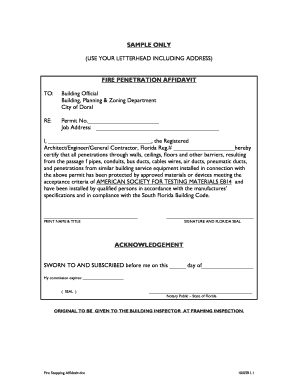
Get Fire Stopping Affidavit.doc
How it works
-

Open form follow the instructions
-

Easily sign the form with your finger
-

Send filled & signed form or save
How to fill out the Fire Stopping Affidavit.doc online
Filling out the Fire Stopping Affidavit.doc online is a crucial step in ensuring compliance with building codes. This guide provides step-by-step instructions to help you complete the form accurately and efficiently.
Follow the steps to successfully complete the Fire Stopping Affidavit online.
- Click the ‘Get Form’ button to access the Fire Stopping Affidavit.doc and open it in an editor.
- Enter the required information in the 'To' section, specifying the building official and department name accurately.
- Fill in the 'RE:' section by providing the permit number and job address to ensure your application is properly documented.
- In the certification section, write your name as the registered architect, engineer, or general contractor along with your Florida registration number.
- Clearly affirm that all fire penetration installations have been completed according to the established standards and specifications.
- Print your name and title in the designated area for clarity.
- Sign the document and affix your Florida seal, which is necessary to validate the affidavit.
- Proceed to the acknowledgment section, providing the date of signing and ensuring the notary public completes this part as required.
- Once complete, review all details for accuracy, then save your changes, and choose to either download, print, or share the completed form.
Complete your Fire Stopping Affidavit online today to ensure timely submission and compliance with building regulations.