Loading
Get Premier Designs Jewelry Catalog Online
How it works
-

Open form follow the instructions
-

Easily sign the form with your finger
-

Send filled & signed form or save
How to fill out the Premier Designs Jewelry Catalog Online online
Filling out the Premier Designs Jewelry Catalog Online is an essential step for placing your order accurately. This guide will provide you with clear instructions on how to complete each section of the form effectively.
Follow the steps to complete your order form with ease.
- Click ‘Get Form’ button to access the form and open it in your browser.
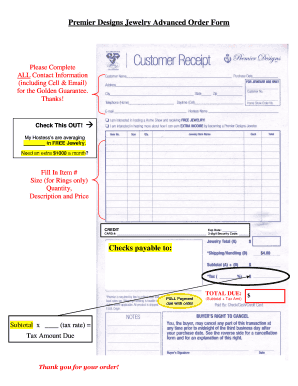
- Complete all contact information fields, including your cell phone number and email address. This information is necessary for the Golden Guarantee.
- In the provided space, enter the item number of the jewelry piece you wish to order. Make sure this number is accurate.
- For rings, specify the size in the appropriate field. Leaving this blank may delay your order.
- Indicate the quantity of each item you wish to purchase.
- Fill in the description and price of each item. Ensure that these details match what you intend to order.
- In the credit section, provide the expiration date of your payment card, card number, and the 3-digit security code.
- If you are paying by check, make it payable to the specified entity. Remember that full payment is due with your order.
- Calculate the subtotal by multiplying the quantity by the price. Apply the appropriate tax rate to find the tax amount due.
- Review your total due, which includes the subtotal and tax amount, before submitting the form.
- Once all fields are filled out correctly, you can save your changes, download, print, or share the completed form as necessary.
Complete your order form today and enjoy your Premier Designs jewelry!
Inspired by Premier Designs Premier Designs briefly shifted its model to support the new DVTD concept before closing its doors at the end of 2020.