Loading
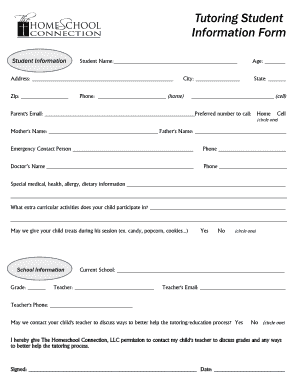
Get Tutoring Student Information Form - The Homeschool Connection, Llc - Thehomeschoolconnection
How it works
-

Open form follow the instructions
-

Easily sign the form with your finger
-

Send filled & signed form or save
How to fill out the Tutoring Student Information Form - The Homeschool Connection, LLC - Thehomeschoolconnection online
Completing the Tutoring Student Information Form is an essential step to ensure that your child's educational needs are met effectively. This guide provides a clear and structured approach to filling out the form online, simplifying the process for all users.
Follow the steps to complete the Tutoring Student Information Form online.
- Click ‘Get Form’ button to obtain the form and open it in the editor.
- Begin by providing the student's name in the designated field. Then, fill out the address, zip code, city, state, and phone number (home and cell) as required.
- Input the parent's email address and indicate the preferred number for contact by circling either home or cell.
- Complete the names of guardians, including mother's and father's names. Additionally, list an emergency contact person along with their phone number.
- Fill in the doctor's name and phone number. Provide any relevant special medical, health, allergy, or dietary information in the space provided.
- Include details about any extracurricular activities your child participates in.
- Indicate whether you permit treats during sessions by marking yes or no.
- Move to the school information section, specifying the student's grade and current school. Include the teacher's name and email, as well as the teacher's phone number.
- Circle yes or no to indicate if you permit contacting your child's teacher to discuss educational support.
- Provide your signature and date to grant permission for The Homeschool Connection, LLC to contact the teacher.
- Complete the schooling questionnaire by selecting the academic area for tutoring and evaluating your student's academic success and classroom behavior.
- Answer additional questions regarding tutoring history, family struggles with reading or writing, and any current educational services like Title 1.
- For report card grades and test scores, enter grades for various subjects and provide relevant test scores, such as FCAT or SAT scores.
- Indicate if your child has an IEP and provide details if applicable. Ensure to note any psychological evaluations and involvement in Response to Intervention (RTI).
- Once completed, review all provided information for accuracy. You can then save changes, download, print, or share the form as needed.
Start filling out the Tutoring Student Information Form online now to support your child's educational journey.
Industry-leading security and compliance
US Legal Forms protects your data by complying with industry-specific security standards.
-
In businnes since 199725+ years providing professional legal documents.
-
Accredited businessGuarantees that a business meets BBB accreditation standards in the US and Canada.
-
Secured by BraintreeValidated Level 1 PCI DSS compliant payment gateway that accepts most major credit and debit card brands from across the globe.