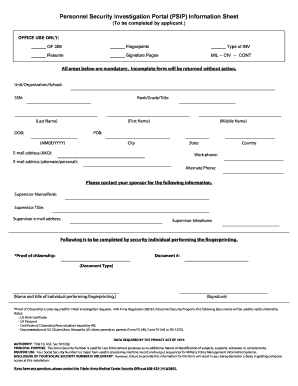
Personnel Security Investigation Portal (PSIP) Information Sheet (To be completed by applicant.) OFFICE USE ONLY: OF 306 Resume Fingerprints.
Open form follow the instructions
Easily sign the form with your finger
Send filled & signed form or save
How to fill out the Psip Army online
Filling out the Personnel Security Investigation Portal (Psip Army) form is a critical step for applicants seeking security clearance. This guide will walk you through each section of the form, ensuring you have the necessary information to complete it accurately and efficiently.
Follow the steps to fill out the Psip Army online form.
- Click the ‘Get Form’ button to access the form and open it for editing.
- Begin by filling out your unit, organization, or school name in the designated field.
- Enter your Social Security Number (SSN) exactly as requested.
- Indicate your rank, grade, or title as appropriate in the specified section.
- Provide your last name, first name, and middle name in the corresponding fields.
- Input your date of birth in the MMDDYYYY format.
- State your place of birth, including state and city.
- Fill in your email address, ensuring to include your Army Knowledge Online (AKO) email.
- Include your country and work phone number.
- Add an alternate email address and an alternate phone number if applicable.
- Contact your supervisor for their name, rank, title, email address, and telephone number, and fill these out on the form.
- A security individual performing fingerprinting will need to complete their section, which includes proof of citizenship. Fill in the document number and type.
- The security individual must also sign and provide their name and title.
- After completing all mandatory fields, review the entire form for accuracy.
- Once confirmed, you can save your changes, download, print, or share the completed form as needed.
Complete your Psip Army form online today to ensure a smooth application process.
Experience a faster way to fill out and sign forms on the web. Access the most extensive library of templates available.
Related content
e-QIP allows the user to electronically enter, update and transmit their personal...
Congratulations on receiving a rotation with Madigan Army Medical Center....
... å bruke PSIP for å vise WRNN-TVs virtuelle kanal 48 på digitale TV-mottakere....
Get answers to your most pressing questions about US Legal Forms API.
What is PSI CoE?
Personnel Security Investigations Center of Excellence (PSI-CoE)
Does everyone in the military have Top Secret clearance?
Not every position in the military requires a clearance (culinary specialists and some support positions may not), but all officers do obtain a security clearance as a part of their service and all service members undergo a background check and complete some form of security application.
What is a psip army?
Personnel Security Investigation Portal (PSIP) Information Sheet.
What are the 5 levels of security clearance?
The four main types of security clearances for national security positions are: confidential, secret, top secret and sensitive compartmented information. This type of security clearance provides access to information that could cause damage to national security if disclosed without authorization.
How long does Army Top Secret clearance take?
How long does the security clearance process take? The security clearance process takes an average of three to four months to complete but can take up to a full year to complete depending on your background.
How do you get top security clearance in the military?
Whether you're applying for a Confidential clearance or a Top Secret security clearance, you need to complete the SF-86, cooperate with investigators in the course of the investigation, and be trustworthy – that's the path to a Top Secret clearance job.
What is top secret clearance army?
Top Secret: Individuals with this clearance have access to information or material that could be expected to cause exceptionally grave damage to national security if it was released without authorization. This level needs to be reinvestigated every five years.
How do I check my PSIP status?
You can check the status of your active PSI requests via PSIP. To check the status, please navigate to the “Requests” tab and select “Request Status”. Brief explanations of status can be found on the “References” tab labeled “Status Explanation”. Note: You will only see status for requests that are active.
Use professional pre-built templates to fill in and sign documents online faster. Get access to thousands of forms.
If you believe that this page should be taken down, please follow our DMCA take down process here.