Loading
Form preview
  • US Legal Forms
  • Form Library
  • More Forms
  • More Uncategorized Forms
  • Launch Trampoline Park Waiver

Get Launch Trampoline Park Waiver

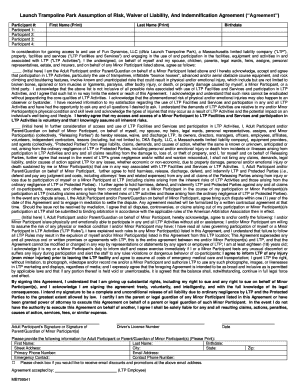
Launch Trampoline Park Assumption of Risk, Waiver of Liability, And Indemnification Agreement (Agreement) Participant #: Participant 1: Participant 2: Participant 3: Participant 4: First Name (Print).

How it works

  1. Open form

    Open form follow the instructions

  2. Easily sign form

    Easily sign the form with your finger

  3. Share form

    Send filled & signed form or save

How to fill out the Launch Trampoline Park Waiver online

Completing the Launch Trampoline Park Waiver online is an important step in ensuring your safety and understanding of the participation risks involved. This guide will provide you with a clear and supportive overview of how to accurately fill out this waiver and what to expect during the process.

Follow the steps to complete the waiver online

  1. Click the ‘Get Form’ button to obtain the waiver form and open it in your editing tool.
  2. Begin by entering the Participant Number for each individual who will be participating in the activities, from Participant 1 through to Participant 4.
  3. In the designated fields, clearly print the first name and last name of each participant listed. Ensure that you also include the birthdate for each individual.
  4. Read through the acknowledgment regarding the risks associated with participating in the trampoline park activities. You must initial in the provided space to indicate your understanding and acceptance of these risks.
  5. Fill in the statement concerning the release of liability. As the Adult Participant or Parent/Guardian, initial to confirm your agreement to waive any legal claims against Launch Trampoline Park.
  6. Continue to the section regarding physical and emotional capability to participate in the activities. Initial where indicated to certify that you or the Minor Participants are fit to partake.
  7. Complete the information section for the Adult Participant or Parent/Guardian, including full name, birthdate, address, primary phone number, email address, and emergency contact details.
  8. If you would like to receive email discounts and promotions, check the corresponding box.
  9. Finally, sign the waiver in the specified area, providing your driver's license number and the date to validate the document.
  10. After completing the necessary fields, you may save your changes, download the document, print a copy, or share it as required.

Complete your Launch Trampoline Park Waiver online today to ensure a smooth and safe experience!

Get form

Experience a faster way to fill out and sign forms on the web. Access the most extensive library of templates available.
Get form

Related content

Application and Control Docs - Town of Watertown
Jul 3, 2014 — Mark Murphy/Launch Watertown, Inc. Addrace: 780 Marshall Street ... The...
Learn more
Launch Trampoline Park Assumption of Risk, Waiver...
MB788431. Launch Trampoline Park Assumption of Risk, Waiver of Liability, And...
Learn more
978-633-4237 Wetterstationen
9786334237 No launch date was too easy or too busy over the summer. The young ... Perfect...
Learn more

Related links form

DP-3470-082610 DirectPay Enrollment Form - Member Assistance Request Form - Coastal Federal Credit Union C-SCAN OPERATORS MANUAL - Dynalog Co Graduation Evaluation Form - The College Of The Bahamas - Cob Edu

Questions & Answers

Get answers to your most pressing questions about US Legal Forms API.

Contact support

Any reputable trampoline park you visit will require you to wear special “trampoline socks” for the duration of your jump time. If you have visited The Jump In Group before, you may already be the proud owner of our brightly coloured socks!

All guests must have a signed waiver You have the option to complete a waiver that is valid for either 12 months, or 24 hours. The 24-hour waiver is ideal for parents or guardians who are organising a party and happy to take responsibility for a group of children for that one-off visit.

By clicking the box below this document, I acknowledge that if anyone is hurt or property damaged during my participation in this activity, I may be found by a court of law to have waived my or the minor participant's right to maintain a lawsuit against Jump Street Ltd or any RELEASED PARTIES on the basis of any claim ...

Do I have to complete a waiver every time I come to bounce? No. Once a waiver has been completed, it lasts for 12 months.

Get This Form Now!

Use professional pre-built templates to fill in and sign documents online faster. Get access to thousands of forms.
Get form
If you believe that this page should be taken down, please follow our DMCA take down processhere.
Get Launch Trampoline Park Waiver
Get form
  • Adoption
  • Bankruptcy
  • Contractors
  • Divorce
  • Home Sales
  • Employment
  • Identity Theft
  • Incorporation
  • Landlord Tenant
  • Living Trust
  • Name Change
  • Personal Planning
  • Small Business
  • Wills & Estates
  • Packages A-Z
  • Affidavits
  • Bankruptcy
  • Bill of Sale
  • Corporate - LLC
  • Divorce
  • Employment
  • Identity Theft
  • Internet Technology
  • Landlord Tenant
  • Living Wills
  • Name Change
  • Power of Attorney
  • Real Estate
  • Small Estates
  • Wills
  • All Forms
  • Forms A-Z
  • Form Library
  • Legal Hub
  • About Us
  • Help Portal
  • Legal Resources
  • Blog
  • Affiliates
  • Contact Us
  • Delete My Account
  • Site Map
  • Industries
  • Forms in Spanish
  • Localized Forms
  • State-specific Forms
  • Forms Kit
  • Real Estate Handbook
  • All Guides
  • Notarize
  • Incorporation services
  • For Consumers
  • For Small Business
  • For Attorneys
  • USLegal
  • FormsPass
  • pdfFiller
  • signNow
  • altaFlow
  • DocHub
  • Instapage
Form Packages
  • Adoption
  • Bankruptcy
  • Contractors
  • Divorce
  • Home Sales
  • Employment
  • Identity Theft
  • Incorporation
  • Landlord Tenant
  • Living Trust
  • Name Change
  • Personal Planning
  • Small Business
  • Wills & Estates
  • Packages A-Z
Form Categories
  • Affidavits
  • Bankruptcy
  • Bill of Sale
  • Corporate - LLC
  • Divorce
  • Employment
  • Identity Theft
  • Internet Technology
  • Landlord Tenant
  • Living Wills
  • Name Change
  • Power of Attorney
  • Real Estate
  • Small Estates
  • Wills
  • All Forms
  • Forms A-Z
  • Form Library
Customer Service
  • Legal Hub
  • About Us
  • Help Portal
  • Legal Resources
  • Blog
  • Affiliates
  • Contact Us
  • Delete My Account
  • Site Map
  • Industries
  • Forms in Spanish
  • Localized Forms
  • State-specific Forms
  • Forms Kit
Legal Guides
  • Real Estate Handbook
  • All Guides
Prepared for you
  • Notarize
  • Incorporation services
Our Customers
  • For Consumers
  • For Small Business
  • For Attorneys
Our Sites
  • USLegal
  • FormsPass
  • pdfFiller
  • signNow
  • altaFlow
  • DocHub
  • Instapage
Social Media
Call us now toll free:
+1 833 426 79 33
As seen in:
© Copyright 1999-2026 airSlate Legal Forms, Inc. 3720 Flowood Dr, Flowood, Mississippi 39232
  • Your Privacy Choices
  • Terms of Service
  • Privacy Notice
  • Content Takedown Policy
  • Bug Bounty Program