Loading
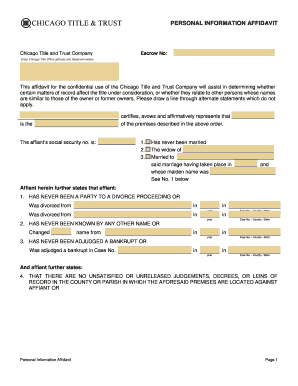
Get Personal Information Affidavit
How it works
-

Open form follow the instructions
-

Easily sign the form with your finger
-

Send filled & signed form or save
How to fill out the Personal Information Affidavit online
Completing the Personal Information Affidavit online can streamline your documentation process. This guide provides clear, step-by-step instructions to assist you in accurately filling out the form, ensuring all necessary information is included.
Follow the steps to effectively complete the affidavit:
- Click ‘Get Form’ button to obtain the form and access it in the online editor.
- Begin by entering the escrow number in the designated field at the top of the affidavit. This will help identify your specific transaction.
- Fill in the name and address of the Chicago Title and Trust Company as specified in the document. Include the phone number provided, ensuring accuracy for communication purposes.
- In the section that certifies your identity, accurately input your name as the affiant, along with your social security number in the appropriate field.
- Indicate your marital status by selecting the applicable option. If married, provide your partner's name and the details of the marriage, including the date and maiden name if necessary.
- Complete the section regarding your divorce history, if any. If applicable, provide details of any divorce proceedings, including dates and case numbers.
- If you have ever changed your name, state your previous name and the effective date of the change. This is crucial for maintaining accurate records.
- State whether you have ever been adjudged a bankrupt or include any relevant bankruptcy case information, if applicable.
- Declare any unsatisfied or unreleased judgments, decrees, or liens against your name, if applicable. This section is vital for the title evaluation process.
- List your residences for the last ten years as required. Include start and end dates, street numbers, cities, and states for each address.
- Document your occupational history for the last ten years, stating each occupation, employer, and place of business along with the respective dates.
- Once all sections are complete, review your information for accuracy. When satisfied, save your changes, and choose to download, print, or share the completed form as necessary.
Start filling out your Personal Information Affidavit online today for a smooth and efficient process.
I, Mr./Ms. Age,_________ , occupation R/at:_________________________________________ do hereby take oath and state on solemn affirmation as under:- I. state that, I undertake to show all the original documents at the time of submission/admission. I will submit true/attested copies of Marksheet, Passport and Visa.