Loading
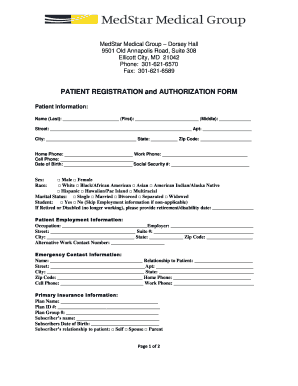
Get Medstar Dorsey Hall
How it works
-

Open form follow the instructions
-

Easily sign the form with your finger
-

Send filled & signed form or save
How to fill out the Medstar Dorsey Hall online
This guide provides comprehensive and user-friendly instructions for completing the Medstar Dorsey Hall patient registration and authorization form online. Follow these steps to ensure accurate and efficient submission of your information.
Follow the steps to successfully complete the Medstar Dorsey Hall form online.
- Click the ‘Get Form’ button to access the patient registration and authorization form and open it in the online editor.
- Begin by entering your personal information in the 'Patient Information' section. Provide your last name, first name, and middle name where indicated. Fill in your address details, including street, apartment number (if applicable), city, state, and zip code.
- Next, input your contact information. Include your home phone, work phone, and cell phone numbers. Ensure that the date of birth and social security number are entered correctly.
- Indicate your gender and race by checking the appropriate boxes. Select your marital status and, if applicable, provide information about your student status.
- In the 'Patient Employment Information' section, fill in your occupation and employer’s name along with their address. If you are retired or disabled, provide the relevant date.
- Provide emergency contact information by entering the name, relationship, address, and phone numbers of your emergency contact.
- Complete the 'Primary Insurance Information' section by entering your insurance plan name, Plan ID number, group number, and subscriber's details.
- If you have secondary insurance, repeat the process in the 'Secondary Insurance Information' section.
- Review the information provided in the 'Insurance Authorization and Assignment' section. Sign and date the form, acknowledging the terms provided.
- In the 'Privacy Practices and Advance Directive' section, indicate whether you have an advance directive and if you would like more information. Sign and date this section as well.
- Once all sections are complete and verified for accuracy, you can save the changes. From this point, you may choose to download, print, or share the completed form as required.
Complete your Medstar Dorsey Hall form online today for a seamless registration experience.