Loading
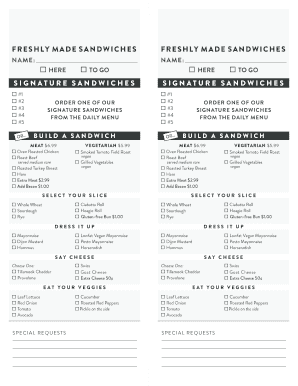
Get Sandwich Form-2up - New Seasons Market
How it works
-

Open form follow the instructions
-

Easily sign the form with your finger
-

Send filled & signed form or save
How to fill out the Sandwich Form-2up - New Seasons Market online
Filling out the Sandwich Form-2up for New Seasons Market online can streamline your ordering process for delicious freshly made sandwiches. This guide will assist you through each component of the form, ensuring that you provide all necessary details to complete your order efficiently.
Follow the steps to fill out the Sandwich Form-2up online:
- Press the ‘Get Form’ button to retrieve the Sandwich Form-2up and open it in your preferred editor.
- Begin by entering your name in the designated field to identify your order.
- Select whether you would like your sandwich ‘here’ or ‘to go’ by checking the appropriate box.
- Choose one of the signature sandwiches from the daily menu by marking the corresponding option.
- If you wish to build your own sandwich, select your preferred meat option for $6.99 or vegetarian option for $5.99 by checking the appropriate box.
- For additional meat or bacon, check the boxes for extra meat at $2.99 or add bacon for $1.00.
- Choose your bread by selecting from the available options, including gluten-free for an additional charge.
- Add dressings or mayonnaise by marking your choice from the listed condiments.
- Select your cheese preference, ensuring to choose only one option from the cheeses provided.
- Include your desired vegetables by checking the appropriate boxes.
- If you have any special requests, make sure to indicate them in the designated section.
- After completing all sections, review your selections to ensure accuracy.
- Finally, save your changes, and you can download, print, or share the completed form.
Complete your Sandwich Form-2up online for a seamless ordering experience!
Portland, OR New Seasons Market / Headquarters