Loading
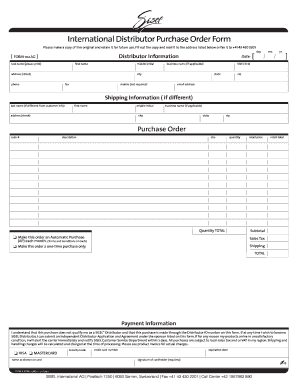
Get International Distributor Purchase Order Form - Sisel International
How it works
-

Open form follow the instructions
-

Easily sign the form with your finger
-

Send filled & signed form or save
How to fill out the International Distributor Purchase Order Form - Sisel International online
Filling out the International Distributor Purchase Order Form online is a straightforward process that ensures your order is submitted accurately. This guide provides clear instructions for each section of the form to facilitate your experience.
Follow the steps to complete your form effectively.
- Press the ‘Get Form’ button to access the International Distributor Purchase Order Form and open it in your preferred editor.
- Start by entering your personal details in the 'Distributor Information' section. This includes your last name, first name, middle initial, address (street), business name (if applicable), city, state, zip code, email address, and phone number. Make sure to include your SISEL ID number and the date of the order.
- If your shipping information is different from your distributor information, fill in the 'Shipping Information' section with the appropriate last name, first name, middle initial, address, business name, city, state, and zip code.
- In the 'Purchase Order' section, specify the code number, description, size, quantity, and retail price for each item you wish to purchase. If you want to make this order an automatic purchase each month, check the corresponding box. Otherwise, indicate it as a one-time purchase.
- Review the subtotal, sales tax, and total amounts to ensure accuracy. This will provide a comprehensive overview of the costs associated with your order.
- In the 'Payment Information' section, fill in your credit card details, including card type, number, expiration date, and security code. Ensure that the name on the card matches the information provided.
- Sign in the designated area to confirm your order and the information provided. It is essential to complete this step for the transaction to be processed.
- Once you have filled out the form, save your changes, and choose to download, print, or share the form as needed.
Complete your documents online today for a seamless experience!
A purchase order is used by a buyer to place an order and is issued before delivery. An invoice is issued by a seller using invoicing software after an order is delivered. It defines the amount the buyer owes for the purchased goods and the date by which the buyer needs to pay.