We use cookies to improve security, personalize the user experience, enhance our marketing activities (including cooperating with our marketing partners) and for other business use.
Click "here" to read our Cookie Policy. By clicking "Accept" you agree to the use of cookies. Read less
Read more
Accept
Loading
Form preview
  • US Legal Forms
  • Form Library
  • Social Forms
  • Wisconsin Social Forms
  • Wi Dpi Pi-1613 2014

Get Wi Dpi Pi-1613 2014

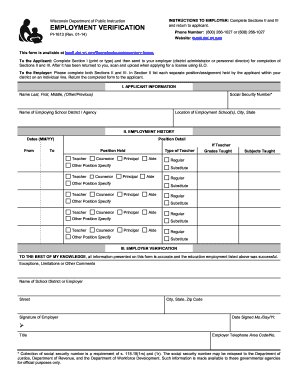
INSTRUCTIONS TO EMPLOYER Complete Sections II and III and return to applicant. Wisconsin Department of Public Instruction EMPLOYMENT VERIFICATION Phone Number 800 266-1027 or 608 266-1027 Website tepdl.dpi. wi. gov PI-1613 Rev. 01-14 This form is available at tepdl.dpi. wi. gov/licensing/supplementary-forms To the Applicant Complete Section I print or type and then send to your employer district administrator or personnel director for completion of Sections II and III. INSTRUCTIONS TO EMPLOYER Complete Sections II and III and return to applicant. Wisconsin Department of Public Instruction EMPLOYMENT VERIFICATION Phone Number 800 266-1027 or 608 266-1027 Website tepdl*dpi. wi. gov PI-1613 Rev* 01-14 This form is available at tepdl*dpi. wi. gov/licensing/supplementary-forms To the Applicant Complete Section I print or type and then send to your employer district administrator or personnel director for completion of Sections II and III. After it has been returned to you scan and upload wh....

How it works

  1. Open form

    Open form follow the instructions

  2. Easily sign form

    Easily sign the form with your finger

  3. Share form

    Send filled & signed form or save

How to fill out the WI DPI PI-1613 online

The Wisconsin Department of Public Instruction's PI-1613 form is essential for employment verification in the education sector. This guide provides clear, step-by-step instructions for filling out the form online, ensuring users can complete it accurately and efficiently.

Follow the steps to complete the WI DPI PI-1613 form online.

  1. Click ‘Get Form’ button to obtain the form and open it in the editor.
  2. Begin by filling out Section I, which includes your personal information. Provide your social security number, full name (last, first, middle), and the name of your employing school district or agency along with the location of employment (school, city, state). Ensure all entries are clear and legible.
  3. Once you have completed Section I, send the form to your employer (district administrator or personnel director) for them to fill out Sections II and III. Ensure they receive the form in a timely manner.
  4. In Section II, the employer will detail your employment history. This includes listing each position/assignment held within the district along with the dates of your employment (MM/YY) and the specific positions you held (e.g., Teacher, Counselor, Principal, Aide). Each position should be listed on a separate line for clarity.
  5. For each position, they will also indicate if the position was a regular or substitute role and specify the subjects and grades taught, if applicable. It's crucial that the employer provides thorough information to ensure accuracy.
  6. In Section III, the employer must verify the information presented. They should provide any exceptions, limitations, or comments as needed, along with their school district or employer name, signature, contact information, and the date signed.
  7. After the employer has completed Sections II and III, they will return the form to you. Once you receive it, scan the completed form for your records.
  8. When applying for your license using ELO, upload the completed PI-1613 form as required.
  9. Remember to save changes to your document, and you may choose to download, print, or share the form as necessary during your application process.

Start completing your WI DPI PI-1613 form online today!

Get form

Experience a faster way to fill out and sign forms on the web. Access the most extensive library of templates available.

Related content

PI-1613 Employment Verification
PI-1613 (Rev. 08-18) ... Return the completed form to the applicant. Phone Number: (800)...
Learn more
How to Become a Superintendent in Wisconsin - UW...
Apr 15, 2024 — Candidates must also submit a PI-1613 Employment Verification form as...
Learn more
PDF Printing 600 dpi
COPVRIGHT ee) DIGITAL EQUIPMENT CORPORATION. 1912,1915. THE MATERIAL IN THIS DOCUMENT IS...
Learn more

Related links form

VA School Day and Extended Day Field Trip Permission Form 2012 VT Special Event Permit Application 2016 WA DLR-430-510 2015 WA DNR SM-6 2017

Questions & Answers

Get answers to your most pressing questions about US Legal Forms API.

Contact support

A Wisconsin DPI license is an official credential issued by the Department of Public Instruction. This license authorizes individuals to teach within Wisconsin's public school system. The WI DPI PI-1613 acts as a framework for both initial licensing and license renewal, ensuring educators meet the required standards.

In Wisconsin, you cannot teach in public schools without a valid teaching license. The state requires educators to meet specific eligibility criteria before they can take up teaching positions. The WI DPI PI-1613 is crucial for obtaining the necessary documentation and permissions.

To achieve 300 DPI, adjust the settings in your image editing software. Select the desired resolution when saving or exporting your images, ensuring 300 DPI is set for print quality. If you're unsure about technical aspects, consider using resources or services that offer guidance on DPI, including those relating to WI DPI PI-1613.

To renew your provisional teaching license in Wisconsin, log into the DPI’s online application portal. Submit the renewal application along with any required documentation and payment. It's crucial to review the requirements for maintaining your status under WI DPI PI-1613 to ensure you meet all conditions.

Renewing a provisional teaching license in Wisconsin involves fulfilling specific teaching and training requirements, followed by submitting the application for renewal. You can refer to the guidance provided in the WI DPI PI-1613 to navigate this process smoothly. Additionally, ensure that you stay informed about deadlines and required documentation to maintain your teaching credentials.

To obtain a Wi-DPI license, you need to meet specific educational and professional requirements, then complete the application process indicated on the DPI’s official portal. Make sure to reference the WI DPI PI-1613 for detailed instructions on the application form. Starting this process early will give you plenty of time to gather the required documentation.

You can contact the Wisconsin DPI licensing office through their official website where they provide contact details, including phone numbers and email addresses. They are typically responsive to queries regarding licensing, including those related to the WI DPI PI-1613 form. Do not hesitate to reach out for assistance with your specific licensing needs.

To renew your DPI license in Wisconsin, you should complete the required professional development hours and submit the renewal application online. Be sure to check that all your documents are up-to-date, and refer to the WI DPI PI-1613 guidelines for any additional requirements. Completing this process on time ensures uninterrupted service in your educational career.

Renewing your psychology license in Wisconsin requires you to complete the necessary continuing education credits and submit a renewal application through the Wisconsin Department of Safety and Professional Services. Don't forget to include any specific documentation related to the WI DPI PI-1613 if applicable. Staying informed of deadlines is vital to avoid any lapses in your licensing status.

To file a complaint with Wisconsin DPI, you need to visit their website where you can find the necessary forms and guidelines. Ensure you gather supporting information about your complaint to provide clarity. If the complaint relates to licensing, referencing the WI DPI PI-1613 can help in addressing the specific concerns effectively.

Get This Form Now!

Use professional pre-built templates to fill in and sign documents online faster. Get access to thousands of forms.
If you believe that this page should be taken down, please follow our DMCA take down processhere.

Industry-leading security and compliance

US Legal Forms protects your data by complying with industry-specific security standards.
  • In businnes since 1997
    25+ years providing professional legal documents.
  • Accredited business
    Guarantees that a business meets BBB accreditation standards in the US and Canada.
  • Secured by Braintree
    Validated Level 1 PCI DSS compliant payment gateway that accepts most major credit and debit card brands from across the globe.
Get WI DPI PI-1613
Form Packages
Adoption
Bankruptcy
Contractors
Divorce
Home Sales
Employment
Identity Theft
Incorporation
Landlord Tenant
Living Trust
Name Change
Personal Planning
Small Business
Wills & Estates
Packages A-Z
Form Categories
Affidavits
Bankruptcy
Bill of Sale
Corporate - LLC
Divorce
Employment
Identity Theft
Internet Technology
Landlord Tenant
Living Wills
Name Change
Power of Attorney
Real Estate
Small Estates
Wills
All Forms
Forms A-Z
Form Library
Customer Service
Terms of Service
Privacy Notice
Legal Hub
Content Takedown Policy
Bug Bounty Program
About Us
Help Portal
Legal Resources
Blog
Affiliates
Contact Us
Delete My Account
Site Map
Industries
Forms in Spanish
Localized Forms
State-specific Forms
Forms Kit
Legal Guides
Real Estate Handbook
All Guides
Prepared for You
Notarize
Incorporation services
Our Customers
For Consumers
For Small Business
For Attorneys
Our Sites
US Legal Forms
USLegal
FormsPass
pdfFiller
signNow
airSlate WorkFlow
DocHub
Instapage
Social Media
Call us now toll free:
+1 833 426 79 33
As seen in:
  • USA Today logo picture
  • CBC News logo picture
  • LA Times logo picture
  • The Washington Post logo picture
  • AP logo picture
  • Forbes logo picture
© Copyright 1997-2025
airSlate Legal Forms, Inc.
3720 Flowood Dr, Flowood, Mississippi 39232
Form Packages
Adoption
Bankruptcy
Contractors
Divorce
Home Sales
Employment
Identity Theft
Incorporation
Landlord Tenant
Living Trust
Name Change
Personal Planning
Small Business
Wills & Estates
Packages A-Z
Form Categories
Affidavits
Bankruptcy
Bill of Sale
Corporate - LLC
Divorce
Employment
Identity Theft
Internet Technology
Landlord Tenant
Living Wills
Name Change
Power of Attorney
Real Estate
Small Estates
Wills
All Forms
Forms A-Z
Form Library
Customer Service
Terms of Service
Privacy Notice
Legal Hub
Content Takedown Policy
Bug Bounty Program
About Us
Help Portal
Legal Resources
Blog
Affiliates
Contact Us
Delete My Account
Site Map
Industries
Forms in Spanish
Localized Forms
State-specific Forms
Forms Kit
Legal Guides
Real Estate Handbook
All Guides
Prepared for You
Notarize
Incorporation services
Our Customers
For Consumers
For Small Business
For Attorneys
Our Sites
US Legal Forms
USLegal
FormsPass
pdfFiller
signNow
airSlate WorkFlow
DocHub
Instapage
Social Media
Call us now toll free:
+1 833 426 79 33
As seen in:
  • USA Today logo picture
  • CBC News logo picture
  • LA Times logo picture
  • The Washington Post logo picture
  • AP logo picture
  • Forbes logo picture
© Copyright 1997-2025
airSlate Legal Forms, Inc.
3720 Flowood Dr, Flowood, Mississippi 39232
WI DPI PI-1613
This form is available in several versions.
Select the version you need from the drop-down list below.
2018 WI DPI PI-1613
Select form
  • 2018 WI DPI PI-1613
  • 2014 WI DPI PI-1613
  • 2010 WI DPI PI-1613
Select form