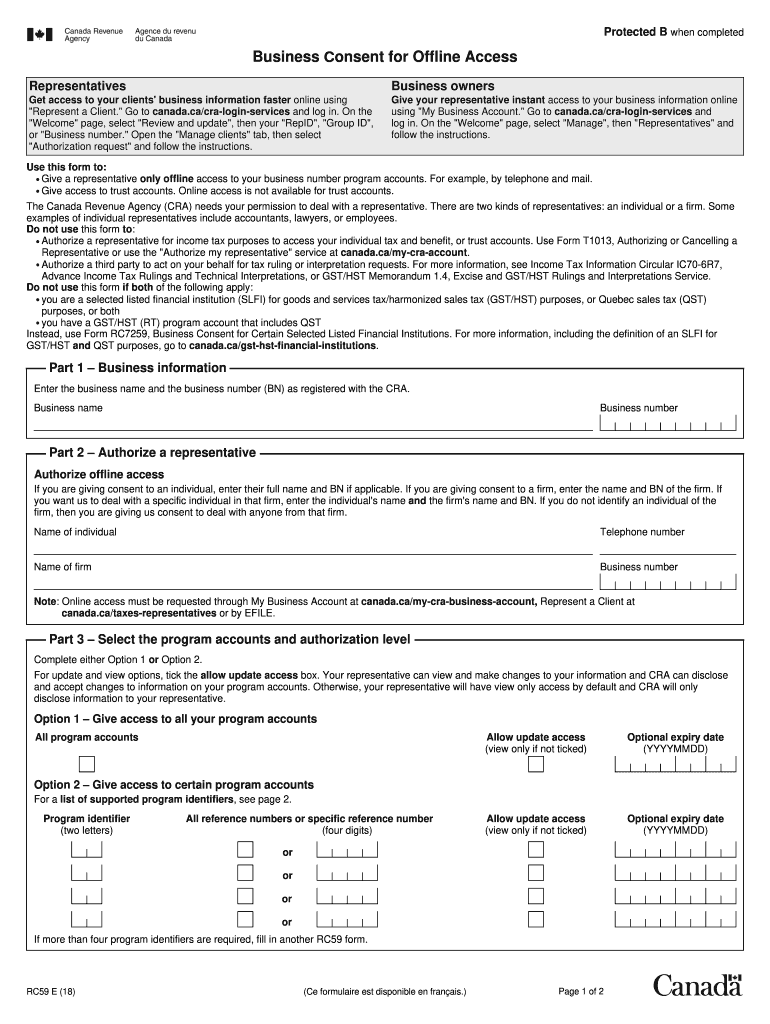
To information on your program accounts. Otherwise, your representative will have view only access by default and CRA will only disclose information to your representative. Option 1 – Give access to all your program accounts All program accounts Allow update access (view only if not ticked) Optional expiry date (YYYYMMDD) Allow update access (view only if not ticked) Optional expiry date (YYYYMMDD) Option 2 – Give access to certain program accounts For a list of supported program ident.
Loading

Open form follow the instructions

Easily sign the form with your finger

Send filled & signed form or save
How to fill out the Canada RC59 E online
This guide provides a clear and user-friendly approach to completing the Canada RC59 E form online. By following these detailed steps, users will understand how to effectively authorize a representative for offline access to their business number program accounts.
Follow the steps to complete the Canada RC59 E form online.
- Press the ‘Get Form’ button to access the RC59 E form and open it for editing.
- In Part 1, enter the business name and the business number (BN) exactly as registered with the Canada Revenue Agency (CRA). This information is crucial for identifying your business.
- Move to Part 2 and authorize a representative for offline access. Provide the full name and BN of an individual or a firm. If applicable, specify the name of a particular individual within the firm and their contact telephone number.
- In Part 3, choose either Option 1 or Option 2 to determine the level of access your representative will have. For all program accounts, tick the box for allow update access and provide an optional expiry date if desired. If only certain accounts are to be accessed, complete the details under Option 2 for each program identifier.
- Proceed to Part 4 to certify the form. An individual with authority must sign here. The signer should check the appropriate box that describes their role (owner, partner, corporate director, etc.). Ensure the first name, last name, title, and telephone number are included, along with the date and signature.
- After completing all sections, save your changes, download the form, and then print or share it as necessary. Ensure to send the finalized document to your appropriate tax centre.
Take action now and complete your Canada RC59 E form online to ensure your representative has the access they need.
Experience a faster way to fill out and sign forms on the web. Access the most extensive library of templates available.
Related content
Jun 18, 2020 — Payments of the Royalty shall be calculated as a percentage of Net...
This document serves as a comprehensive resource for Canadian small businesses by defining...
Feb 23, 2024 — Wiring. Tritium recommends the use of copper cables. Take care to observe...
Get answers to your most pressing questions about US Legal Forms API.
Does CRA text you in Canada?
The CRA can send you texts in Canada, but only if you have opted into this form of communication. These texts may provide updates or alerts regarding your tax situation. Always confirm the authenticity of any message received, especially when dealing with sensitive information related to Canada RC59 E.
Does the CRA send text messages?
Yes, the CRA may send text messages, but only under specific circumstances. These messages often pertain to account alerts or important notifications about your tax status, and they will usually reference your CRA account. It's crucial to verify any text messages you receive, particularly in relation to Canada RC59 E, to ensure they're legitimate.
How do I contact GST HST Canada?
To contact GST HST Canada, you can visit their official website for up-to-date contact information or call their dedicated hotline. They provide options for inquiries related to goods and services tax, which can help clarify any issues regarding your tax status. Resources available through USLegalForms can aid in navigating these communications effectively.
When can I file my taxes in Canada?
Typically, you can file your taxes in Canada starting on the first day of the tax season, which usually begins in late February or early March. It's essential to file by the deadline, generally April 30, to avoid penalties. Utilizing tools and resources from USLegalForms can simplify your filing process, ensuring that you're well-prepared for your Canada RC59 E submission.
How to contact CRA outside Canada?
To contact CRA from outside Canada, you can call their international line. They provide specific phone numbers for inquiries, and it's best to have your personal information ready for verification. Using resources from USLegalForms can guide you in ensuring your inquiries are directed appropriately when managing your Canada RC59 E matters.
What is a CRA number in Canada?
A CRA number is a unique identifier assigned to individuals and businesses by the Canada Revenue Agency. It is used for various tax purposes, such as filing returns and making payments. Knowing your CRA number can streamline your tax processes and help you stay on track with your Canada RC59 E obligations.
What is a CRA notification?
A CRA notification is a communication regarding your tax accounts, responsibilities, or updates from the Canada Revenue Agency. These notifications can inform you about your tax filing status, refunds, or any actions required on your part. Keeping track of these notifications is key in managing your finances effectively, especially in relation to Canada RC59 E.
Does CRA send text messages on Reddit?
CRA does not send text messages through platforms like Reddit. The agency ensures communication through secure channels, such as your CRA My Account portal. Always be cautious of scams and verify any messages you receive that claim to be from CRA.
How do you know if your CRA account was compromised?
If you notice unexpected changes in your CRA account, such as unauthorized tax filings or changes to your contact information, your account may have been compromised. Additionally, if you receive communication about actions you did not initiate, you should take immediate steps to secure your account. Using services like the ones offered on USLegalForms can help you manage and protect your tax information.
What are CRA alerts?
CRA alerts are notifications sent by the Canada Revenue Agency to inform you about the status of your tax accounts and important updates. They help you stay informed about your tax responsibilities and any potential issues. It's essential to monitor these alerts, especially when dealing with issues related to Canada RC59 E.
Use professional pre-built templates to fill in and sign documents online faster. Get access to thousands of forms.
If you believe that this page should be taken down, please follow our DMCA take down process here.