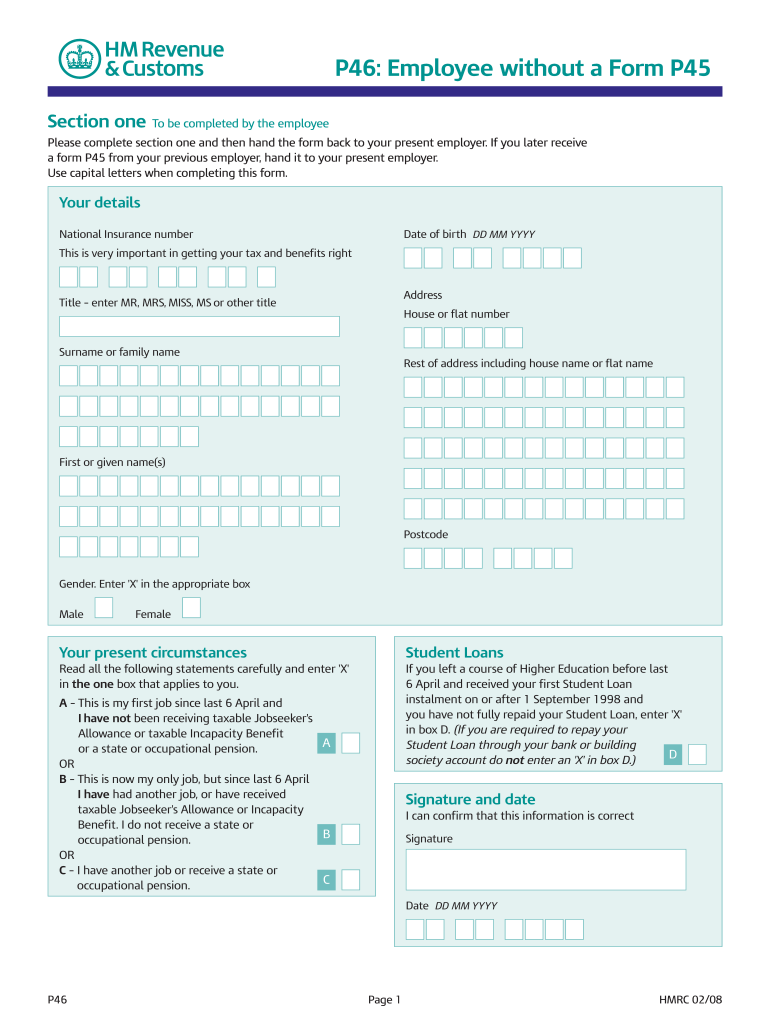
P46: Employee without a Form P45 Section one To be completed by the employee Please complete section one and then hand the form back to your present employer. If you later receive a form P45 from.
Loading

Open form follow the instructions

Easily sign the form with your finger

Send filled & signed form or save
How to fill out the UK HMRC P46 online
Completing the UK HMRC P46 online is an essential step for employees starting new jobs without a P45 form. This guide will walk you through the necessary steps to confidently fill out the form and ensure that your tax details are accurate.
Follow the steps to complete the P46 form accurately.
- Press the ‘Get Form’ button to retrieve the P46 form and open it in the online editor.
- In section one, provide your personal details. Enter your date of birth in the format DD MM YYYY, your National Insurance number (this is crucial for accurate tax calculations), and your address, including house or flat number, surname, first name, and postcode. Use capital letters for clarity.
- Indicate your gender by placing an 'X' in the appropriate box for either 'Male' or 'Female'.
- Proceed to your present circumstances. Carefully read the statements provided and mark an 'X' in the box that accurately describes your situation, whether it's your first job or if you have another job or receive a pension.
- Confirm the accuracy of the information by adding your signature and the date (DD MM YYYY) at the bottom of section one.
- Once you have completed section one, hand the form back to your current employer. If you later receive a P45 from a previous employer, provide that to your current employer as well.
- Your employer will fill out section two, which includes their details and the tax code to use. Ensure that this portion is completed and submitted to HM Revenue & Customs at the appropriate time.
- After completing the form, save your changes, download a copy for your records, print the document if needed, or share it as necessary.
Start completing your HMRC P46 form online today to ensure accurate tax processing!
Experience a faster way to fill out and sign forms on the web. Access the most extensive library of templates available.
Related content
When a P45 is unavailable, new employees complete a starter checklist (previously P46)...
The syllabus for TX-UK introduces candidates to the subject of taxation and provides the...
Oct 9, 2015 — The UK deferred tax asset of £30.4 million (2014: £29.2 million) is...
Get answers to your most pressing questions about US Legal Forms API.
What does P46 mean?
P46 is a tax form used in the UK to gather essential details about new employees when they do not have a P45 from their previous employer. This information helps the UK HMRC calculate the appropriate income tax deductions. Utilizing P46 correctly can help both employers and employees avoid tax errors and maintain compliance in fiscal responsibilities.
What is the difference between employer and employee?
The employer is the individual or organization that hires people to work for them, while the employee is the person who performs tasks or duties in exchange for compensation. In the context of the UK HMRC P46, employers must ensure appropriate tax codes are applied to employees based on their earnings. Understanding this distinction can help you navigate payroll responsibilities effectively.
How to get a copy of your P45 UK?
To get a copy of your P45 in the UK, kindly reach out to your last employer or their human resources department. If they are not available, HMRC can provide guidance on obtaining the necessary documentation to support your tax processes. Utilizing services like US Legal Forms can simplify this task and ensure your paperwork is in order.
Where to get a p46 form in the UK?
You can get a UK HMRC P46 form directly from the HMRC website or through your employer if you need to fill one out for new employment. The form is specifically designed to collect your tax information if you do not have a P45. Completing this correctly is essential to ensure your tax is calculated accurately.
How do I get my P6?
The P6 form, which notifies you of your new tax code, should be sent to you directly by HMRC if there's a change. If you do not receive it or cannot find it, you can check your tax code details online by logging into your personal tax account on the UK government website. This provides essential information relevant to your income and helps prevent overpayment of taxes.
How do I get my P45 from an old job UK?
To retrieve your P45 from an old job in the UK, contact your previous employer's human resources or payroll department. If they no longer operate, you may need to reach out through official channels, such as a direct request for employment records. Knowing how to navigate these steps can save you time, especially if you might need this document for your next tax return.
What is the difference between a P60 and a P46?
The P60 is a summary of your total earnings and deductions for the tax year, provided by your employer by the end of April. In contrast, the UK HMRC P46 helps you report new employment details when you do not have a P45 from a previous job. Understanding these differences can help ensure you meet your tax obligations accurately.
How do I get my UK P45 online?
To obtain your UK P45 online, you typically need to contact your former employer or their payroll department. They can arrange to send you a digital copy of your P45 through email or another online method. If you have trouble getting in touch, consider using services like US Legal Forms to assist in managing your employment documentation effectively.
What is the P6 form in the UK?
The P6 form is a notification from the HMRC that informs employers about changes in an employee's tax code. This form typically provides essential information for employers to ensure the right tax deductions are made. Understanding the P6 form can prevent tax overpayments or underpayments for employees. Keeping track of such notifications is vital for maintaining accurate payroll records.
What is NI P46?
NI P46 refers to the combination of National Insurance and the P46 form, which is used for tax purposes. When starting a new job, if you don’t have a P45, you will need to fill out the P46 form to inform your employer about your tax status. This ensures that the correct amount of tax is deducted from your paycheck. Proper completion of the NI P46 is essential for compliance with UK tax regulations.
Use professional pre-built templates to fill in and sign documents online faster. Get access to thousands of forms.
If you believe that this page should be taken down, please follow our DMCA take down process here.
This form is available in several versions. Select the version you need from the drop-down list below.