Loading
Get Nvr For Entry Into Bangladesh Form D
How it works
-

Open form follow the instructions
-

Easily sign the form with your finger
-

Send filled & signed form or save
How to fill out the NVR for Entry into Bangladesh Form D online
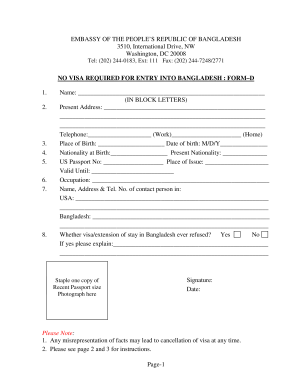
Filling out the NVR for Entry into Bangladesh Form D is an essential step for eligible individuals looking to travel to Bangladesh without a visa. This guide provides clear, step-by-step instructions for completing the form online with confidence and ease.
Follow the steps to successfully complete the NVR for Entry into Bangladesh Form D online.
- Click the ‘Get Form’ button to obtain the form and open it in the editor.
- Begin by filling in your name in block letters as it appears in your passport.
- Enter your present address, including street, city, and zip code.
- Fill in your telephone numbers, providing both a work and home contact.
- Indicate your place and date of birth, ensuring the date is in the correct format.
- List your nationality at birth and your current nationality.
- Provide your US passport number, place of issue, and the expiration date.
- State your occupation clearly and accurately.
- Include the name, address, and telephone number of a contact person in the USA and another in Bangladesh.
- Answer whether your visa or extension of stay in Bangladesh has ever been refused, and if so, provide an explanation.
- Sign and date the form where indicated.
- Attach a recent passport-sized photograph in the designated area.
- Review all the information for accuracy, save your changes, and then download, print, or share the completed form as needed.
Complete your NVR for Entry into Bangladesh Form D online today to ensure a smooth travel experience.
Related links form
CA Advanced Emergency Medical Technician Certificate Application - Imperial County 2018
UT Parental Exclusion From State Assessments Form: Elementary State Assessments 2017
UT Parental Exclusion From State Assessments Form: Elementary State Assessments 2020
NH Physical Fitness Assessment Waiver Form - Seabrook 2016
The required photo size for the NVR for Entry into Bangladesh Form D is usually a 2x2 inch passport-sized photograph. The image must be recent, clear, and meet the standard visa photo guidelines. Ensure that you adhere to these specifications for a smooth application process.