Loading
Form preview
  • US Legal Forms
  • Other Templates
  • More Forms
  • More Uncategorized Forms
  • Texasaver Com

Get Texasaver Com

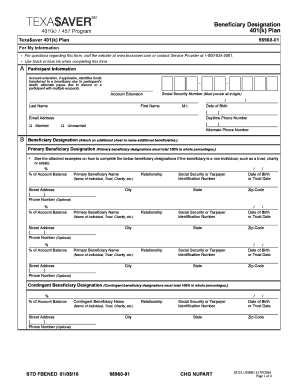
Beneficiary Designation 401(k) Plan Texa$aver 401(k) Plan 9896001 For My Information For questions regarding this form, visit the website at www.texasaver.com or contact Service Provider at 18006345091.

How it works

  1. Open form

    Open form follow the instructions

  2. Easily sign form

    Easily sign the form with your finger

  3. Share form

    Send filled & signed form or save

How to fill out the Texasaver Com online

This guide will walk you through the step-by-step process of filling out the Texasaver Com form. Designed to be user-friendly, it ensures that you understand each section and requirement for a successful submission.

Follow the steps to complete the Texasaver Com form accurately.

  1. Click ‘Get Form’ button to obtain the form and access it using your preferred method.
  2. Begin with the participant information section. Fill in your last name, first name, middle initial, social security number (ensure it includes all 9 digits), date of birth, daytime phone number, and email address. Indicate your marital status by checking either 'Married' or 'Unmarried'.
  3. In the beneficiary designation section, specify the primary beneficiaries. Ensure that their total share equals 100% in whole percentages. Include their name, relationship to you, social security number or taxpayer identification number, date of birth, street address, and optional phone number.
  4. If you have multiple primary beneficiaries, repeat step 3 for each and maintain the total percentage at 100%. Use additional sheets if necessary.
  5. Proceed to contingent beneficiaries. Similar to primary beneficiaries, these designations must total 100% in whole percentages. Fill in the required details as per the form.
  6. After completing the beneficiary designations, review all entries to ensure accuracy. Make sure both primary and contingent beneficiaries are clearly specified.
  7. Finally, sign and date the form in the designated area. This confirms that you understand and agree to the beneficiary designations outlined in the form.
  8. Once everything is completed, you can save your changes, download the form, print it, or share it as necessary.

Start filling out your Texasaver Com form online today to ensure your beneficiaries are designated accurately.

Get form

Experience a faster way to fill out and sign forms on the web. Access the most extensive library of templates available.
Get form

Related content

Texa$aver 401(k) / 457 Program | ERS
As you begin to plan for retirement, be sure to make good use of tax-advantaged savings...
Learn more
Texa$aver pdf presentation
from www.texasaver.com or by requesting one from your Texa$aver representative. For...
Learn more

Related links form

Amendments To The Loan Conditions Application For An ... - ABLV Bank Material Safety Data Sheet - KEMPER SYSTEM Nanonis STM Simulator Tutorial Function Booking Form .pdf - Townsville Yacht Club

Questions & Answers

Get answers to your most pressing questions about US Legal Forms API.

Contact support

Advantages & Disadvantages of 457(b) and 457(k) Plans ProsConsTaxes on your contributions, interest and dividends are deferred until you withdraw money.The maximum annual limit for contributions is $45,000 (including all catch-up contributions); far below the limit for total 401(k) contributions.3 more rows • Sep 14, 2020

While you are still employed, you can withdraw funds from your Texa$aver accounts for financial hardship withdrawals and withdrawals when you reach 59 1/2. You must exhaust your 401(k) loan and/or 457 loan options before you can apply for a financial hardship withdrawal.

What is the Texa$aver program? Texa$aver is a voluntary retirement savings program offered through ERS. Texa$aver can help you save for your future today. Many financial experts agree that you will need 70-100% of your income to maintain your current way of life in retirement.

Types of 457 Plans Just like a 401(k) or 403(b) retirement savings plan, a 457 plan allows you to invest a portion of your salary on a pretax basis. The money grows, tax-deferred, waiting for you to decide what to do with it when you retire.

Age 59½ Withdrawals Withdrawals taken from your 401(k) account if you are age 59½ or older will not have a penalty. However, a 20% tax on your withdrawal will be withheld if the funds are not rolled over to an IRA or other qualified plan. For more information or withdrawal assistance, contact Texa$aver.

For employees, the key benefit of a 457(b) plan is that the savings are tax-deferred: Contributions are made on a pre-tax basis, reducing taxable income and growing tax-deferred until withdrawal. 457(b) plans also have the advantage of catch-up options.

The Employees Retirement System of Texas (ERS) administers the Texa$aver 401 (k) and 457 Program - a voluntary tax-deferred supplemental retirement program developed to help state and eligible higher education employees with their personal retirement savings through elective payroll contributions to complement their ...

401(k) plans and 457 plans are both tax-advantaged retirement savings plans. 401(k) plans are offered by private employers, while 457 plans are offered by state and local governments and some nonprofits.

Get This Form Now!

Use professional pre-built templates to fill in and sign documents online faster. Get access to thousands of forms.
Get form
If you believe that this page should be taken down, please follow our DMCA take down processhere.
Get Texasaver Com
Get form
  • Adoption
  • Bankruptcy
  • Contractors
  • Divorce
  • Home Sales
  • Employment
  • Identity Theft
  • Incorporation
  • Landlord Tenant
  • Living Trust
  • Name Change
  • Personal Planning
  • Small Business
  • Wills & Estates
  • Packages A-Z
  • Affidavits
  • Bankruptcy
  • Bill of Sale
  • Corporate - LLC
  • Divorce
  • Employment
  • Identity Theft
  • Internet Technology
  • Landlord Tenant
  • Living Wills
  • Name Change
  • Power of Attorney
  • Real Estate
  • Small Estates
  • Wills
  • All Forms
  • Forms A-Z
  • Other Templates
  • Legal Hub
  • About Us
  • Help Portal
  • Legal Resources
  • Blog
  • Affiliates
  • Contact Us
  • Delete My Account
  • Site Map
  • Industries
  • Forms in Spanish
  • Localized Forms
  • State-specific Forms
  • Forms Kit
  • Real Estate Handbook
  • All Guides
  • Notarize
  • Incorporation services
  • For Consumers
  • For Small Business
  • For Attorneys
  • USLegal
  • FormsPass
  • pdfFiller
  • signNow
  • altaFlow
  • DocHub
  • Instapage
Form Packages
  • Adoption
  • Bankruptcy
  • Contractors
  • Divorce
  • Home Sales
  • Employment
  • Identity Theft
  • Incorporation
  • Landlord Tenant
  • Living Trust
  • Name Change
  • Personal Planning
  • Small Business
  • Wills & Estates
  • Packages A-Z
Form Categories
  • Affidavits
  • Bankruptcy
  • Bill of Sale
  • Corporate - LLC
  • Divorce
  • Employment
  • Identity Theft
  • Internet Technology
  • Landlord Tenant
  • Living Wills
  • Name Change
  • Power of Attorney
  • Real Estate
  • Small Estates
  • Wills
  • All Forms
  • Forms A-Z
  • Other Templates
Customer Service
  • Legal Hub
  • About Us
  • Help Portal
  • Legal Resources
  • Blog
  • Affiliates
  • Contact Us
  • Delete My Account
  • Site Map
  • Industries
  • Forms in Spanish
  • Localized Forms
  • State-specific Forms
  • Forms Kit
Legal Guides
  • Real Estate Handbook
  • All Guides
Prepared for you
  • Notarize
  • Incorporation services
Our Customers
  • For Consumers
  • For Small Business
  • For Attorneys
Our Sites
  • USLegal
  • FormsPass
  • pdfFiller
  • signNow
  • altaFlow
  • DocHub
  • Instapage
Social Media
Call us now toll free:
+1 833 426 79 33
As seen in:
© Copyright 1999-2026 airSlate Legal Forms, Inc. 17 Station Street, Ste. 203, Brookline, MA 02445
  • Your Privacy Choices
  • Terms of Service
  • Privacy Notice
  • Content Takedown Policy
  • Bug Bounty Program