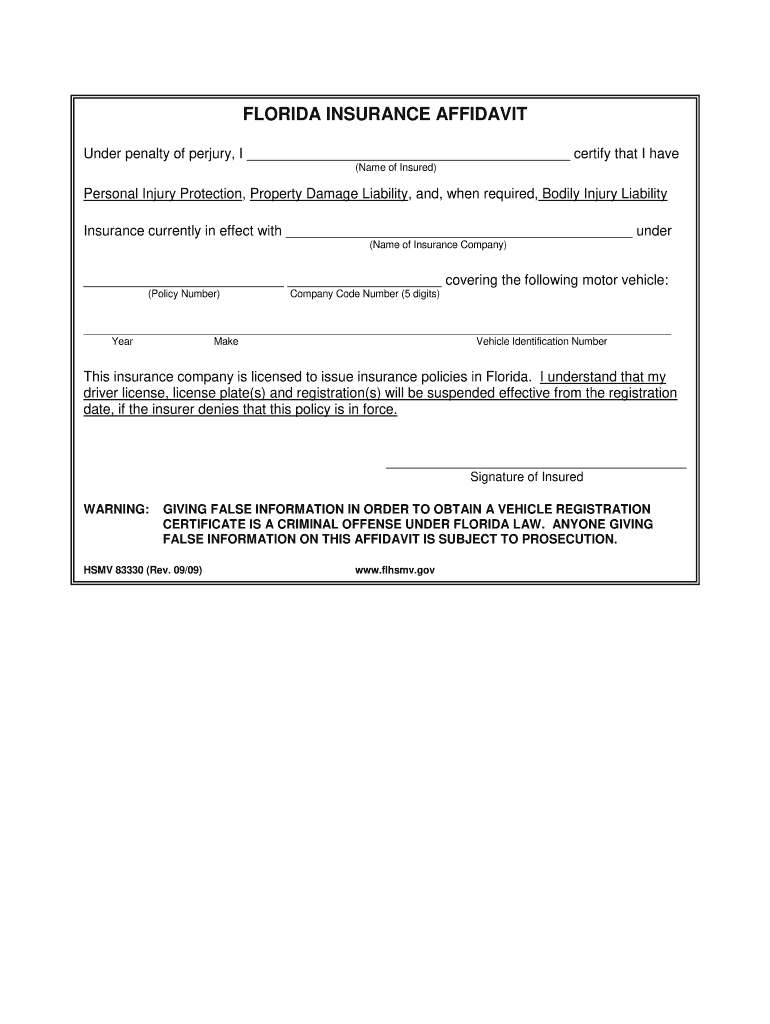
R denies that this policy is in force. _______________________________________ Signature of Insured WARNING: GIVING FALSE INFORMATION IN ORDER TO OBTAIN A VEHICLE REGISTRATION CERTIFICATE IS A CRIMINAL OFFENSE UNDER FLORIDA LAW. ANYONE GIVING FALSE INFORMATION ON THIS AFFIDAVIT IS SUBJECT TO PROSECUTION. HSMV 83330 (Rev. 09/09) www.flhsmv.gov .

Open form follow the instructions

Easily sign the form with your finger

Send filled & signed form or save
How to fill out the FL HSMV 83330 online
Filling out the FL HSMV 83330 form is an important step in verifying your motor vehicle insurance compliance. This guide provides a clear, step-by-step approach to ensure that users can complete the form accurately and efficiently.
Follow the steps to successfully complete the form.
- Click ‘Get Form’ button to obtain the form and open it in the editor.
- In the first section, enter your name in the space provided. This should be the name of the insured person.
- Next, fill in the name of your insurance company where indicated. Make sure this name matches the official documents from your insurer.
- Locate and enter your policy number in the designated field. This number is typically found on your insurance card or policy documents.
- Enter the company code number, which is a five-digit identifier for your insurance company.
- Proceed to fill in the vehicle details: Provide the year, make, and vehicle identification number (VIN) of the motor vehicle being insured.
- After completing all fields, review the information you've provided to ensure accuracy.
- Finally, sign the form in the designated area to certify that the information is correct. This demonstrates your acknowledgment of the conditions set forth.
- Once you have finalized the entries, save your changes, and choose to download, print, or share the completed form as required.
Complete your forms online today to ensure your vehicle registration is in good standing.
Experience a faster way to fill out and sign forms on the web. Access the most extensive library of templates available.
Related content
83330: Florida Insurance Affidavit*; 83345: Certificate of Deposit Power of Attorney;...
I understand that my driver license, license plate(s) and registration(s) will be...
Get answers to your most pressing questions about US Legal Forms API.
What is a form HSMV 83330?
Form HSMV 83330 is a specific affidavit form used in Florida to demonstrate proof of insurance. This form is crucial for compliance with state requirements when registering a vehicle or updating insurance information. By filling out the FL HSMV 83330, you assure authorities of your valid insurance coverage. For ease, uslegalforms offers resources and templates for completing this form correctly.
What is a Florida insurance affidavit?
A Florida insurance affidavit is a legal document that verifies insurance coverage when required by the state. This document often needs to be submitted during vehicle registration or reinstatement of driving privileges. The FL HSMV 83330 form is typically the one used for this purpose. Utilizing uslegalforms can streamline your understanding and fulfillment of this requirement.
How do I submit an insurance claim form?
To submit an insurance claim form, first, contact your insurance provider to obtain the necessary form. Fill it out with accurate information regarding the incident or claim. Ensure you provide any supporting documents, and submit the form electronically or by mail as directed. If you have questions about using the FL HSMV 83330 form for claims, uslegalforms can help.
How do I file Form HSMV 82050?
Filing Form HSMV 82050 requires you to download and complete the form from the Florida Highway Safety and Motor Vehicles website. Once filled out, submit it to your local HSMV office or designated agency. It's essential to keep a copy of the form for your records. If you encounter difficulties, uslegalforms can guide you through the filing process effectively.
How do I write an affidavit in Florida?
When writing an affidavit in Florida, start by clearly stating the title of the document. Then, include your full name, address, and a statement affirming your knowledge of the facts you are presenting. Make sure to sign the affidavit in the presence of a notary public. If your affidavit involves insurance matters, consider referencing the FL HSMV 83330 form for clarity.
How do I submit an insurance affidavit in Florida?
To submit an insurance affidavit in Florida, complete the required form accurately and ensure all necessary details are included. After filling out the FL HSMV 83330 form, you can submit it to your local Florida Department of Highway Safety and Motor Vehicles office. Be sure to keep a copy for your records. Using the uslegalforms platform can simplify this process, providing guidance and resources.
How do you show proof of insurance in Florida?
In Florida, you can show proof of insurance by carrying a physical insurance card or an electronic version on your mobile device. Your card should include key details such as the policy number and insurance company information. Additionally, the FL HSMV 83330 form may be required during certain situations, such as vehicle registration. To ensure compliance, always have your proof of insurance accessible.
How do I get my Florida motor vehicle report?
To acquire your Florida motor vehicle report, access the FL HSMV platform online. Fill out the necessary form, typically the FL HSMV 83330, providing all required information. Once submitted, you can quickly obtain your motor vehicle report that includes your driving history and other essential data.
How do I get a copy of my crash report in Florida?
To get a copy of your crash report in Florida, contact the law enforcement agency that responded to the accident. You may also fill out a request form available on the FL HSMV website or use the FL HSMV 83330 form for additional assistance. Ensure you have the relevant details about the crash, as this information will help expedite the process.
How do I get a Florida motor vehicle report?
To obtain a Florida motor vehicle report, visit the FL HSMV website or a local DMV office. You will need to fill out the appropriate forms, including the FL HSMV 83330 if applicable, and provide a valid identification. Once your request is processed, you’ll receive the report detailing information related to the vehicle’s registration and history.
Use professional pre-built templates to fill in and sign documents online faster. Get access to thousands of forms.
If you believe that this page should be taken down, please follow our DMCA take down process here.