Loading
Get Ph Bir 2305 2014
How it works
-

Open form follow the instructions
-

Easily sign the form with your finger
-

Send filled & signed form or save
How to fill out the PH BIR 2305 online
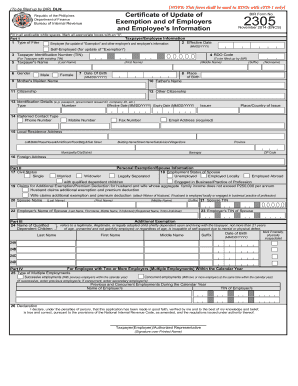
The PH BIR 2305 form is essential for updating exemptions and information related to employers and employees. This guide provides a comprehensive, step-by-step approach to effectively completing this form online.
Follow the steps to accurately complete the PH BIR 2305 form.
- Click ‘Get Form’ button to obtain the form and access it in the online editor.
- In Part 1, begin by filling in the Taxpayer/Employee Information section. Select the Type of Filer by marking the appropriate box for either Employee or Self-Employed. Enter the Effective Date in MM/DD/YYYY format.
- Provide the Taxpayer Identification Number (TIN) and the RDO Code for the taxpayer with an existing TIN. Enter the taxpayer's name, including Last Name, First Name, Middle Name, and Suffix as applicable.
- Indicate the Gender by marking 'Male' or 'Female'. Fill in the Date of Birth and Place of Birth as required. Include the Mother's Maiden Name, Father's Name, Citizenship, and any Other Citizenship information.
- State the Identification Details such as type, number, effective date, and expiry date. Choose a Preferred Contact Type and provide the necessary contact information, including phone and email address.
- Complete the Local Residence Address by filling in all relevant fields, including Lot Number, Building Name, Municipality, Province, and ZIP Code. If applicable, also include the Foreign Address.
- Proceed to Part II and select the Civil Status. Fill in the Employment Status of the Spouse if applicable, and indicate whether claims for additional exemptions are being made.
- In Part III, list the names and details of any Qualified Dependent Children and indicate any mental or physical incapacitation as needed.
- Navigate to Part IV to specify the type of Multiple Employments. Provide details on previous and concurrent employments within the calendar year.
- In Part V, fill out the Primary Employer Information, including the TIN, RDO Code, Employer's Name, and Employer's Address.
- Lastly, sign the Declaration affirming the truthfulness of the information provided. This can be done by the taxpayer or authorized representative.
- After verifying all entries, users can save changes, download, print, or share the completed form as needed.
Complete your PH BIR 2305 form online today to ensure your information is up to date.
Get form
Experience a faster way to fill out and sign forms on the web. Access the most extensive library of templates available.
Submitting your alphalist to BIR online involves navigating to the e-filing section of the BIR website. After logging in, choose the alphalist submission option, upload your completed file, and ensure all details are correct before finalizing the submission. Utilizing platforms like Uslegalforms can simplify this process, especially for your PH BIR 2305.
Get This Form Now!
Use professional pre-built templates to fill in and sign documents online faster. Get access to thousands of forms.