We use cookies to improve security, personalize the user experience, enhance our marketing activities (including cooperating with our marketing partners) and for other business use.
Click "here" to read our Cookie Policy. By clicking "Accept" you agree to the use of cookies. Read less
Read more
Accept
Loading
Form preview
  • US Legal Forms
  • Form Library
  • Executive Forms
  • Executive Department DOS Forms
  • Ds-60 2017

Get Ds-60 2017

S. passport. The collection of the Social Security number will be used to verify your identity and for no other purpose unless authorized by law. ROUTINE USES: This information may be disclosed to another domestic government agency, a private contractor, a foreign government agency, or to a private person or private employer in accordance with certain approved routine uses. These routine uses include, but are not limited to, law enforcement activities, employment verification, fraud prevention.

How it works

  1. Open form

    Open form follow the instructions

  2. Easily sign form

    Easily sign the form with your finger

  3. Share form

    Send filled & signed form or save

How to fill out the DS-60 online

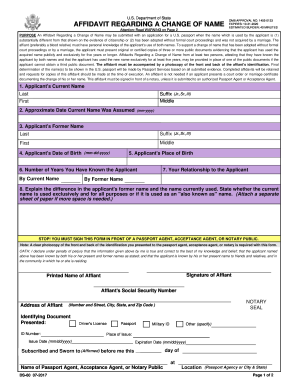
The DS-60 Form, known as the Affidavit Regarding a Change of Name, is essential for individuals applying for a U.S. passport when their name differs from that on their citizenship documents. This guide provides clear, step-by-step instructions on how to complete this form online.

Follow the steps to complete the DS-60 form online.

  1. Click 'Get Form' button to obtain the form, opening it in a suitable online editor.
  2. In the first section, enter the applicant's current name, including last name, first name, middle name, and any suffixes if applicable.
  3. Provide the approximate date when the current name was assumed using the format mm-yyyy.
  4. Input the applicant's former name as recorded on birth documents, including the last name, first name, and middle name.
  5. Fill in the applicant's date of birth in the format mm-dd-yyyy.
  6. Indicate the applicant's place of birth by specifying the city and state.
  7. State the number of years you have known the applicant by their current name.
  8. Specify your relationship to the applicant, both by their former name and current name.
  9. Explain any differences between the former name and the current name. State whether the current name is used exclusively or if it is an 'also known as' name, attaching additional sheets if necessary.
  10. When all sections are completed, sign the form in front of a notary public or a passport agent.
  11. Ensure to attach a clear photocopy of the affiant's identification presented to the notary or agent.
  12. Save the completed form, then download, print, or share it as needed.

Encourage others to complete their documents online for a more efficient application process.

Get form

Experience a faster way to fill out and sign forms on the web. Access the most extensive library of templates available.

Related content

DS-160: Online Nonimmigrant Visa Application...
The DS-160, Online Nonimmigrant Visa Application form, is for temporary travel to the...
Learn more
DS-160 Online Nonimmigrant Visa Application
Anyone applying for a nonimmigrant visa to the US, including F-1 & J-1 students and...
Learn more
FLUID HEAD
The DS60 features 4-position counterbalance plus 4-position selectable pan/tilt drag to...
Learn more

Related links form

Canada AINP 008B 2013 Canada Alberta AT2054 2013 Canada Amway O-6178CE 2014 Canada Application for a Permit to Construct or Demolish 2012

Questions & Answers

Get answers to your most pressing questions about US Legal Forms API.

Contact support

Yes, you need to fill out separate DS-160 forms for your wife and child. Each individual must have their own DS-60, even if they are part of the same visa application process. This ensures that everyone’s details are correctly reflected, promoting a smooth visa application experience.

Filling out the DS-160 form involves several straightforward steps. Begin by gathering personal information, travel plans, and background details, which you will enter into the online form. USLegalForms provides helpful tips and tools that simplify the process, ensuring you complete each section of the DS-60 accurately.

The DS-160 form is per person, not for the family as a whole. Each applicant, including spouses and children, must complete their own DS-60 to accurately represent their information. This ensures that the US visa application process is personalized and detailed for each individual.

Yes, you can add your child to your US visa appointment. Each child must have their own DS-60 form filled out, where you will include the necessary details. It is crucial to keep all information organized to facilitate the appointment process for your whole family.

To add your spouse to your DS-160, navigate to the appropriate section for family members during the application process. Input your spouse's details accurately to ensure a seamless application experience. If you encounter issues, USLegalForms offers resources that can guide you through the DS-60 submission steps.

Yes, a husband and wife can apply separately for a US visa. Each individual needs to complete their own DS-60 form, ensuring accurate information for both parties. It is essential to provide all necessary details specific to the individual applicant, as this will streamline the visa application process.

The approval time for the DS-160 can vary based on several factors like your interview date and the consulate's workload. Typically, you will receive your visa decision shortly after your interview, but it might take longer in some cases. Staying informed about the process and checking your consulate’s website can provide updates about any delays or requirements.

While completing the DS-160, gather essential documents such as your passport, travel itinerary, and previous U.S. visa information, if applicable. It's also helpful to have details about your employment, education, and family. Remember, providing accurate and complete information helps ensure a smoother application process, so prepare your documents beforehand.

To get the DS-160, you begin by visiting the Consular Electronic Application Center website. There, you will find a link to start your application. It’s important to complete the form accurately, as any errors can delay your visa processing, so take your time. After filling it out, make sure to submit it and print the confirmation page for your interview.

Filling out the DS-160 form involves several steps. Begin by gathering your personal information, passport details, and travel plans. Proceed to the online form, following the section prompts carefully. For a comprehensive understanding and tips on each section, explore tools from USLegalForms to make the process smoother.

Get This Form Now!

Use professional pre-built templates to fill in and sign documents online faster. Get access to thousands of forms.
If you believe that this page should be taken down, please follow our DMCA take down processhere.

Industry-leading security and compliance

US Legal Forms protects your data by complying with industry-specific security standards.
  • In businnes since 1997
    25+ years providing professional legal documents.
  • Accredited business
    Guarantees that a business meets BBB accreditation standards in the US and Canada.
  • Secured by Braintree
    Validated Level 1 PCI DSS compliant payment gateway that accepts most major credit and debit card brands from across the globe.
Get DS-60
Form Packages
Adoption
Bankruptcy
Contractors
Divorce
Home Sales
Employment
Identity Theft
Incorporation
Landlord Tenant
Living Trust
Name Change
Personal Planning
Small Business
Wills & Estates
Packages A-Z
Form Categories
Affidavits
Bankruptcy
Bill of Sale
Corporate - LLC
Divorce
Employment
Identity Theft
Internet Technology
Landlord Tenant
Living Wills
Name Change
Power of Attorney
Real Estate
Small Estates
Wills
All Forms
Forms A-Z
Form Library
Customer Service
Terms of Service
Privacy Notice
Legal Hub
Content Takedown Policy
Bug Bounty Program
About Us
Help Portal
Legal Resources
Blog
Affiliates
Contact Us
Delete My Account
Site Map
Industries
Forms in Spanish
Localized Forms
State-specific Forms
Forms Kit
Legal Guides
Real Estate Handbook
All Guides
Prepared for You
Notarize
Incorporation services
Our Customers
For Consumers
For Small Business
For Attorneys
Our Sites
US Legal Forms
USLegal
FormsPass
pdfFiller
signNow
airSlate WorkFlow
DocHub
Instapage
Social Media
Call us now toll free:
+1 833 426 79 33
As seen in:
  • USA Today logo picture
  • CBC News logo picture
  • LA Times logo picture
  • The Washington Post logo picture
  • AP logo picture
  • Forbes logo picture
© Copyright 1997-2025
airSlate Legal Forms, Inc.
3720 Flowood Dr, Flowood, Mississippi 39232
Form Packages
Adoption
Bankruptcy
Contractors
Divorce
Home Sales
Employment
Identity Theft
Incorporation
Landlord Tenant
Living Trust
Name Change
Personal Planning
Small Business
Wills & Estates
Packages A-Z
Form Categories
Affidavits
Bankruptcy
Bill of Sale
Corporate - LLC
Divorce
Employment
Identity Theft
Internet Technology
Landlord Tenant
Living Wills
Name Change
Power of Attorney
Real Estate
Small Estates
Wills
All Forms
Forms A-Z
Form Library
Customer Service
Terms of Service
Privacy Notice
Legal Hub
Content Takedown Policy
Bug Bounty Program
About Us
Help Portal
Legal Resources
Blog
Affiliates
Contact Us
Delete My Account
Site Map
Industries
Forms in Spanish
Localized Forms
State-specific Forms
Forms Kit
Legal Guides
Real Estate Handbook
All Guides
Prepared for You
Notarize
Incorporation services
Our Customers
For Consumers
For Small Business
For Attorneys
Our Sites
US Legal Forms
USLegal
FormsPass
pdfFiller
signNow
airSlate WorkFlow
DocHub
Instapage
Social Media
Call us now toll free:
+1 833 426 79 33
As seen in:
  • USA Today logo picture
  • CBC News logo picture
  • LA Times logo picture
  • The Washington Post logo picture
  • AP logo picture
  • Forbes logo picture
© Copyright 1997-2025
airSlate Legal Forms, Inc.
3720 Flowood Dr, Flowood, Mississippi 39232
DS-60
This form is available in several versions.
Select the version you need from the drop-down list below.
2020 DS-60
Select form
  • 2020 DS-60
  • 2017 DS-60
  • 2014 DS-60
  • 2011 DS-60
Select form