Loading
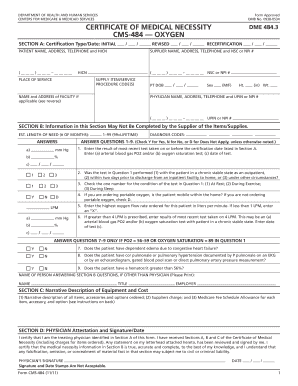
Get Cms-484 2011
How it works
-

Open form follow the instructions
-

Easily sign the form with your finger
-

Send filled & signed form or save
How to fill out the CMS-484 online
The CMS-484 form, also known as the Certificate of Medical Necessity for Oxygen, is an essential document required for patients seeking oxygen equipment through Medicare. This guide will walk you through the process of filling out the CMS-484 effectively and accurately.
Follow the steps to fill out the CMS-484 form online.
- Press the ‘Get Form’ button to download and open the CMS-484 in your preferred editing program.
- In Section A, enter the certification type and date. If this is the initial certification, select 'INITIAL' and provide the relevant date. For any revisions, enter both the initial and revision dates.
- Complete the patient information by filling in the patient’s name, permanent legal address, telephone number, and health insurance claim number (HICN) as it appears on the Medicare card.
- Input the supplier's information, including the name, address, telephone number, and either the National Supplier Clearinghouse (NSC) number or National Provider Identifier (NPI).
- Indicate the place of service where the item will be used, such as the patient's home or a skilled nursing facility.
- List the supply item/service procedure codes for the items required. Ensure to only include certification-required procedure codes.
- Fill in the patient’s date of birth, sex, height, and weight in the respective fields.
- Enter the physician’s information, including their name, address, and unique identification number, either UPIN or NPI.
- In Section B, if you are a non-physician or physician employee, complete the clinical questions as applicable, providing the highest oxygen flow rate and answering clinical necessity questions.
- In Section C, provide a narrative description of the equipment, including all accessories and costs, as well as the Medicare fee schedule allowance.
- Finally, in Section D, the physician must review, sign, and date the form, certifying accuracy and medical necessity.
- After completing the form, save your changes, download or print a copy, or share it as necessary.
Complete your documents online today to ensure timely processing.
Get form
Experience a faster way to fill out and sign forms on the web. Access the most extensive library of templates available.
Writing a prescription for an oxygen concentrator requires clarity on the patient's oxygen needs. Specify the flow rate, duration of use, and any specific equipment requirements. It is crucial to include the CMS-484 to support the medical necessity and ensure that the prescription aligns with insurance policies.
Get This Form Now!
Use professional pre-built templates to fill in and sign documents online faster. Get access to thousands of forms.