Loading
Form preview
  • US Legal Forms
  • Other Templates
  • Foreign Forms
  • Foreign Canada Other Forms
  • Bc Hydro Application For New Electric Service Connections 2012

Get Bc Hydro Application For New Electric Service Connections 2012-2026

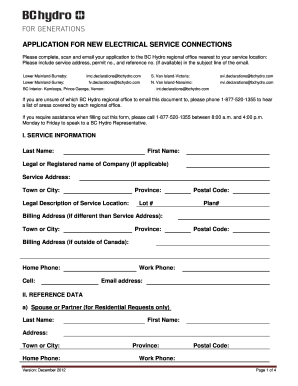
permit no., and reference no. (if available) in the subject line of the email. Lower Mainland-Burnaby: Lower Mainland-Surrey: lmc.declarations@bchydro.com fv.declarations@bchydro.com S. Van Island-Victoria: svi.declarations@bchydro.com N. Van Island-Nanaimo: nvi.declarations@bchydro.com BC Interior- Kamloops, Prince George, Vernon: int.declarations@bchydro.com If you are unsure of which BC Hydro regional office to email this document to, please phone 1-877-520-1355 to hear a list of are.

How it works

  1. Open form

    Open form follow the instructions

  2. Easily sign form

    Easily sign the form with your finger

  3. Share form

    Send filled & signed form or save

How to fill out and sign BC Hydro Application for New Electric Service Connections online?

Get your online template and fill it in using progressive features. Enjoy smart fillable fields and interactivity.Follow the simple instructions below:

Discover all the benefits of preparing and submitting legal documents online.

Using our platform, completing the BC Hydro Application for New Electric Service Connections only takes a few minutes. We make this possible by providing you with access to our comprehensive editor that can modify or correct a document's original text, insert unique boxes, and affix your signature.

Submit the new BC Hydro Application for New Electric Service Connections electronically as soon as you finish completing it. Your data is securely safeguarded, as we adhere to the latest security standards. Join the many satisfied clients who are already submitting legal documents from their homes.

  1. Select the template you require from the assortment of legal documents.
  2. Click the Get form button to open it and proceed to editing.
  3. Fill in the required fields (these are highlighted in yellow).
  4. The Signature Wizard will assist you in adding your electronic signature once you have completed entering data.
  5. Include the date.
  6. Review the entire form to ensure you have filled out everything and that no revisions are necessary.
  7. Click Done and save the completed document to your device.

Tips on how to fill out, edit and sign BC Hydro Application for New Electric Service Connections online

How to fill out and sign BC Hydro Application for New Electric Service Connections online?

Get your online template and fill it in using progressive features. Enjoy smart fillable fields and interactivity.Follow the simple instructions below:

Discover all the benefits of preparing and submitting legal documents online.

Using our platform, completing the BC Hydro Application for New Electric Service Connections only takes a few minutes. We make this possible by providing you with access to our comprehensive editor that can modify or correct a document's original text, insert unique boxes, and affix your signature.

Submit the new BC Hydro Application for New Electric Service Connections electronically as soon as you finish completing it. Your data is securely safeguarded, as we adhere to the latest security standards. Join the many satisfied clients who are already submitting legal documents from their homes.

  1. Select the template you require from the assortment of legal documents.
  2. Click the Get form button to open it and proceed to editing.
  3. Fill in the required fields (these are highlighted in yellow).
  4. The Signature Wizard will assist you in adding your electronic signature once you have completed entering data.
  5. Include the date.
  6. Review the entire form to ensure you have filled out everything and that no revisions are necessary.
  7. Click Done and save the completed document to your device.

How to modify Get BC Hydro Application for New Electric Service Connections 2012: personalize forms online

Streamline your document creation process and adapt it to your specifications with just a few clicks. Complete and authorize Get BC Hydro Application for New Electric Service Connections 2012 using an efficient yet user-friendly online editor.

Drafting documents is often a hassle, particularly when you deal with it occasionally. It requires you to strictly adhere to all procedures and thoroughly fill in all sections with complete and precise information. However, it frequently occurs that you need to modify the document or include additional fields to complete. If you wish to enhance Get BC Hydro Application for New Electric Service Connections 2012 before submission, the most effective method is by utilizing our all-encompassing yet straightforward online editing solutions.

This comprehensive PDF editing tool allows you to swiftly and effortlessly finalize legal documents from any device with internet access, perform simple modifications to the form, and incorporate additional fillable fields. The service lets you select a specific area for each type of information, such as Name, Signature, Currency, and SSN, etc. You can categorize them as mandatory or conditional and designate who should fill out each section by assigning to a specific recipient.

Follow the steps outlined below to enhance your Get BC Hydro Application for New Electric Service Connections 2012 online:

Our editor is a versatile, feature-rich online tool that can assist you in swiftly and easily refining Get BC Hydro Application for New Electric Service Connections 2012 and other forms according to your requirements. Enhance document creation and submission efficiency and ensure your documentation appears professional without complications.

  1. Access the required sample from the directory.
  2. Complete the fields with Text and utilize the Check and Cross tools for the checkboxes.
  3. Employ the right-hand toolbar to modify the template with new fillable sections.
  4. Choose the fields based on the type of data you want to collect.
  5. Designate these fields as mandatory, optional, or conditional and adjust their sequence.
  6. Allocate each section to a specific individual using the Add Signer tool.
  7. Confirm that you’ve made all necessary changes and click Done.

Get form

Experience a faster way to fill out and sign forms on the web. Access the most extensive library of templates available.
Get form

Related content

British Columbia Power Exchange Corporation Order...
On December 23, 1997, British Columbia Power Exchange Corporation (Powerex) applied to the...
Learn more
CONNECTING RELIABILITY STANDARDS AND ...
Dec 8, 2005 — “Recognizing that bulk electric system reliability and electricity...
Learn more
ARC - Homeowner Manual - updated March 13 2020
Mar 13, 2020 — Hydro. It is important that you make an immediate new account application...
Learn more

Related links form

Universaltankcom Form Application For Licensure As A Licensed Clinical Social Worker ... - Njconsumeraffairs Vtag Pdf Liberty Form Amtdivisionorg Form

Questions & Answers

Get answers to your most pressing questions about US Legal Forms API.

Contact support

The requirements for BC Hydro underground service include having a clear site plan and ensuring accessibility for installation. You will need to submit the BC Hydro Application for New Electric Service Connections along with your site details. Additionally, maintain communication with BC Hydro to adhere to any local regulations. This approach helps guarantee a successful installation tailored to your property.

To request BC Hydro services, you should fill out the BC Hydro Application for New Electric Service Connections. You can do this online or through customer service. Be prepared to provide your location and service needs, ensuring a smooth setup that meets your requirements. Once submitted, BC Hydro will reach out to you regarding the next steps.

If you prefer to speak with a human at BC Hydro, you can call their customer service line. Make sure to have your account information handy, as this will expedite the process. Representatives are available to assist you with inquiries regarding the BC Hydro Application for New Electric Service Connections. This personal touch can make resolving issues much easier.

To set up a hydro account in British Columbia, you will need to complete the BC Hydro Application for New Electric Service Connections. Start by visiting the BC Hydro website and look for the account setup section. Provide necessary details such as your address, identification, and payment information. This process ensures that you receive reliable service tailored to your needs.

If you need assistance from a real person at BC Hydro, you can contact their customer service line. They offer several ways to get in touch, such as phone consultations or live chat features on their website. Remember, help is available to guide you through the BC Hydro Application for New Electric Service Connections and address any questions you may have.

To become a BC Hydro contractor, you must apply through their official website and complete the necessary registration process. Familiarize yourself with their project requirements and safety standards. If your work involves assisting customers with their BC Hydro Application for New Electric Service Connections, understand the guidelines to provide accurate and helpful support throughout the process.

Yes, BC Hydro has a mobile app that allows users to manage their accounts conveniently. Through the app, you can view billing information, report outages, and track your energy consumption. For those planning to submit a BC Hydro Application for New Electric Service Connections, the mobile app also offers features that can enhance your user experience and keep you informed throughout the process.

BC Hydro typically provides service voltages of 120/240V for residential customers and up to 600V for commercial services. The voltage may vary based on your location and specific service needs. When you submit your BC Hydro Application for New Electric Service Connections, you can specify the service requirements to ensure you receive the appropriate voltage for your needs.

Joining BC Hydro involves submitting a BC Hydro Application for New Electric Service Connections. Start by visiting their website to learn about the various options available for new customers. You may need documentation such as identification and proof of residence, so be prepared to provide this information during the application process.

The requirements for underground wiring with BC Hydro typically include specific cable types and installation depths. You'll need to follow the guidelines outlined in the service standards provided by BC Hydro. If you are preparing a BC Hydro Application for New Electric Service Connections, ensure you review these requirements carefully to avoid any delays in your service connection.

Get This Form Now!

Use professional pre-built templates to fill in and sign documents online faster. Get access to thousands of forms.
Get form
If you believe that this page should be taken down, please follow our DMCA take down processhere.
Get BC Hydro Application for New Electric Service Connections
Get form
  • Adoption
  • Bankruptcy
  • Contractors
  • Divorce
  • Home Sales
  • Employment
  • Identity Theft
  • Incorporation
  • Landlord Tenant
  • Living Trust
  • Name Change
  • Personal Planning
  • Small Business
  • Wills & Estates
  • Packages A-Z
  • Affidavits
  • Bankruptcy
  • Bill of Sale
  • Corporate - LLC
  • Divorce
  • Employment
  • Identity Theft
  • Internet Technology
  • Landlord Tenant
  • Living Wills
  • Name Change
  • Power of Attorney
  • Real Estate
  • Small Estates
  • Wills
  • All Forms
  • Forms A-Z
  • Other Templates
  • Legal Hub
  • About Us
  • Help Portal
  • Legal Resources
  • Blog
  • Affiliates
  • Contact Us
  • Delete My Account
  • Site Map
  • Industries
  • Forms in Spanish
  • Localized Forms
  • State-specific Forms
  • Forms Kit
  • Real Estate Handbook
  • All Guides
  • Notarize
  • Incorporation services
  • For Consumers
  • For Small Business
  • For Attorneys
  • USLegal
  • FormsPass
  • pdfFiller
  • signNow
  • altaFlow
  • DocHub
  • Instapage
Form Packages
  • Adoption
  • Bankruptcy
  • Contractors
  • Divorce
  • Home Sales
  • Employment
  • Identity Theft
  • Incorporation
  • Landlord Tenant
  • Living Trust
  • Name Change
  • Personal Planning
  • Small Business
  • Wills & Estates
  • Packages A-Z
Form Categories
  • Affidavits
  • Bankruptcy
  • Bill of Sale
  • Corporate - LLC
  • Divorce
  • Employment
  • Identity Theft
  • Internet Technology
  • Landlord Tenant
  • Living Wills
  • Name Change
  • Power of Attorney
  • Real Estate
  • Small Estates
  • Wills
  • All Forms
  • Forms A-Z
  • Other Templates
Customer Service
  • Legal Hub
  • About Us
  • Help Portal
  • Legal Resources
  • Blog
  • Affiliates
  • Contact Us
  • Delete My Account
  • Site Map
  • Industries
  • Forms in Spanish
  • Localized Forms
  • State-specific Forms
  • Forms Kit
Legal Guides
  • Real Estate Handbook
  • All Guides
Prepared for you
  • Notarize
  • Incorporation services
Our Customers
  • For Consumers
  • For Small Business
  • For Attorneys
Our Sites
  • USLegal
  • FormsPass
  • pdfFiller
  • signNow
  • altaFlow
  • DocHub
  • Instapage
Social Media
Call us now toll free:
+1 833 426 79 33
As seen in:
© Copyright 1999-2026 airSlate Legal Forms, Inc. 17 Station Street, Ste. 203, Brookline, MA 02445
  • Your Privacy Choices
  • Terms of Service
  • Privacy Notice
  • Content Takedown Policy
  • Bug Bounty Program