Loading
Form preview
  • US Legal Forms
  • Other Templates
  • Independent Agency Forms
  • Independent Agency USPS Forms
  • Usps Ps 3600-ez 2018

Get Usps Ps 3600-ez 2018-2026

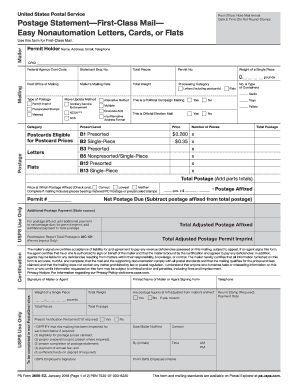
First-Class Mail. Permit Holder Name, Address, Email, Telephone CRID Federal Agency Cost Code Statement Seq. No. Total Pieces Permit No. Weight of a Single Piece Post Office of Mailing Mailer’s Mailing Date Total Weight Processing Category Mailing 0. Letters (including postcards) Sacks Type of Postage Move Update Method Permit Imprint Ancillary Service Endorsement Precanceled Stamps Alternative Method Yes No This is Official Election Mail Yes No Category Presort Le.

How it works

  1. Open form

    Open form follow the instructions

  2. Easily sign form

    Easily sign the form with your finger

  3. Share form

    Send filled & signed form or save

How to fill out the USPS PS 3600-EZ online

This guide provides a comprehensive overview of how to complete the USPS PS 3600-EZ form online for First-Class Mail. We will break down each section and field of the form to help you navigate the process with ease.

Follow the steps to fill out the USPS PS 3600-EZ online successfully.

  1. Press the ‘Get Form’ button to access the USPS PS 3600-EZ form and open it for editing.
  2. Complete the Mailer and Mailing sections on page one relevant to your mailing. For sections that do not apply to you, indicate N/A.
  3. Fill in the Postage section based on the category of your mailing, whether it is for cards, letters, or flats. Determine the appropriate postage price based on the weight and presort level.
  4. Calculate the total postage by multiplying the number of pieces by the determined per-piece price, ensuring the totals are rounded to the correct decimal places.
  5. For mailings with postage affixed, fill in the Postage Affixed line. Select the correct box indicating the pricing status and calculate the net postage due by subtracting the Postage Affixed from the Total Postage.
  6. Read and endorse the Certification section of the form. Provide your contact number as required.
  7. Once all sections are filled, save your changes, and choose to download, print, or share the completed form.

Begin filling out your USPS PS 3600-EZ form online today!

Get form

Experience a faster way to fill out and sign forms on the web. Access the most extensive library of templates available.
Get form

Related content

Forms Glossary | Postal Explorer - USPS
3600-R. Postage Statement—First-Class Mail and Priority Mail ; 3602. See appropriate...
Learn more
Overview of Proposed Key Changes
Jan 27, 2019 — Postage Statements: PS Form 3602-EZ form name updated from “USPS...
Learn more
Mailer User Manual
3600-EZ. First-Class Mail - Easy -. Nonautomation Letters, Cards, or ... PS Form 3600 FCM...
Learn more

Related links form

AU Shellharbour Business Network Database Registration Form AU Shellharbour Club Position Description AU SHRS Assignment Cover Sheet AU Sintex Loan Discharge Authority Form

Questions & Answers

Get answers to your most pressing questions about US Legal Forms API.

Contact support

The 3602 EZ form from USPS is a simplified version of the postage statement form. It is designed for easier completion and is often used for customers with straightforward mailing needs. Using this form effectively can enhance your shipping experience.

Filing a USPS claim online is straightforward. Visit the USPS website, navigate to the claims section, and provide the necessary information about your shipment. The USPS PS 3600-EZ form can help facilitate this process by ensuring all required details are captured.

To file a report with USPS, begin by visiting their official website to access the reporting section. You can report issues such as missing mail or service problems directly online. Using their user-friendly platform simplifies the report-filing experience.

The USPS 3602 form serves as the 'Postage Statement.' It is often used for bulk mailing and needs to be accurately completed to ensure proper processing. Utilizing USPS PS 3600-EZ can streamline your mailing and refund process effectively.

The USPS 3972 form is known as the 'Request for Payment of a Claim.' This form helps you seek compensation for lost or damaged items shipped through the USPS. It is vital to understand the details of your shipment when filling out this form.

The form number for a USPS refund is usually 3600-EZ. This form is essential for processing your refund request effectively. For additional assistance, consider using platforms like USLegalForms, which can help simplify your filing process.

The USPS approved postal supplier program connects businesses with trusted suppliers that meet USPS standards. This program ensures that you have access to high-quality mailing and shipping solutions. By utilizing the USPS PS 3600-EZ, you can easily navigate through approved products that enhance your postage and shipment efficiency.

To obtain your W-2 from USPS online, you need to log into the USPS employee portal. Once logged in, navigate to the payroll or tax information section where you can securely access and download your W-2. If you need further assistance, platforms like uslegalforms offer resources to guide you through the process.

Filling out the USPS claim form correctly is essential for a smooth process. First, gather necessary information, such as your tracking number and relevant details from your shipment. Next, visit the USPS PS 3600-EZ form online or at your local post office. Complete the form by providing accurate information, and don't forget to check any additional requirements that may apply to your specific claim.

Get This Form Now!

Use professional pre-built templates to fill in and sign documents online faster. Get access to thousands of forms.
Get form
If you believe that this page should be taken down, please follow our DMCA take down processhere.
Get USPS PS 3600-EZ
Get form
  • Adoption
  • Bankruptcy
  • Contractors
  • Divorce
  • Home Sales
  • Employment
  • Identity Theft
  • Incorporation
  • Landlord Tenant
  • Living Trust
  • Name Change
  • Personal Planning
  • Small Business
  • Wills & Estates
  • Packages A-Z
  • Affidavits
  • Bankruptcy
  • Bill of Sale
  • Corporate - LLC
  • Divorce
  • Employment
  • Identity Theft
  • Internet Technology
  • Landlord Tenant
  • Living Wills
  • Name Change
  • Power of Attorney
  • Real Estate
  • Small Estates
  • Wills
  • All Forms
  • Forms A-Z
  • Other Templates
  • Legal Hub
  • About Us
  • Help Portal
  • Legal Resources
  • Blog
  • Affiliates
  • Contact Us
  • Delete My Account
  • Site Map
  • Industries
  • Forms in Spanish
  • Localized Forms
  • State-specific Forms
  • Forms Kit
  • Real Estate Handbook
  • All Guides
  • Notarize
  • Incorporation services
  • For Consumers
  • For Small Business
  • For Attorneys
  • USLegal
  • FormsPass
  • pdfFiller
  • signNow
  • altaFlow
  • DocHub
  • Instapage
Form Packages
  • Adoption
  • Bankruptcy
  • Contractors
  • Divorce
  • Home Sales
  • Employment
  • Identity Theft
  • Incorporation
  • Landlord Tenant
  • Living Trust
  • Name Change
  • Personal Planning
  • Small Business
  • Wills & Estates
  • Packages A-Z
Form Categories
  • Affidavits
  • Bankruptcy
  • Bill of Sale
  • Corporate - LLC
  • Divorce
  • Employment
  • Identity Theft
  • Internet Technology
  • Landlord Tenant
  • Living Wills
  • Name Change
  • Power of Attorney
  • Real Estate
  • Small Estates
  • Wills
  • All Forms
  • Forms A-Z
  • Other Templates
Customer Service
  • Legal Hub
  • About Us
  • Help Portal
  • Legal Resources
  • Blog
  • Affiliates
  • Contact Us
  • Delete My Account
  • Site Map
  • Industries
  • Forms in Spanish
  • Localized Forms
  • State-specific Forms
  • Forms Kit
Legal Guides
  • Real Estate Handbook
  • All Guides
Prepared for you
  • Notarize
  • Incorporation services
Our Customers
  • For Consumers
  • For Small Business
  • For Attorneys
Our Sites
  • USLegal
  • FormsPass
  • pdfFiller
  • signNow
  • altaFlow
  • DocHub
  • Instapage
Social Media
Call us now toll free:
+1 833 426 79 33
As seen in:
© Copyright 1999-2026 airSlate Legal Forms, Inc. 17 Station Street, Suite 303, Brookline, MA 02445
  • Your Privacy Choices
  • Terms of Service
  • Privacy Notice
  • Content Takedown Policy
  • Bug Bounty Program