Get Canada T2200 2012
How it works
-

Open form follow the instructions
-

Easily sign the form with your finger
-

Send filled & signed form or save
How to fill out the Canada T2200 online
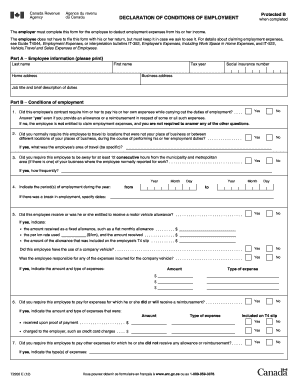
The Canada T2200 form, also known as the declaration of conditions of employment, is essential for employees who wish to deduct employment expenses from their income. This guide will provide a comprehensive overview of how to accurately complete the T2200 online, ensuring that you have all the necessary information at hand.
Follow the steps to fill out the Canada T2200 online.
- Click ‘Get Form’ button to obtain the form and open it in the editor.
- Begin with Part A, which requires employee information. Fill in the last name, first name, home address, social insurance number, business address, job title, and a brief description of duties.
- Proceed to Part B, which includes conditions of employment. Start by answering whether the employee is required to travel away from their place of business during the course of their duties. Select 'Yes' or 'No' as applicable.
- If the answer in step 3 is 'Yes', specify the area of travel for which the employee is responsible.
- Next, indicate whether the employee was required to be away from the municipality for at least 12 consecutive hours, and if so, how frequently.
- Indicate the period of employment by providing the start and end dates. If there was a break in employment, specify the dates.
- Respond to questions regarding whether the employee had the use of a company vehicle and if they were responsible for any related expenses.
- Provide details about any motor vehicle allowance the employee received, including type and amounts.
- Indicate any reimbursements for expenses incurred, whether they were included on the T4 slip.
- Continue through the questions related to other employment expenses. Check applicable boxes regarding tools, equipment usage, home office requirements, and any other relevant costs.
- Complete the employer declaration section. The employer or authorized person must print their name and title, provide their contact number, and sign and date the form.
- Review all entered information for accuracy before saving changes, and complete the process by downloading, printing, or sharing the form as needed.
Ready to finalize your forms? Compete your documents online today.
Get form
To claim a 1042-S in Canada, you should first ensure you have received the form from the foreign payer. This form details any U.S. source income that is subject to withholding tax. When preparing your Canadian tax return, be sure to report this income and consult the Canada T2200 form for information on potential deductions, ensuring you optimize your tax situation.