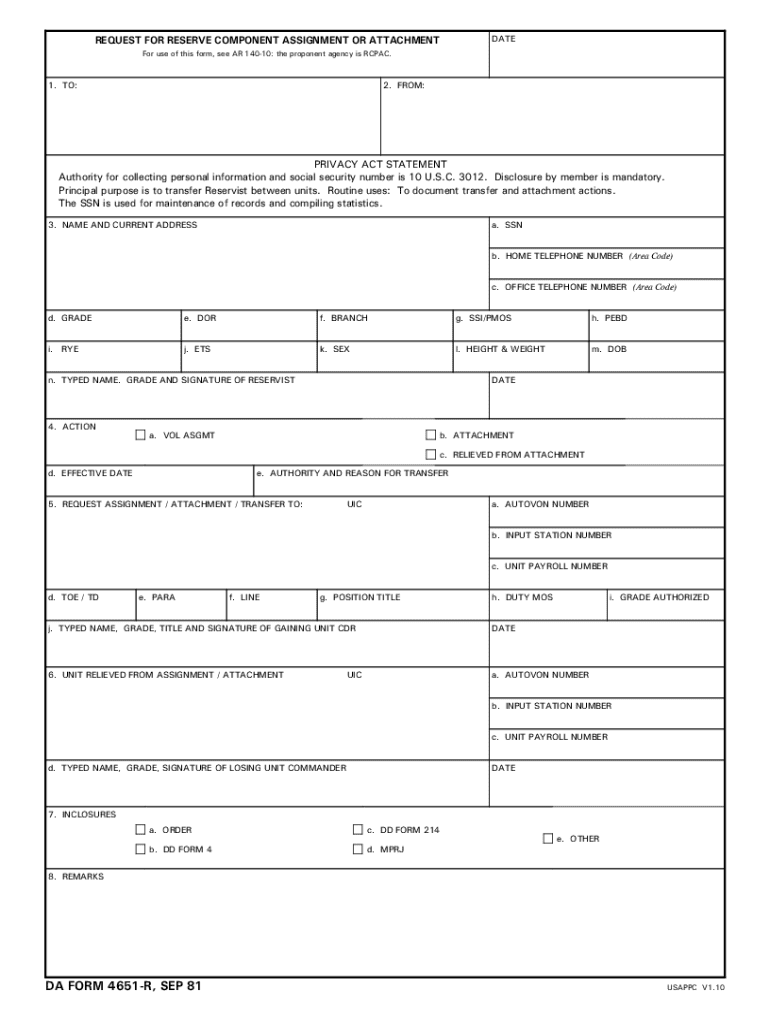
U.S. DOD Form dod-da-4651-r REQUEST FOR RESERVE COMPONENT ASSIGNMENT OR ATTACHMENT DATE For use of this form see AR 140-10 the proponent agency is RCPAC. 1. TO 2. FROM PRIVACY ACT STATEMENT Authority for collecting personal information and social security number is 10 U*S*C. 3012. Disclosure by member is mandatory. Principal purpose is to transfer Reservist between units. Routine uses To document transfer and attachment actions. The SSN is used for maintenance of records and compiling statistics. 3. NAME AND CURRENT ADDRESS a* SSN b. HOME TELEPHONE NUMBER Area Code c* OFFICE TELEPHONE NUMBER Area Code d. GRADE e. DOR f* BRANCH g. SSI/PMOS h. PEBD i. RYE j. ETS k. SEX l* HEIGHT WEIGHT m* DOB n* TYPED NAME* GRADE AND SIGNATURE OF RESERVIST 4. ACTION a* VOL ASGMT b. ATTACHMENT c* RELIEVED FROM ATTACHMENT d. EFFECTIVE DATE e. AUTHORITY AND REASON FOR TRANSFER 5. REQUEST ASSIGNMENT / ATTACHMENT / TRANSFER TO UIC a* AUTOVON NUMBER b. INPUT STATION NUMBER c* UNIT PAYROLL NUMBER d. TOE / TD e.....

Open form follow the instructions

Easily sign the form with your finger

Send filled & signed form or save
How to fill out the DA 4651-R online
The DA 4651-R is a crucial form for reservists seeking assignment or attachment. This guide will provide you with clear, step-by-step instructions on how to efficiently fill out this form online, ensuring that you provide all necessary information accurately.
Follow the steps to successfully complete the DA 4651-R form online.
- Press the ‘Get Form’ button to access the DA 4651-R form and open it in the editing interface.
- In section 1, provide the names of the person to whom you are making the request and your own name in the appropriate fields.
- Fill in section 3 with your personal details, including your Social Security Number (SSN), home and office telephone numbers, grade, date of rank (DOR), service branch, and primary military occupational specialty (PMOS), as well as other required information.
- In section 4, indicate the nature of your request by selecting from the options available such as voluntary assignment (VOL ASGMT), attachment, or relieved from attachment. Specify the effective date and provide the authority and reason for the transfer.
- Complete section 5 by entering the details of the assignment, attachment, or transfer you are requesting, including the unit identification code (UIC), various identification numbers, and position title.
- Fill out section 6 with the information regarding the unit you are being relieved from, including all applicable UICs and signatures of the losing unit commander.
- In section 7, list any enclosures, such as orders and relevant forms like the DD Form 214 or DD Form 4.
- Use section 8 for any additional remarks that you may need to include.
- Finally, review all entries for accuracy before saving, downloading, printing, or sharing your completed DA 4651-R form.
Complete your documents online today for a smoother process.
Experience a faster way to fill out and sign forms on the web. Access the most extensive library of templates available.
Related content
Attached was DA Form 4651-R, which showed that his last unit was the 954th Personnel Svc...
Jun 17, 2016 — ... DA. Athletic Field Building. 10. 525 Storage. Athletics. 54. DA...
Optimized for public viewing. • Projects a high brightness picture even in daylight. •...
Get answers to your most pressing questions about US Legal Forms API.
How to fill out military address on customs form?
Filling out a military address on a customs form involves using the proper formatting, including the unit number and APO or FPO address. Always include the correct zip code as per the DA 4651-R guidelines to avoid any mishaps. This attention to detail can streamline the mailing process and ensure your package is delivered without problems.
Does military mail go through customs?
Yes, military mail often goes through customs, especially if it is sent internationally. Ensuring that your customs forms are correctly filled out, possibly using resources from the DA 4651-R process, will help facilitate the clearance of your packages. Remember, accurate documentation will prevent delays and ensure your mail reaches its intended recipient.
What state do I put for a military address?
When addressing a military location, it's common to use the location's APO or FPO designation instead of a traditional state. This is a standard practice for military addresses and ensures that your mail is handled properly. Referencing the DA 4651-R can provide clarity on the correct format for your specific situation.
How to correctly fill out a customs form?
To correctly fill out a customs form, gather accurate information about the contents of the package, including descriptions and value. If utilizing the DA 4651-R, make sure to double-check the military address and also confirm the specifics for the item being shipped. Proper completion of this form can help prevent issues at customs and ensure smooth processing.
How to fill out community service form?
Filling out a community service form can often be done using the DA 4651-R format for thoroughness and consistency. It's important to include the dates, locations, and description of the community service performed. If you need assistance, the uslegalforms platform offers resources and templates for easy completion of various forms, including community service documentation.
How do I enter a military address?
Entering a military address requires specifying the unit, an APO or FPO code, and the appropriate zip code. If you are using the DA 4651-R form, ensure the address is formatted correctly to prevent any issues with mail delivery. Accurate information helps ensure that your correspondence reaches its destination without unnecessary delays.
How do I fill out an Army sworn statement?
To complete an Army sworn statement, start by using the correct DA form 4651-R template. Clearly state the facts you are swearing to and make sure to sign and date the document. It's essential to provide complete and truthful information, as this document may have legal implications for your military career.
How to fill out customs form with military address?
Filling out a customs form with a military address requires attention to detail. Begin by correctly identifying your military address, which often includes an APO or FPO zip code. Ensuring the accurate use of the DA 4651-R information can help prevent delays in mail delivery, so include your unit designation and ensure that the street address is clear and complete.
What is a DA form 4651?
The DA form 4651, also known as the Request for Reserve Component Assignment, is an important document used in the U.S. Army. It facilitates the transfer of service members between different units and helps maintain accurate records of service assignments. Understanding how to complete the DA 4651-R can streamline the process and ensure that all relevant information is properly documented.
What is DA form 7281 used for?
DA form 7281 is used for the management and tracking of personnel assignments. This form helps maintain accurate records of soldier assignments and assignments changes. It is essential for ensuring that personnel are correctly placed according to their skills and unit needs. If you need assistance with understanding or completing this form, look for comprehensive guides on the US Legal Forms platform.
Use professional pre-built templates to fill in and sign documents online faster. Get access to thousands of forms.
If you believe that this page should be taken down, please follow our DMCA take down process here.