Loading
Form preview
  • US Legal Forms
  • Form Library
  • Independent Agency Forms
  • Independent Agency USPS Forms
  • Usps Ps 2608 1986

Get Usps Ps 2608 1986-2026

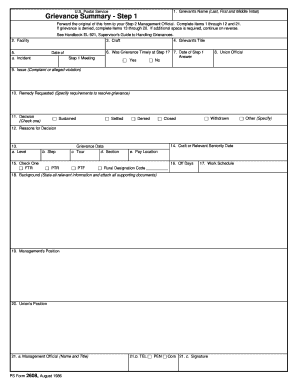
Union s Position 21. a. Management Official Name and Title PS Form 2608 August 1986 21. b. TEL PEN Com 21. 1. Grievant s Name Last First and Middle Initial U*S* Postal Service Grievance Summary - Step 1 Forward the original of this form to your Step 2 Management Official* Complete Items 1 through 12 and 21. If grievance is denied complete Items 13 through 20. If additional space is required continue on reverse. See Handbook EL-921 Supervisor s Guide to Handling Grievances. 3. Craft 4. Grievant s Title 2. Facility a* Incident Date of Step 1 Meeting 6. Was Grievance Timely at Step 1 7. Date of Step 1 Answer Yes No 8. Union Official 9. Issue Complaint or alleged violation 10. Remedy Requested Specify requirements to resolve grievance Sustained 11. Decision Check one Settled Denied Withdrawn Closed 12. Reasons for Decision a* Level b. Step 15. Check One FTR PTR Grievance Data c* Tour d. Section PTF 14. Craft or Relevant Seniority Date e. Pay Location Rural Designation Code 16. Off Days 17.....

How it works

  1. Open form

    Open form follow the instructions

  2. Easily sign form

    Easily sign the form with your finger

  3. Share form

    Send filled & signed form or save

How to fill out the USPS PS 2608 online

Filling out the USPS PS 2608 form online is a straightforward process designed to assist users in documenting grievances effectively. This guide provides step-by-step instructions to ensure you complete the form accurately.

Follow the steps to fill out the USPS PS 2608 form online.

  1. Press the ‘Get Form’ button to access the USPS PS 2608 and open it in your editor of choice.
  2. Begin by filling in the grievant's name in the designated first section. This includes the last name, first name, and middle initial if applicable.
  3. Enter the grievant's title in the following field to clarify their position.
  4. Provide information regarding the facility where the grievance occurred.
  5. Indicate the incident date for the Step 1 meeting in the next field.
  6. Answer whether the grievance was timely at Step 1 by selecting 'Yes' or 'No'.
  7. Fill out the date of the Step 1 response in the subsequent field.
  8. Include the union official's name and contact information.
  9. Clearly outline the issue, which can be a complaint or an alleged violation.
  10. Specify the remedy requested to resolve the grievance in detail.
  11. Choose the decision regarding the grievance from the options provided: sustained, settled, denied, withdrawn, or closed.
  12. In the reasons for the decision section, provide a clear explanation that led to the decision made.
  13. Fill in the management official's name and title, along with their telephone number and any other necessary contact information.
  14. Once all sections are completed, review your entries for accuracy, save your changes, and choose to download, print, or share the form as required.

Get started on completing your USPS PS 2608 form online today.

Get form

Experience a faster way to fill out and sign forms on the web. Access the most extensive library of templates available.
Get form

Related content

Associate Supervisor Program
Sep 12, 1998 — Participant will be able to: • Complete PS Form 2608. • Understand...
Learn more
Unites States v. Windsor, Obergefell v. Hodges and...
by S Wheeler · 2016 — People everywhere long for the freedom to determine their...
Learn more
SHOP STEWARD'S TRAINING MANUAL
Management's PS Form 2608, if provided. 8. Step 1 Grievance Appeal Form, if used. 9. Copy...
Learn more

Related links form

USDA 4279-6 1997 USDA 7001 2017 USDA 7001 2015 USDA AD-1046 1989

Questions & Answers

Get answers to your most pressing questions about US Legal Forms API.

Contact support

Formatting an address for USPS requires clear and concise information. Start with the recipient’s name, then add the street address, city, state, and zip code, ensuring you use standard abbreviations. Utilizing the USPS PS 2608 can help you manage complex addresses or multiple locations without hassle.

To fill out a postal address correctly, begin with the recipient’s full name, followed by their street address, city, state, and the zip code. Ensure that you format each component clearly to avoid any confusion during delivery. Remember, the USPS PS 2608 can assist in ensuring all your address details are organized and up-to-date.

Filling out a USPS claim form involves detailing your loss or damage to the postal service. Include information about the item, the tracking number, and any proof of value. Using the USPS PS 2608 can simplify this process by allowing you to manage multiple claims or addresses related to your mailing experience.

To fill out the USPS hold mail form, simply provide your name, address, and the dates for which you want your mail held. It’s crucial to submit this form at least one day before the hold period starts. The USPS PS 2608 form can be beneficial here as it helps organize how your hold mail request aligns with your new address or delivery specifications.

Filling out a USPS address is straightforward. Include the recipient’s name, followed by their street address, city, state, and zip code. If you are dealing with complex situations, the USPS PS 2608 can help clarify your address details to avoid any mailing issues.

To establish a new address with USPS, you need to complete the online Change of Address form on the USPS website. This process ensures that your mail gets redirected to your new location effectively. Utilize the USPS PS 2608 for managing additional change requests and tracking your address transition easily.

To fill out USPS mail correctly, start by entering your return address in the top left corner. Next, write the recipient's address in the center of the envelope, ensuring you include the correct zip code. Additionally, you can incorporate the USPS PS 2608 form if you're managing multiple addresses to streamline your mailing process.

A USPS NASS code refers to the National Addressing and Sourcing System code, which standardizes address processing. This code ensures your addresses are validated and optimized for delivery. Knowing how the NASS code ties into USPS PS 2608 can enhance your mailing strategies and improve delivery rates.

The employer code for USPS is a unique code that identifies businesses when using postal services. It plays an essential role in streamlining mail processing and can significantly simplify administrative tasks. Understanding how it relates to USPS PS 2608 can help you manage your mailing practices more efficiently.

The hardship transfer form for USPS allows employees facing personal difficulties to apply for a transfer to a different location. This form is essential for those needing to relocate for family or medical reasons. Utilizing resources like USPS PS 2608 can guide you through this process smoothly and effectively.

Get This Form Now!

Use professional pre-built templates to fill in and sign documents online faster. Get access to thousands of forms.
Get form
If you believe that this page should be taken down, please follow our DMCA take down processhere.

Industry-leading security and compliance

US Legal Forms protects your data by complying with industry-specific security standards.
  • In businnes since 1997
    25+ years providing professional legal documents.
  • Accredited business
    Guarantees that a business meets BBB accreditation standards in the US and Canada.
  • Secured by Braintree
    Validated Level 1 PCI DSS compliant payment gateway that accepts most major credit and debit card brands from across the globe.
Get USPS PS 2608
Get form
  • Adoption
  • Bankruptcy
  • Contractors
  • Divorce
  • Home Sales
  • Employment
  • Identity Theft
  • Incorporation
  • Landlord Tenant
  • Living Trust
  • Name Change
  • Personal Planning
  • Small Business
  • Wills & Estates
  • Packages A-Z
  • Affidavits
  • Bankruptcy
  • Bill of Sale
  • Corporate - LLC
  • Divorce
  • Employment
  • Identity Theft
  • Internet Technology
  • Landlord Tenant
  • Living Wills
  • Name Change
  • Power of Attorney
  • Real Estate
  • Small Estates
  • Wills
  • All Forms
  • Forms A-Z
  • Form Library
  • Legal Hub
  • About Us
  • Help Portal
  • Legal Resources
  • Blog
  • Affiliates
  • Contact Us
  • Delete My Account
  • Site Map
  • Industries
  • Forms in Spanish
  • Localized Forms
  • State-specific Forms
  • Forms Kit
  • Real Estate Handbook
  • All Guides
  • Notarize
  • Incorporation services
  • For Consumers
  • For Small Business
  • For Attorneys
  • USLegal
  • FormsPass
  • pdfFiller
  • signNow
  • altaFlow
  • DocHub
  • Instapage
Form Packages
  • Adoption
  • Bankruptcy
  • Contractors
  • Divorce
  • Home Sales
  • Employment
  • Identity Theft
  • Incorporation
  • Landlord Tenant
  • Living Trust
  • Name Change
  • Personal Planning
  • Small Business
  • Wills & Estates
  • Packages A-Z
Form Categories
  • Affidavits
  • Bankruptcy
  • Bill of Sale
  • Corporate - LLC
  • Divorce
  • Employment
  • Identity Theft
  • Internet Technology
  • Landlord Tenant
  • Living Wills
  • Name Change
  • Power of Attorney
  • Real Estate
  • Small Estates
  • Wills
  • All Forms
  • Forms A-Z
  • Form Library
Customer Service
  • Legal Hub
  • About Us
  • Help Portal
  • Legal Resources
  • Blog
  • Affiliates
  • Contact Us
  • Delete My Account
  • Site Map
  • Industries
  • Forms in Spanish
  • Localized Forms
  • State-specific Forms
  • Forms Kit
Legal Guides
  • Real Estate Handbook
  • All Guides
Prepared for you
  • Notarize
  • Incorporation services
Our Customers
  • For Consumers
  • For Small Business
  • For Attorneys
Our Sites
  • USLegal
  • FormsPass
  • pdfFiller
  • signNow
  • altaFlow
  • DocHub
  • Instapage
Social Media
Call us now toll free:
+1 833 426 79 33
As seen in:
© Copyright 1999-2026 airSlate Legal Forms, Inc. 3720 Flowood Dr, Flowood, Mississippi 39232
  • Your Privacy Choices
  • Terms of Service
  • Privacy Notice
  • Content Takedown Policy
  • Bug Bounty Program