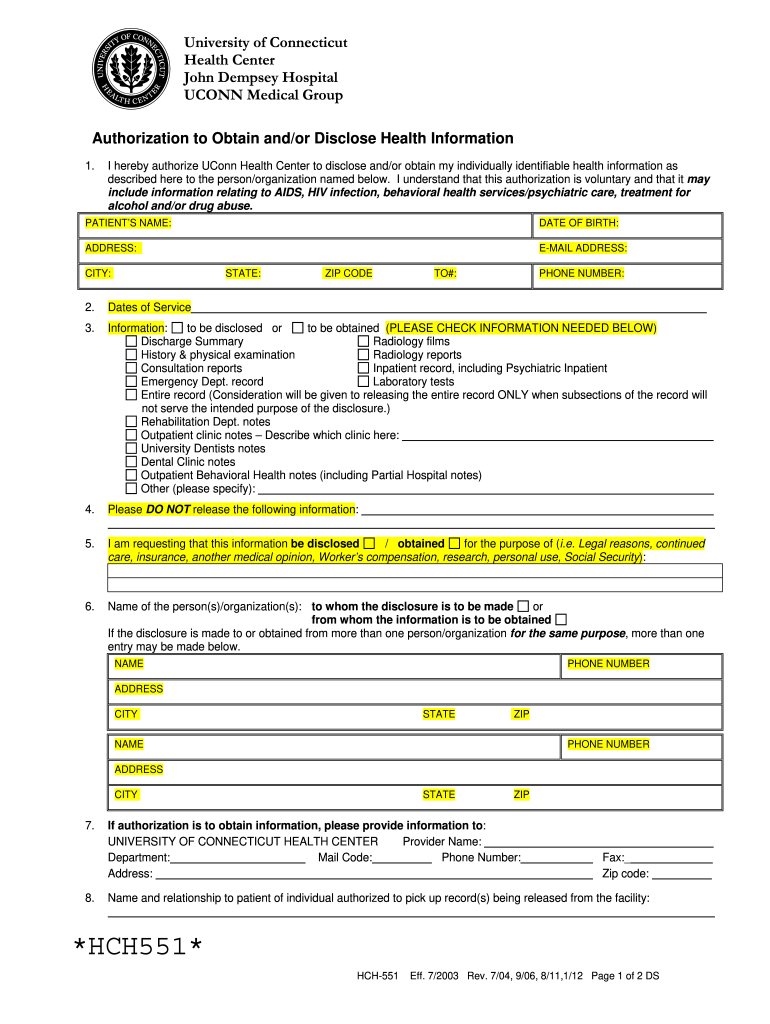
R obtain my individually identifiable health information as described here to the person/organization named below. I understand that this authorization is voluntary and that it may include information relating to AIDS, HIV infection, behavioral health services/psychiatric care, treatment for alcohol and/or drug abuse. PATIENT’S NAME: DATE OF BIRTH: ADDRESS: E-MAIL ADDRESS: CITY: STATE: ZIP CODE TO#: PHONE NUMBER: 2. Dates of Service 3. Information: to be disclosed or to be obtaine.
Loading

Open form follow the instructions

Easily sign the form with your finger

Send filled & signed form or save
How to fill out the UConn Health HCH-551 online
The UConn Health HCH-551 form is utilized for authorizing the disclosure and/or acquisition of your health information. This guide will help you navigate the form step-by-step to ensure a smooth and accurate completion.
Follow the steps to complete the UConn Health HCH-551 online.
- Press the ‘Get Form’ button to access the HCH-551 form and open it in your editor.
- In the first section, fill in the patient's name, date of birth, and contact details including the address, email address, city, state, and zip code.
- Specify the dates of service for the health information you wish to disclose or obtain.
- In the information section, check all types of records you want to be disclosed or obtained, such as discharge summaries, radiology reports, lab tests, etc.
- If there is information you do not want to be released, specify it in the additional section provided.
- Indicate the purpose for requesting the information, which could include legal reasons, ongoing care, insurance, or personal use.
- List the name(s) and contact details of the person(s) or organization(s) to whom the information will be disclosed or from whom it will be obtained.
- If you are requesting to obtain information, provide the details of the UConn Health Center including the provider name, department, and contact information.
- Note the expiration date for the authorization, ensuring it does not exceed six months from your signature unless otherwise specified.
- Review the form for accuracy, sign it, and provide the date and time of your signature.
- Finally, save your changes, and you may choose to download, print, or share the completed form as needed.
Complete your UConn Health HCH-551 form online today for efficient processing of your health information.
Experience a faster way to fill out and sign forms on the web. Access the most extensive library of templates available.
Related content
Jan 3, 2019 — ... 551, CIRCLING CAT C MDA 620/HAA. 571. SACRAMENTO INTL ALTIMETER...
I have the right to inspect or copy (may be provided at a reasonable fee) the health...
Get answers to your most pressing questions about US Legal Forms API.
How to waive UConn Health insurance?
To waive UConn Health HCH-551 insurance, you generally need to provide proof of comparable coverage through another health insurance plan. This can usually be done by submitting documentation through your student portal or the UConn Health website. If you face challenges during this process, consider visiting uslegalforms, where you can find helpful resources to navigate the waiver process smoothly.
Is UConn Health a part of UConn?
Yes, UConn Health HCH-551 is part of the University of Connecticut system. This affiliation allows it to incorporate cutting-edge research and educational initiatives into its healthcare services. Being part of UConn means that patients receive care backed by the latest medical advancements and a commitment to quality.
What level trauma center is UConn Health?
UConn Health HCH-551 operates a Level I trauma center, which means it provides the highest level of surgical care and comprehensive resources. This designation reflects UConn's commitment to handling severe injuries and complex cases effectively. As a Level I center, it offers advanced care for critical patients around the clock.
Is Hartford Healthcare part of UConn?
Hartford HealthCare is not a part of UConn, but they work closely together to provide exceptional healthcare services. The partnership between UConn Health HCH-551 and Hartford HealthCare allows patients to receive specialized and integrated care. This collaboration helps them to leverage each other's strengths for better health outcomes.
Who is Hartford HealthCare affiliated with?
Hartford HealthCare collaborates with various institutions and organizations to create a comprehensive network of care. Among its many affiliations, it partners with UConn Health HCH-551, ensuring that patients benefit from an expansive selection of healthcare services. This collaboration enhances the scope of services available to the community.
Is UConn affiliated with Hartford HealthCare?
Yes, UConn Health HCH-551 does have a collaboration with Hartford HealthCare. This partnership allows for better integration of services, improved patient access, and a broader range of healthcare options for the community. Together, they work to enhance patient care and outcomes through shared resources.
What Hospital is UConn associated with?
UConn Health HCH-551 is primarily associated with the University of Connecticut Health Center. This affiliation strengthens its commitment to medical excellence and innovative healthcare. As a leader in research and education, UConn enhances its community by providing high-quality services through its hospital network.
What level trauma is UConn Health?
As a Level 1 trauma center, UConn Health offers advanced treatment options for traumatic injuries and emergencies. This level also indicates that they are equipped with surgical teams and specialists available around the clock. When critical situations arise, UConn Health HCH-551 stands ready to serve the community’s urgent health needs.
What trauma level is UConn Health?
UConn Health is designated as a Level 1 trauma center, which signifies its capability to handle the most critical cases. This classification means they have the resources and medical expertise to provide immediate and comprehensive care to trauma patients. Trust UConn Health HCH-551 to deliver urgent care in times of need.
Is UConn Health a good hospital?
Absolutely, UConn Health is recognized for its commitment to providing high-quality medical care. It has received numerous accolades and positive feedback from patients for its services and patient care. If you are looking for a reliable provider, UConn Health HCH-551 stands out as a reputable option.
Use professional pre-built templates to fill in and sign documents online faster. Get access to thousands of forms.
If you believe that this page should be taken down, please follow our DMCA take down process here.
This form is available in several versions. Select the version you need from the drop-down list below.