Loading
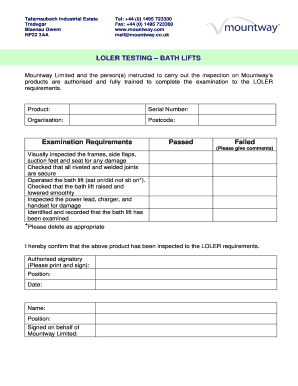
Get Loler Certificate Template
How it works
-

Open form follow the instructions
-

Easily sign the form with your finger
-

Send filled & signed form or save
How to fill out the Loler Certificate Template online
Filling out the Loler Certificate Template online is a straightforward process designed to ensure compliance with safety regulations. This guide will walk you through each section of the form, providing clear instructions to help you complete it with ease.
Follow the steps to complete the Loler Certificate Template online.
- Click ‘Get Form’ button to obtain the form and open it in the editor.
- Fill in the 'Product' field with the name of the bath lift you are inspecting. Ensure this is accurate for record-keeping.
- Enter the 'Serial Number' of the product. This unique identifier is crucial for tracking the inspection history.
- Provide the name of your organization in the 'Organisation' field. This should reflect the entity responsible for the equipment.
- Enter the 'Postcode' related to your organization's address to facilitate communication.
- In the 'Examination Requirements' section, mark either 'Passed' or 'Failed' based on the inspection results. If 'Failed,' include relevant comments detailing any issues found.
- Indicate whether the bath lift was operated by selecting 'sat on' or 'did not sit on'. Delete the option that does not apply.
- Confirm that all aspects of the inspection were completed by checking each item in the requirements list.
- In the 'Authorised signatory' section, print your name and position, then sign the form.
- Finally, ensure all information is correct and complete. Save your changes, then download, print, or share the form as needed.
Complete your documents online for effective management and compliance.
Related links form
How to create a certificate template in Word Open the Word document. ... Format page layout. ... Select certificate colour. ... Insert page border. ... Insert text. ... Add and adjust text and graphics. ... Insert pictures or logos. ... Insert signatures.