Loading
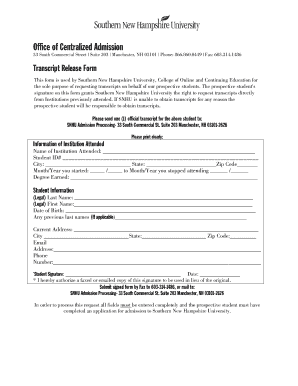
Get Snhu Transcript Request
How it works
-

Open form follow the instructions
-

Easily sign the form with your finger
-

Send filled & signed form or save
How to fill out the SNHU Transcript Request online
Requesting your transcripts from Southern New Hampshire University is a straightforward process. This guide is designed to help you navigate the SNHU Transcript Request form online efficiently.
Follow the steps to complete your transcript request form
- Press the ‘Get Form’ button to retrieve the transcript request form and display it for completion.
- Fill in your personal information in the designated fields. This typically includes your full name, student identification number, and contact details. Ensure all information is accurate to facilitate processing.
- Provide information regarding the institutions you previously attended, along with the years you attended each school. This is crucial for SNHU to obtain transcripts on your behalf.
- Review the authorization statement on the form. By signing this statement, you permit Southern New Hampshire University to request your transcripts from your previous institutions.
- Sign and date the form in the appropriate sections. Depending on the form’s requirements, this may need to be done electronically.
- Once you have completed all fields, you can save changes, download the form for your records, print a copy, or share it as necessary.
Start your online transcript request today for a smooth process.
Related links form
To email your transcript request, start with a professional greeting and subject line such as 'SNHU Transcript Request'. In the email, include your name, student ID, and details of where to send the transcript. It's important to be clear and respectful in your language, ensuring your request is easy to understand.